


lueurcen
Members
-
Joined
Everything posted by lueurcen
-
-
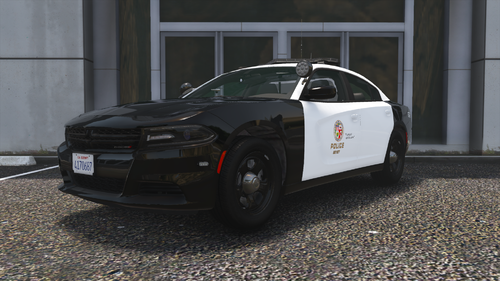 hello. will there be any updates on the pack? Tactical Donut made a big update on his pack, some new cars were added, so it would be great to see an updated version of the textures
 -
-
SOLVED: Had trouble with converting EUP to outfits.xml, all fixed now
-
SOLVED: Had trouble with converting EUP to outfits.xml, all fixed now
-
This is an addition to my previous post, which nobody answered to. I figured out that it's not about UltimateBackup plugin as I've loaded LSPDFR with it removed, and this error still appeared to be. Basically, the game doesn't recognize this part of agency.xml file: The log says this: And as far as I figured it out, this part appears to be the reason of my problem. It worked perfectly fine till something happened, even though I didn't touch the lspdfr/data folder in ages. I don't know how to solve it and I didn't find any other posts or videos explaining or showing this problem. Any possible help is appreciated.
-
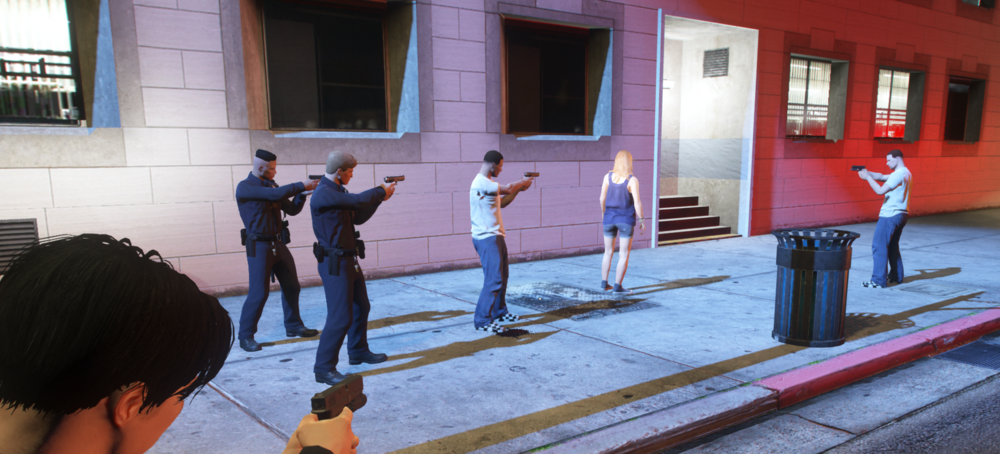
Here's how it looks in game. Half the backup is good, and the other half (the ones that spawn ambiently with LSPDFR and not with UltimateBackup) dressed like homeless.
-
I've been having this problem for several days now. NPCs that spawn at the police stations have their outfits like if it was unset. The blank white shirt, blue jeans, etc. The thing is I have configured that previously, and they spawned normally with the EUP outfit that I had already installed before. The backup units come as they should, using EUP clothing, and the ones that ambiently patrol the area spawn and look as they should too. The weird thing is I haven't changed anything related to LSPDFR .xml files, or the UB .xml files. It kinda happened itself, and I still have no idea why. UltimateBackup files: SpecialUnits.xmlDefaultRegions.xml LSPDFR files: outfits.xmlcop_presets_outfits.xmlcop_presets.xmlagency.xml Another thing I noticed, is that when I used "ForceDuty" back in the days this issue didn't exist, my character would automatically get the correct EUP uniform, and now when I do the same - he doesn't.
-
Would be better if you attached your RagePluginHook.log file from the main GTA V directory. Since I don't have your log, I only can advise you to install SirenSetting Limit Adjuster as a possible solution.
-
Don't really get what you mean by "locked"?
-
Yeah, my bad. Fixed it, here you go. outfits.xml
-
Here's the already edited file for ya, enjoy. outfits.xml
-
Nvm, found the solution. For some reason, Riskier Traffic Stops was crashing my game, I just removed it.
-
Nvm, found the solution. For some reason, Riskier Traffic Stops was crashing my game, I just removed it.
-
Here's the log RagePluginHook.log
-
Fixed that problem myself, now it's crashing when going on duty. RagePluginHook.log
-
RagePluginHook.log Works good when I rename the mods folder to _mods. Installed the SVE Tactics mod which completely broke my game, then uninstalled it manually (had to delete all the files from common\data and place the default ones). Also replaced paths.rpf to the default one, nothing seems to help.
-
Thanks for the reply, I found a solution myself. So, the problem was "Improved Pursuit AI" LSPDFR plugin. I tried reinstalling the game couple time just to make sure this was the actual troublemaker, and it confirmed. This stuff just crashes your game, even a clean version with just LSPDFR and this plugin. I don't recommend to download it :)
-
I got an issue with loading my game, it crashes - With RagePluginHook: When the first loading screen (that one with a girl in bikini) comes Without it: When I click on "Story Mode" I know that it's 100% not about plugins, because I tried launching my game without RagePluginHook and it still crashed. Think it might be a thing of my Add-On cars installed, but I deleted all of them, game still crashes. Idk how can I add the RagePluginHook crash report directly to this site, so here's a Google Drive link to it: https://drive.google.com/file/d/1e-5DuHp2bwvKTs40FydZm1MWG5UgNXxc/view?usp=sharing Any help is appreciated


