
Wehrmachgt
Members
-
Joined
-
Last visited
Files posted by Wehrmachgt
-
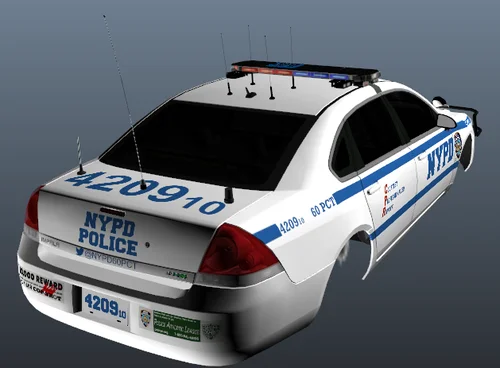
Livery pack inspired by brighton beach 60 Precinct NYPD
WARNING: This livery pack contains liverys only for following three vehicles - CVPI, Charger, Impala
Didnt try to be real, but tried my best at being auenthetic, used lotta real life photos as a reference.
Screenshot is some development screenshot - i created this livery pack back in 2023, i decide to upload it because why not, originaly i created this pack just for myself, right now i moved to GTA V, sooo.. yeah.
How to make Defender Pack work: Do not install extra cars (like ford exploders) and install just a few cars as replaces (i personally had impala for FBI, CVPI for prisoner transporter or noose patriot (i dont remember), and Charger for noose car. you can also install cars you like as replacements for police and police2 and rhino's), install handling files and carcols as replacement too, and after that Defender pack will work cool without crashes, but yeah, you wont have extra cars like new ford explorer.
ANOTHER WARNING: Do not expect quality, as i said, this pack was made just for myself, the pack itself is pretty mid, so dont expect much.
Installation: Go to vehicles .dds in vehicles.img of the vehicle (impala for example) and find an image inside .dds (open with OpenIV, make sure you have editor mode on) with text "(vehicle name, impala for ex.)_police)sign.png" or something like that, it should have Sign in it's name, then, replace it with the mod picture.
- 340 Downloads
Updated -
I tried to make it look like it looked on real impalas, and i think the result is pretty good.
Installation:
Open police2.wtd in vehicles.img, you will see file called "impala_sign_1", now replace it with "impala_sign_1.png" from the zip you've downloaded - Tada, you've installed the livery!
So uhhh... that's it, just a mid livery for chevy impala, i'm not a big/skilled texturer or modder.
- 97 Downloads
Updated -
Ooboyle, sorry if i misspeled your name... Is the creator of the car's mod, this mod is just a texture mod.
UPDATE: THIS MOD IS ONLY FOR OLDER VERSIONS OF THE MOD, IT WILL NOT WORK WITH THE FINAL VERSION!
So this mod is a texture for my favorite Declasse Merit (police2), I had ideas of making one for vapid (police1) but i got lazy(
Soo.. the idea of creating this mod got into my idea when i tried to install some texture mod for vanilla cars, but it didn't work because Vanilla ELS cars has their own texture template and only Vanilla ELS's textures work... Ummm yeah.
Umm.. that's all, i made those textures in GIMP, i am not a modder or an experienced spriter so don't judge much, but i just felt like i have to upload because for me - Those textures are dope.
What's the diffirence between those textures and those that come with Vanilla ELS textures?
-Everything can be seen on screenshots, The stickers on the bumper, Diffirent text on the hood.. I also moved that "CPR" text up a bit.
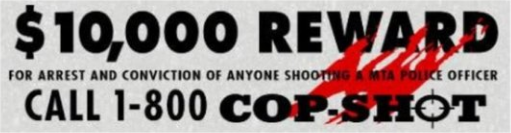
Cop-shot and athletics league stickers are grabbed from google pictures and photoshopped by me into the car texture with GIMP, and the text made by me, i literally wrote "NYPD font" it gave me Sans Serif. I downloaded the font and made the text, The text on the hood is inspired by how it looks
Credits: Credit to Abraxas and his vdH's Textures for Vanilla Cars (sorry if i misspeled this mod name), On the screenshots i use the indicator and other light's textures from that mod, I also heavily recommend you to install those lights from that mod, because they are dope.
I don't know why but i have a feeling that i have to say that you should use those textures with some "SS2000 Rumbler" siren mod, there are alot of them but... Eeh i don't remember which one i personally use, but mine is a bit edited with some .vaud editor because i changed some sirens to better ones.
Installation: read ReadMePlease.txt in the zip file. In the zip you can find folder named "Thick Text" i recommend this livery because it is a copy of the first livery of PCT 38, but with thicker and better-looking text on the hood.
I wanted to put .wtd files into the zip to make installation easier, But i am afraid of copyrights because my .wtd has vdH's lights textures.
What is this "patrol supervisor" livery on the third screenshot?
Umm.. So basically i was trying to make it work with Area Livery, but i didn't understand how this mod works so i abandoned this idea... So umm if you have Area Livery mod you may use those additional merit sign .dds files if you want, The two are just the same texture but with diffirent Precint Number, except that the second one has the underlined numbers like on non-modded vanilla merit textures, And the third one has "PCT 16" text and a text saying "Patrol Supervisor" which is inspired by NYPD patrol supervisor cars.
To be honest, i do not recommend you to use those extra liveries because they just don't look cool, The text is very skinny and just doesn't look cool, If you are going to use just one livery then use that "Thick Text" one because it's my favorite.
Link to ooboyle's ELS car's mod that the textures are made for:
You have my permission for whatever you're going to do with this mod, Just put credits.
- 46 Downloads
Updated