



Chris Wolfgang
Members
-
Joined
Everything posted by Chris Wolfgang
-
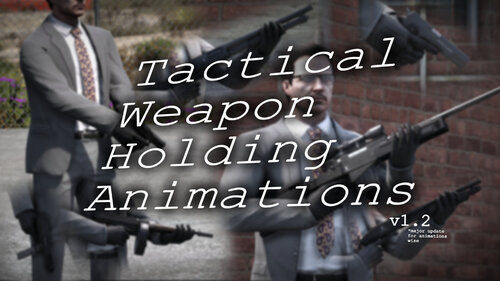 Making it simple, this modifies the "<MotionClipSetHash>" of the weapons listed in the description, replacing them with others, so if you want help to integrate the modified weaponsanimations.meta that you already have, contact me in Discord: chriswolfgang, and I can maybe help you with it :)
- 5 comments
- 2 reviews
-
This mod changes the handling/holding/grip of several weapons in the game when you are idle, walking, or running. (The mod modifies your weaponsanimations.meta, so it's recommended to back up your files before installing it. The mod includes a backup, but it's from the vanilla game.) The following list is of the weapons that change their handling/grip when the mod is installed: • PISTOL • PISTOL_MK2 • COMBATPISTOL • PISTOL50 • APPISTOL • STUNGUN • HEAVYPISTOL • VINTAGEPISTOL • MACHINEPISTOL • SMG • ASSAULTSMG • COMBATPDW • MINISMG • PUMPSHOTGUN • PUMPSHOTGUN_MK2 • SAWNOFFSHOTGUN • ASSAULTSHOTGUN • BULLPUPSHOTGUN • DBSHOTGUN • ASSAULTRIFLE • CARBINERIFLE • CARBINERIFLE_MK2 • ADVANCEDRIFLE • COMPACTRIFLE • MG • COMBATMG • GUSENBERG • SNIPERRIFLE • HEAVYSNIPER Notes: If you're having trouble with the female MP or others not using the animations on some weapons, do this: Menyoo > Player Options > Movement Styles > Weapon Animations (All Below) > Default. (Female and Ballistic works as well.) The person who discovered this is jjj777. Go to their profile and check it out. OIV Installation: 1) Open the .oiv file located in the "OIV" folder, and open it after that. Click on "Install" and then select the "Mods" option, if available. 2) You finished downloading the mod, enjoy... Manual Installation: 1) Go to C:\Program Files (x86)\Steam\steamapps\common\Grand Theft Auto V\mods\update\update.rpf\common\data\ai (With OpenIV.) 2) Go into editing mode. Drop the files located in the folder named "Manual" into it. 3) You finished downloading the mod, enjoy... Recommended to use with the mod: NPC Style Cover Animations By Hanako
- 5 comments
- 2 reviews
-
-

- 2
-
-
-
.thumb.jpg.37cdb54de83d6dee03b6b15e76b2f5fd.jpg) If you have not at least tried this callout you do not have the blessing in your veins. (●'◡'●)
If you have not at least tried this callout you do not have the blessing in your veins. (●'◡'●)- 183 comments
- 24 reviews
-
 The calls are bugged, well some of them but the ones I tried I don't think were good enough but some still look good🙂.
- 195 comments
- 36 reviews
-
-

- 1
-
.thumb.jpg.37cdb54de83d6dee03b6b15e76b2f5fd.jpg)
