Radium
Members
-
Joined
-
Last visited
Everything posted by Radium
-
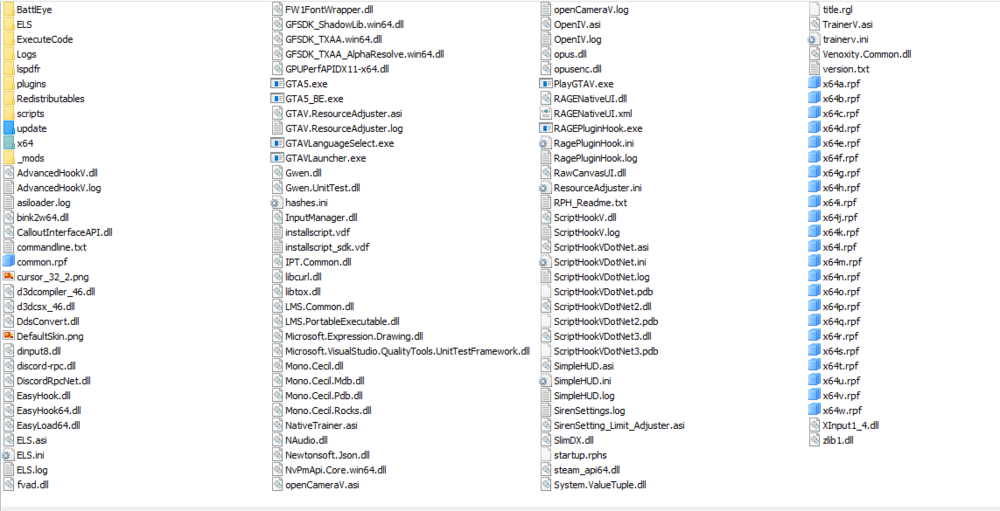
Edit: I've also ran GTA 5 with just LSPDFR and no other modifications whatsoever and it worked perfectly fine, it was after I started modding it when issues came up. Hello. My game keeps immediately crashing after the loading screen for story mode but it goes straight to desktop, there's not even a window afterwards that says "The game has crashed" or "RPH has crashed", it just closes. I've tried but to no avail: - running it without RPH through the actual game shortcut and steam. - running it and then hooking RPH after launch and before pressing the story mode button with all plugins disabled - running it with RPH while the mods folder is disabled The mods, scripts, plugins I've installed are: LSPDFR EUP (EUP LO and SR are both installed correctly.) SimpleCTRL (I know it's outdated but it worked during when I installed LSPDFR for the first time in a long time which was only two days ago but that was when ELS wouldn't work because of a broken AdvancedHookV included, this current attempt is a reinstall after that.) A bunch of car mods with modified handlingids. I checked, all modified handlingids are all in caps and spelled correctly Stop The Ped with Search Items and Questioning Reborn Ultimate Backup with the EUP mods Compulite with Charges and Citations+ Callout Interface Kuchera and Simple Callouts Pit TImer Plus Realistic Gun sounds Max Payne Glock mod M16A4 Carbine Rifle mod Cruise Master Simple Trainer And the various recommended LOD, resource, and ELS fixes/mods Here is my main game directory