


rp0123
Members
-
Joined
-
Last visited
Everything posted by rp0123
-
From setTaskVehicleChaseBehaviorFlag. Flag 8: Medium-aggressive boxing tactic with a bit of PIT Flag 1: Aggressive ramming of suspect Flag 2: Ram attempts Flag 32: Stay back from suspect, no tactical contact. Convoy-like. Flag 16: Ramming, seems to be slightly less aggressive than 1-2.
-
Hopefully, the block on AI pit maneuvering burrito vans will be removed for the enhanced version. Also the anti pit maneuver traction that lspdfr applies to pursuit suspect's vehicle. Clarification edit: LSPDFR backup AI seems to be blocked from being able to use tactics on vehicle with big in strModelFlags. They can't do pit maneuvers on burrito van, but if the flag is removed, then AI can pit them. Also it takes abnormal amount of force to pit pursuit suspect's vehicle, that only AI backup with cheat force could do it or have to use the plugin.
-
.thumb.png.85ebab6eaa6192aa1f90095b096edb61.png) I replaced FLAG_EXTRAS_REQUIRE with FLAG_EXTRAS_TAXI and light bar still spawned randomly.
I replaced FLAG_EXTRAS_REQUIRE with FLAG_EXTRAS_TAXI and light bar still spawned randomly. -
I'm also using it for dispatch.meta for swat team. There was a thread on gta5-mods forum on how to disable an extra from spawning in vehicle.meta, but unfortunately their forum is gone.
-
The police utility interceptor
-
Is there way to disable top lightbar extras from spawning? Would like a slicktop version for unmarked units.
-
.thumb.png.da021285949ac65d504db2d68fc84958.png) Hoping for dorado and impaler cruiser too.
Hoping for dorado and impaler cruiser too. -
With the police equipment enabled, it can be used in dispatch.meta.
-
Very heavy traffic in GTA without rageplugin running and LSPDFR. I haved modified the gameconfig for heavy traffic. But if running LSPDFR, the traffic spawn is decreased and sometimes almost no traffic. There are still pedestrians. Other users have encountered this too, with several posts about traffic but no solution yet.
-
Even setting Chase.DisableTrafficDensityAdjustments to true, traffic spawn is still diminished with LSPDFR. Especially affected if added DLC cars into popgroups.
-
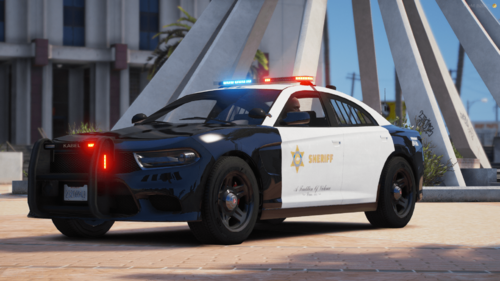 Good to have more quality non els vehicles. Hope to see LSPD version.
 -
Sometimes backup units drop off passengers too far away from suspect's location, and then the passengers just wander away and they don't attempt to locate suspect unless they happen to wonder close enough to detect the suspect. They also don't despawn unless they've detected the suspect at least once or the pursuit ends Can backup's suspect detection radius be adjusted? I've tried it with wantedtuning but didn't work. Or is there a way to adjust passenger drop off distance?
-
There are critical bugs with automatic roadblock plugin and development seems to have ceased.
-
On default callout holdup , if suspects uses gburrito to escape, police AI will not use tactics like pit maneuver and stays stuck in following state. If player is being chased in gburrito, police AI will use tactics. So this seems like LSPDFR has set the AI tactics usage threshold too restrictive.
-
 Opensource, better performance and less issues than els. Also, unlike els, car sirens can work for both DLS and non DLS users.
- 280 comments
- 21 reviews
-
-

- 1
-
-
I like to be able to set pursuit backup allowed to take point from player in front without yield/stopping hesitation. Also, there's some sort of limit threshold, such as suspect vehicle size/mass that determines whether AI can use pursuit tactics. In default game, the AI can pit and ram large vehicles like semi trucks, but in LSPDFR, the pursuit AI will only follow(pursuit tactics enabled). So I would like to raise this threshold and enable ramming tactics.
-
I thought there was another flag that forces it to stay in vehicle and forgot could just set BF_CanLeaveVehicle to false. Tried NativeFunction.Natives.SET_PED_COMBAT_ATTRIBUTES(ped, 3, false); but they still disembark tank. I also have NativeFunction.Natives.SET_PED_COMBAT_ATTRIBUTES(ped, 52, true); NativeFunction.Natives.SET_PED_CONFIG_FLAG(ped, 29, false); NativeFunction.Natives.SET_PED_CONFIG_FLAG(ped, 391, false);
-
Suspects keeps abandoning tank vehicles even when it's not stuck. Tested with with wheeled APC and it doesn't have this issue. Interestingly, SWAT using tank vehicles doesn't abandon their vehicle and can fire vehicle weapon automatically. Is there a command for suspect to stay in vehicle? Tried to use SET_PED_COMBAT_ATTRIBUTES, but it doesn't have leave vehicle flag available.
-
So far tried: suspect.CanRagdoll = false; suspect.IsRagdoll = false; NativeFunction.Natives.SET_PED_CONFIG_FLAG(suspect, 107, true); NativeFunction.Natives.setRagdollBlockingFlags(suspect, 1); also tried 0 and (1 << 0). It seems like ragdoll was disabled and there's a difference between damage knock down and ragdoll. Ragdoll enabled, peds get knocked from just 1 shot. and stay in ragdoll physics form while getting hit. With ragdoll disabled, peds aren't always knocked down from bullet hit and if knocked down, can get back up while taking hits. But none of the setting so far can completely stop peds from getting knocked down by bullets. I hope there's a command to disable knock down, like player.
-
I'm trying to recreate the juggernaut shoot out from the paleto score mission. I still need them to have collision, just not fall down from bullet hits.
-
Yes, I've tried using both in the process too and suspect still ragdolls from getting shot. They don't get ragdolled by every shot, but most of the shots.
-
I've tried suspect.CanRagdoll = false; suspect.IsRagdoll = false; Suspect still gets knocked down when shot.

.thumb.png.85ebab6eaa6192aa1f90095b096edb61.png)
.thumb.png.da021285949ac65d504db2d68fc84958.png)
