Skip to content
View in the app

A better way to browse. Learn more.

LCPDFR.com

A full-screen app on your home screen with push notifications, badges and more.

To install this app on iOS and iPadOS
  1. Tap the Share icon in Safari
  2. Scroll the menu and tap Add to Home Screen.
  3. Tap Add in the top-right corner.
To install this app on Android
  1. Tap the 3-dot menu (⋮) in the top-right corner of the browser.
  2. Tap Add to Home screen or Install app.
  3. Confirm by tapping Install.

Michael1151

Members
  • Joined

  • Last visited

Everything posted by Michael1151

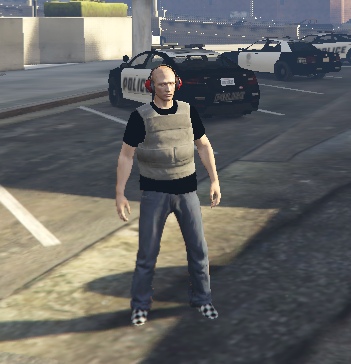
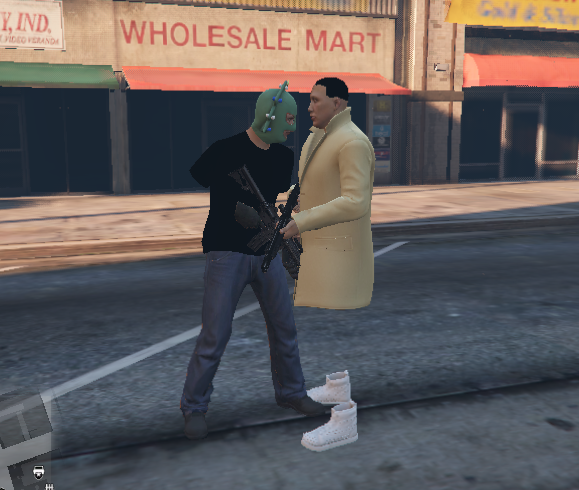
  1. I added back my dlc packs and it works now completely fine now, but the cop models are weird, i have pictures below, do you know how to fix this. it has to be caused by lspdfr because without lspdfr installed cops/swat/noose are completely normal
  2. My GTA version is 2845.0, RPH version is 1.104.1327.16500. LSPD 0.4.9 Preload models is set to off, my game isn't modded. Borderless windowed settings for RPH but everything else for rage is default RagePluginHook.log I deleted a couple dlc packs to save space because don't use multiplayer so that might be it.
Account

Navigation

Search

Search

Configure browser push notifications

Chrome (Android)
  1. Tap the lock icon next to the address bar.
  2. Tap Permissions → Notifications.
  3. Adjust your preference.
Chrome (Desktop)
  1. Click the padlock icon in the address bar.
  2. Select Site settings.
  3. Find Notifications and adjust your preference.