


DanX
Members
-
Joined
-
Last visited
Everything posted by DanX
-
Are you using any type of graphics improvement mod? Like a timecyc mod or ENB? Also, what does the [ ENV LIGHTING ] section say under your ELS.ini?
-
Hey everyone. Randomly as I'm playing the audio for the dispatcher becomes a never ending loop of just static. When I look in the LCPD:FR log I see: [WARNING - 11:05:06 PM] [AudioHelper] audioFilePath C:Program Files (x86)SteamsteamappscommonGrand Theft Auto IVGTAIVlcpdfrAudioPoliceScannerStreetsDELAWARE_AVE.wav [WARNING - 11:05:06 PM] [AudioHelper] streetName Delaware_Ave [WARNING - 11:05:18 PM] [AudioHelper] formattedStreet Mohawk_Ave [WARNING - 11:05:18 PM] [AudioHelper] audioFilePath C:Program Files (x86)SteamsteamappscommonGrand Theft Auto IVGTAIVlcpdfrAudioPoliceScannerStreetsMOHAWK_AVE.wav [WARNING - 11:05:18 PM] [AudioHelper] streetName Mohawk_Ave So far looks normal to me. LCPDFR looks for a different audio file to play. No problem. But then I see this: GetAudioFileForAction: Location parameter is NULL for CALL_IN_PURSUIT The only way to fix it is to restart GTA4, but the problem is becoming more common. The audio files are there so I'm not sure why it's having trouble accessing them in the directory. Of course, all dependencies are installed, legit GTA4, read-only off, etc etc. I can't seem to find this problem on google or the site, so any help would be appreciated.
-
I think some of those pursuits are a part of GTAIV itself. I remember seeing them before I installed the mod. I'm not 100% though.
-
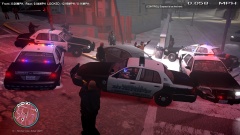
From the album: Random gameplay photos
Gotcha. -
Just some random gameplay photos.
-
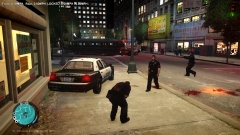
From the album: Random gameplay photos
Blargh, I'm hit. -
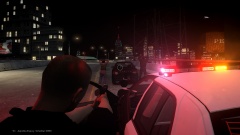
From the album: Random gameplay photos
Testing out a felony traffic stop. -
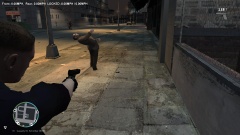
From the album: Random gameplay photos
Yeah he definitely needs to see a chiropractor. -
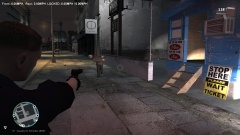
From the album: Random gameplay photos
I think he needs to see a chiropractor. -
What I do is this: Press shift to start a traffic stop. Once the vehicle stops, I don't exit my car. Instead, I go to the police computer, which has already pooled the data from the ped (without even approaching the window. The info from the ped is in your computer the moment you pull up behind his vehicle). All I need to do is search his name. If he has a warrant, I press shift again (to cancel the original traffic stop) and press M to stop his vehicle. I then exit my car with my gun drawn and order him out of the car. This is all possible in vanilla LCPD:FR
-
-
-
Wow that's really cool. I was just thinking the other day how could something like this be possible. I'm going to start doing this now too. Great idea!
-
-
This is a sound modification to replace the default GTA4 loading song to the 30 second (repeating) loading introduction song from Southland. To Install: Go to: (Your install directory)Grand Theft Auto IVGTAIVpcaudioSfx Backup your original LOADING.rpf file Open LOADING.rpf with SparkIV or your program of choice Import the two files found in the .zip file. Save and enjoy! REMEMBER! Always back up your original files! Example Video: http://youtu.be/CkeGP9MMYY0 I also recommend using DarthWound's LCPD Museum Loading Screens with this mod for the full experience, found here:
-
WoutersCallouts has a "Fight in a building" call that is very similar to the domestic dispute. As far as the drunk driving call: When you call someone to arrest the drunk, you can actually hold onto the suspect by using "E" and walk them over to the arriving officers car. It's made it easier for me.
-
Since I've been playing version 1.0, I've noticed that pursuits are a lot more common. So while I was playing I did a quick test by pulling over 20 vehicles at random. Out of those 20, about 11 ran from me, which, for my taste, is a bit high. Is there a way to change the chance of pursuits in the config file anywhere, or to add a command line that could change this? Thank you EDIT: I should add that I'm referring to the pursuits that start when you pull over a vehicle, either when you walk over to the window or after you press the shift key.
-
Example Video: Just a quick, simple modification I made to the "All units" and "All units, All units" dispatch file for immersion purposes. It includes a flatline emergency alert tone used by some Fire and Law enforcement agencies to gather the officers' attention. The files themselves are not commonly used by the GTAIV dispatcher, so they will not be annoying or overdone in the game itself. TO INSTALL: Go to: (Install directory) Grand Theft Auto IVGTAIVlcpdfrAudioPoliceScanner. Locate and backup the original "ALL_UNITS.wav" and "ALL_UNITS_ALL_UNITS.wav". Replace these files with those you downloaded.
- 5 comments
- 2 reviews
-
Okay. Make sure in the els INI that the default cars have els set to off
-
So the AI is using the default police cars? Do you have ELS installed?
-
I fixed it! After days of searching I came up with my own solution. I knew it had to be something out of the game so I did some digging and configuring. It turns out that, if you are running larger windows and text on your desktop ,it will affect the callout text in game as well. So here's out to fix it! (For those of you who may stumble upon this in google). Go to Control panel > displays. (If you're on windows 7) If you have it set to Medium (125%) or Larger (150%) it will bump the callout text off your screen. Set it back to standard and it will fix your issue.
-
I just tried a fresh install, no other mods other than LCPDFR, still have the issue which makes me think it might be something outside of the game but I'm not sure. I'm not sure what file the control dialogue box references to get it's size or position. Does it use the ingame font? Or does it reference something external? If you could let me know it may help me pinpoint a solution. Is there a way to change the font size, or edit a file to move the position of the control dialogue box? I have noticed too that the resolution size does have an effect. When I lower the resolution, more of the dialogue box disappears of screen. When I raise it again to my maxiumum resolution, it's like it doesn't quite seem big enough to show the whole thing, even though it matches my desktop resolution (1920X1080).
-
I think some foot chases are a part of GTAIV itself. They may be hard coded into the game. Here is the response LMS gave me when I asked.
-
Full screen. I checked my AMD videocard program to make sure there wasn't an under/overscaling problem and all seemed fine there. I searched the web for about 4 hours yesterday and I couldn't find anything. I was thinking maybe the hud wasn't scaling right, or if there was an option to move the Control callout box in the font.dat files or something. Here is a screenshot of what im seeing. http://cloud-2.steampowered.com/ugc/487825736962997378/FE8F9F4D21B7C9992816875114C6A92AA9C84121/
-
No problem, thank you for replying.

