




Cryptorm
Members
-
Joined
-
Last visited
Everything posted by Cryptorm
-
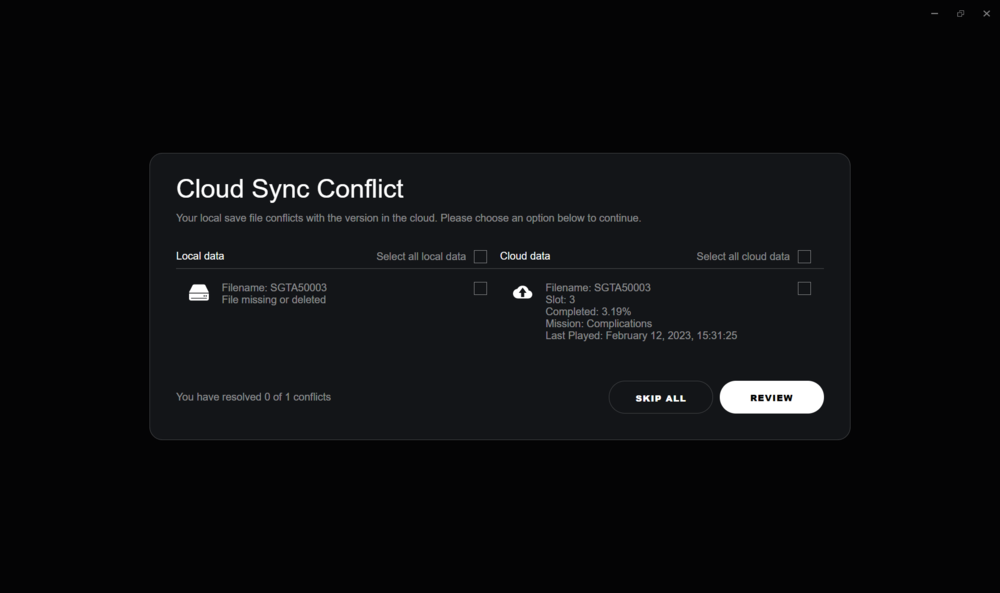
Update 2/12/2023 There was a corrupt save file that had to be deleted in order to be able to open GTA 5. If anyone is experience infinite load loop in Solo Mode GTA and when you try opening LSPDFR. Go to the GTA 5 Save files. "C:\Users\YOURUSER\Documents\Rockstar Games\GTA V\Profiles\*******" Completely delete the last saved game. Important: Don't save your game when playing LSPDFR or it will cause issues when you try opening GTA and or LSPDFR PLUGIN! Once you delete that save when you go to open GTA there will be a message that will pop up. Don't Panic!!! Cloud Sync Conflict Your local save file conflicts with the version in the cloud. Please choose an option below to continue. This is basically showing you the saved game. ***Do NOT check the file and click review. Only hit Skip All!*** By checking the file and clicking review you are reloading the save game you just deleted that was causing issues. If you click skip all it will reload a previous save before this one. Meaning the game and LSPDFR will load.
-
February 11, 2023 LSPDFR Infinite Loading Issue An issue where LSPDFR via Rage Plugin Hook does not load as of February 11, 2023. Even if you try almost every possible way to fix the issue. I have the Steam version of GTA 5. I followed the installation guide. I've blocked Mcafee from scanning rage plugin hook. I've tried uninstalling LSPDFR. Installed OpenIV. Verified integrity of game files via steam. Everything seems to load smooth at the beginning. But once I hit the loading screen it makes it to loading LSPD First Response and then stops and begin infinite loading I waited 30 minutes one time and nothing. LSPDFR only worked once for a few days ago roughly Wednesday February 1. After that never worked again. I'm not kinda lost as to what to do to fix the issue. I've watched a bunch of YouTube Videos and tried almost every possible potential fix but nothing seems to work. And because I have no clue why LSPDFR is no longer working no matter what I try to do. I'm creating a new thread so others who are having the same issue can look at this thread and get answers on how to fix.


