


ZH540
Members
-
Joined
-
Last visited
Everything posted by ZH540
-
 @opus49 I'm not sure if it's related or if this is even helpful to you, but since installing this, I've had a couple of instances where my ELS has stopped working,log is clear of any related errors. Also, advice please! Is it better to remove Compulite and the ALPR mod now? I'm yet to learn all the features and usability of your mod,but thought I'd ask in case removal of those mods would help the process etc. Thanks.
- 451 comments
- 47 reviews
-
As and when I've had time today I've gone through my unzipped folder and compared it to the files unzipped into GTA V folder. As I said, all the files copied over are indeed all the same and nothing was missing, so to my thinking the only thing that could have caused the issue was the RAGE file, mine must have been older and not in fact newer as I previously thought,this is the only difference I could conceive between any files. And that's how unzipping directly did actually make a difference to the install! Because previously,I had not included the rage file,believing mine was the newer version. Thought I'd explain my process. I'm about to go in-game now and give it's first actual run and enjoy it - loved your previous version.
- 451 comments
- 47 reviews
-
Glad it wasn't just me! It's very hard to prove your following steps without it coming across as your provoking the author, which I'm definitely not doing. It's just frustrating when your following everything to the letter and it's not happening. It's not as if installing it is hard either. The way I resolved it was simply to remove all the callout interface files from the GTA V & Plugin folders again and then instead of copying across the files, I unzipped everything into the GTA V folder directly, it ultimately has worked. Just go into the GTA V folder afterwards and remove the readme,
- 451 comments
- 47 reviews
-
This is odd then! I’m literally dragging & dropping as per your video (excluding Rage as mine is ok). I’ll keep running the process hoping it works. Cheers
- 451 comments
- 47 reviews
-
I meant to add that I had done that. I watched yours first as it was top,then after having issues read through the 1.4 replies & saw the CJ video mentioned. As mentioned,followed your instructions but just keep getting that box/window & error(shown in my screenshot above). I’ve removed the files & repeatedly tried but still the error.
- 451 comments
- 47 reviews
-
Hi, I've been trying to install this version and to the best of my knowledge everything is in place...I followed the instructions to the letter and also followed Criminal justice's guide too. However, once in game I get the following on screen "calloutinterface could not start you are missing required libraries". Any ideas at all? Thanks in advance.
- 451 comments
- 47 reviews
-
-

- 1
-
-
Charlie, Thanks very much for that link, very very helpful! I'll take a deeper look at it later as I'm a tad short on time right now. Glad the tile made you laugh mate! By the way, I literally just installed your 686 callouts, excellent work! Thanks again.
-
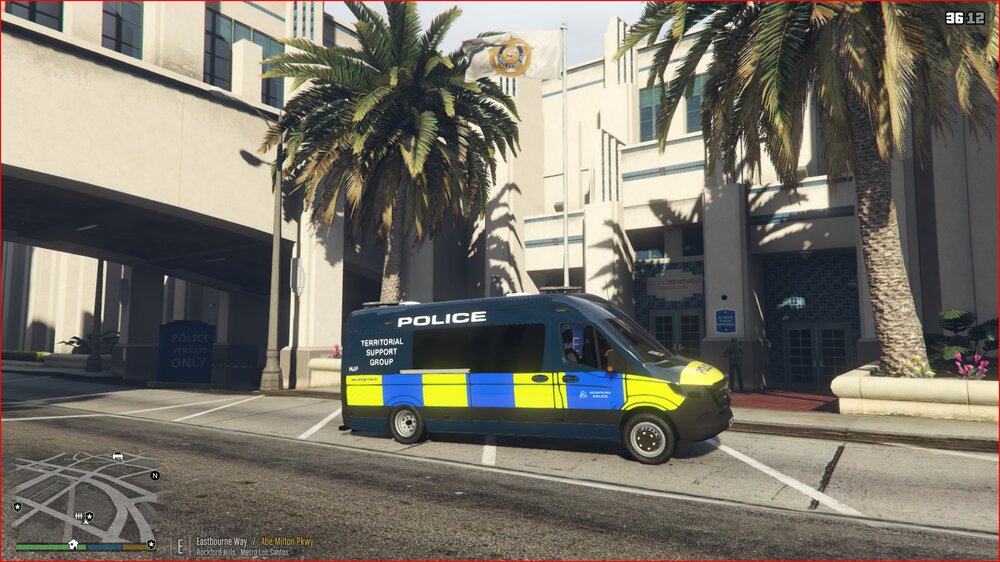
Hi, I have the [ELS] 2019-2021 - Mercedes Sprinter - LWB+SWB - 6 Pack - Metropolitan Police from Union Mods, but I have an issue. The rear suspension is too low and is hitting the road surface and looks ridiculous. Where/how can I correct this? I assumed in the handling file? I've included an image to show you the issue, any help would be great! Thanks.
-
Apologies @Cyan,I hit search and it came up with this. I obviously misread the title or something mate. Can you point me in the right direction so I don't cause further confusion here? I've been trying it via the LSPDFR in game pause but it keeps telling me to either log in or head here to activate it. All done.
-
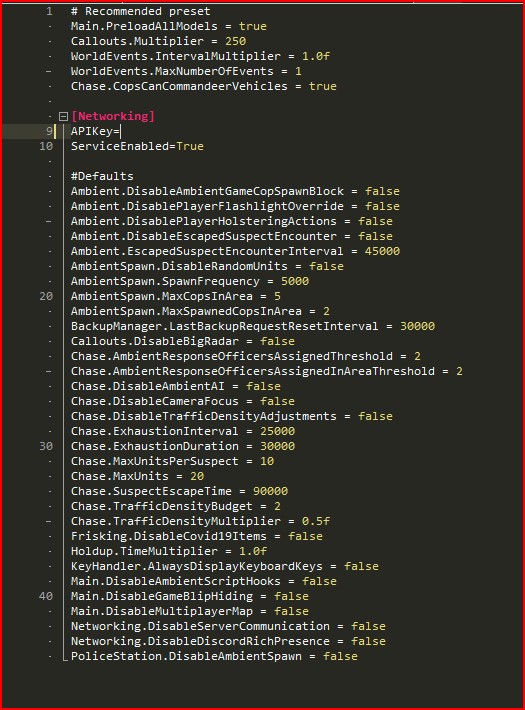
Thanks again @LMS for your help. Sadly this is still not working. I keep checking it in game in the sync & character menu's but it says not recording data etc. I added the above lines and added under [Networking]. See attached image (I removed my unique number obviously). Sorry to be a pain in the arse.
-
Thank you @LMS. I just wanted help & also confirmation I wasn't about to shaft the whole lot lol. I'll drop it in there shortly. Quick question, can the line be added anywhere or a specific place?
-
I have this very same issue, @Cyan should we add this text into the ini ourselves or is there a problem with the file?




