



itsjzee85
Members
-
Joined
-
Last visited
Everything posted by itsjzee85
-
-
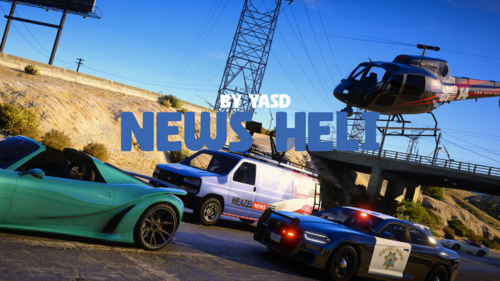 It is in the XML! The current vehicle is the Annihilator with the Polmav livery. So it is kinda a militaryish type. But you can change it there a long with the van and even the peds. Yasd made this super customizable. The Maverick is probably gonna be one you might want to use. Look up all the helicopters and choose one you want or like you said, you have one that would be cool so ya! try it out
- 40 comments
- 8 reviews
-
 Oh when I quoted his quote lmao! That was funny to me I actually lol'd irl! Thanks for clairifing that cause I was like man i hope that didn't make you feel like you weren't important or something so ya, deff makes me feel better lol You da man Xeno but I already know u know that!
 -
@249Xeno What's got u confused my guy? Use your words. Edit: If you were confused about why they said "especially you" is because when this was released it was one of my fav mods ever and I even let them know. I am a member on their discord (because of this mod) and have helped with feedback on this and other of their mods as well. Not just a fanboy, I'm active within their community. So every update they do that adds something new or it fixes something that was broken I am genuinely excited. If that wasn't it please let me know!
-
@Nightz Development "My brain is currently performing an unscheduled dlc_brain_crash on the 22nd" lol that was the best haha I'm so there with you. Thanks for all the updates!
-
Heck yeah! I was waiting for this very update so stoked it's here. That light was driving me insane. Always appreciate the hard work for us!
-
This 100% fixed my crashing and els issue. Thanks Lennyy! (again as always)
-
Yeaa UB lol I always call one in just in case I lose the guy lol Thank you for all you do here!
- 40 comments
- 8 reviews
-
-

- 1
-
-
Correct. Not sure why you are confused. Pretty Simple. Those are the sources that come from. The rage Discord has it posted the second it gets updated and released. Plus notifications. We cant do that. They are often updated before anyone here has a chance to update anything. As well, scripthook V is always about a week or more late being posted here. People don't look for themselves and rely on the updates from you. Not everyone uses rage just for LSPDFR and script hook V wasnt posted here for over a week after it was dropped. And again, so I can make sure you understand. RDR2 also relies on RPH which I also use. Edit: Just to give some context. I get burned out on lspdfr. So I take like an 6-7 month break. Discord is how I keep up on everything. Yes, it's is released with LSPDFR but I get notified the second it's up and running. That is all I'm trying to say. I'm on discord every day. I'm just saying what I do. There isn't just one way to do things. And also, I respect all of you. I do, but sometimes I feel like because it's not your way then like you guys don't ask why, you guys just want to leave something trying to say why someone is wrong. I only tell people the things that have worked for me. I don't pull things out of thin air. This has been a thing here for awhile. At the end of the day if it wasn't for all of you guys this wouldn't exist. I paid to support and I do appreciate you all.
-
I really like this plugin, but I'd love it if it also came with a police option to spawn a police chopper a certain amount of time after the chase begins. The reasoning for this is so you don't lose the suspect, and at night to follow and see the car better during and after the chase and arrest. Plus the spot does look cool. News Van could still come rollin in hot tho
- 40 comments
- 8 reviews
-
The best way to stay up to date with RPH is their discord - https://ragepluginhook.net and go to social then select Discord. Join there and when it is done it will be announced on their discord along with a download link. That will let you know when it's available way ahead of LSPDFR mainly because of schedules of admins. (Sign up for notifications to their sub). Best method to have for ScripthookV is the dev's website. He directly posts it here. https://www.dev-c.com/gtav/scripthookv/ In the meantime if you are on Rockstar launcher you can try my method to play lspdfr and not update your game yet.
-
 I don't think this ever made it's way to you because I didn't add your convo to my reply. EDIT: I was wrong. I DID include it. Disregard this, but Idk how to delete this so. Here we are.
 -
Hey everyone, I have found a workaround for the Rockstar launcher to launch and play LSPDFR if you have not updated or if u have a backup. Follow these steps: Disconnect internet from your PC. Start Rockstar Launcher for Offline Mode and start the game through either the launcher or Rage and once the game starts to load, Re-connect the internet to your PC (This is so all your plugins and online maps work. Play. Disconnect internet BEFORE you close the game. That way the launcher does not start to update game. The launcher will stay offline even when internet is plugged in. It will ask u to restart launcher. Don't. Close everything then reconnect. https://youtu.be/g6dHs4CcbNk
-
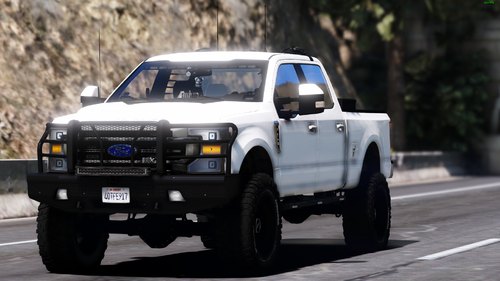 As usual one of @Rabbit GTA V Development 's vehicles makes it to my number one. Always have something you make in my rotation. Since I started back in 2023. Great quality, look awesome as all of your stuff. Thank you for doing all these cars for us! Now, we need to just make aal the air fresheners in the rear view mirrors have some slight moving physics!
 -
I was coming here to say that but the awesome Mister @Lennyy already knew whats good! The mod is good and the dev is responsive. So yeah get that and you will enjoy it! @WyaReadingThis gta5-mods has other driver type jobs plugins that are really fun and include a bunch of delivery things. It was called DriverJobsV. The newest one is flying a client on a private jet or driving a train and like 25 more.
-
A liiiitle bit late to the party but this is a great idea. I'd love to hear that too. Talk about immersion.
- 40 comments
- 8 reviews
-
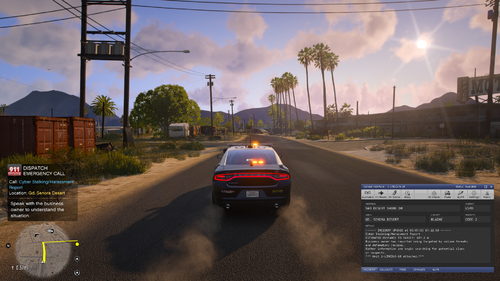 I didn't see you as rude at all. It's how he spoke to Dr. Mamba. Like I'm all about communicating issues and things like because that's how we make improvements. I have people message me trying to figure things out with my lil mod, so I can imagine what it's like for you guys, but there is a correct and a non correct way to let someone know there is an issue with the plugin. Saying It would be nice if your going to have XYZ that it worked or other condescending or rude remarks or tone is not an acceptable way to talk to a Dev who is doing all this for free, for us. As I said, I too take questions and I try help everyone I can, but the rudeness was unnecessary for a man that has been here 11 years. Idk, when the author agrees with me it's very clear that he also felt the same way but can't say it outright. That's why it went down that way. You guys all put so much time and effort into these plugins and to have people take a crappy tone just isn't acceptable. Like you, you have amazing mods and if someone didn't stay in their lane with you I'd say something then too. This is about respect and talking to people with respect. But he got what he gave.
- 72 comments
- 8 reviews
-
With all do respect and no type of hate or anything toward you, just an open convo and I do mean this whole heartedly and genuinely. But, if you honestly think that was not rude I'm not sure what to tell ya bud cause I wasn't the only one who sees it that way. People saying "If your going to have XYZ then it would be nice if you XYZ that works right. I really don't need a constant warning flashing....". That's not rude? If accepting peoples rude behavior is part of the journey then you are part of the problem. I shouldn't have to point that out because I know you are intelligent and that is fact however it was a rude comment and meant to be rude. Feedback is awesome, I have a small simple mod and people message or post comments about problems and THAT is part of the journey. Not an attitude that he is not entitled to. I think you are misunderstanding the whole point of the post itself.
- 72 comments
- 8 reviews
-
When I upgraded gta to the newest build this last time, when I'd try to go on duty and it would crash and ya know I didn't think about all my add on police vehicles that would spawn when I started the game. Not sure if after the update the gameconfig became obsolete or something but it worked when I upgraded to a new game config and stopped crashing when I went on duty. Good call on add on vehicles! I may have put too many in there on top of all the mods. Ya Imma take some out. You're awesome man!
-
After Months of trouble shooting in between mods it all came down to a bad YMAP and DLC that was somehow affecting grammar police. This was discovered because I was also having the The Infinite Holster/Unholster Loop Animation glitch where it's stuck in a loop. Nothing stopped it. The only thing to stop that was to remove a bad YMAP and a DLC that had known issues with causing this issue. The infinite holster/unholster loop isn’t a bug in vanilla GTA V but it’s most often triggered by a corrupted or conflicting mod especially custom map or YMAP files. Apparently bad YMAP's can affect a lot of things. If you are ever having the same issue try going thru your YMAP's. Tedious but worth it. The game is playable again. Hope it helps someone in the future
-
Changing my gameconfig fix my crashing mod issue. You have been doing this for a while now so not sure why that confused you but okay..
-
Not sure if you saw but your X2 longer train suggestion led me to put the 99 car train. No one would probably keep it in the game but it is fun to see how long the thing can get!
-
Have you by chance installed the latest gameconfig.xml also?
-
You are 100% right. That is confusing. I will fix that on the desc ription right now. Thank you for pointing it out! Edit: DONE! Thank You JM!!! I appericate you helping!
-
I meaaannnn why so rude tho? This is an ALPHA release. Let me explain cause even if you do know (which I know you do) I will assume by your post you have forgotten. Hence the BOLD, underlined, different font, color and enlarged text for ALPHA that way next time before you leave a rude comment to a person who is literally doing this for us, for free, is attentive and responsive to people and it's an Alpha, oh sorry, ALPHA release at that.. Now, an ALPHA release is the stage BEFORE BETA.. So, by downloading an ALPHA build means there will be bugs, suggestions still to be implemented and a lot of changes, so lots of updates. This creator is very active and actually helps people with their issues instead of ignoring us like other creators. You've been here a FAAAAAT min so I'd assume you'd known that. So to recap, if you DO NOT want to participate in this particular ALPHA release just don't download it, don't comment on it. If YOU DO want to participate in this release then actually be a part of it without the nonsense. Be a helpful member of our community. This goes for any other Alpha (ALPHA) release of any other creator who's active. I DO appreciate the constant updates and actually trying to make this a great plugin for everyone!! Loving the callouts so far. I figured the issue with the warning and all that would be taken care of next update. But yea that nag screen was annoying ngl lol. Doin great tho and always ready to try the next new callout! One suggestion is the distance to a call. I like that it has dynamic variables but a lot of calls are right around the corner from where you are so it's like same place after same place. I think if maybe you guys did something different to eliminate that issue that would sweeeeet. And if not, it's all good too.
- 72 comments
- 8 reviews



