Skip to content
View in the app

A better way to browse. Learn more.

LCPDFR.com

A full-screen app on your home screen with push notifications, badges and more.

To install this app on iOS and iPadOS
  1. Tap the Share icon in Safari
  2. Scroll the menu and tap Add to Home Screen.
  3. Tap Add in the top-right corner.
To install this app on Android
  1. Tap the 3-dot menu (⋮) in the top-right corner of the browser.
  2. Tap Add to Home screen or Install app.
  3. Confirm by tapping Install.

Gambino37

Members
  • Joined

  • Last visited

Everything posted by Gambino37

  1. For some reason my els crashes while ingame, dont know what to do i reinstalled els and Scripthook, but still same error, Smhw this started happening since i installed NVE, do u guys have any Solution ?
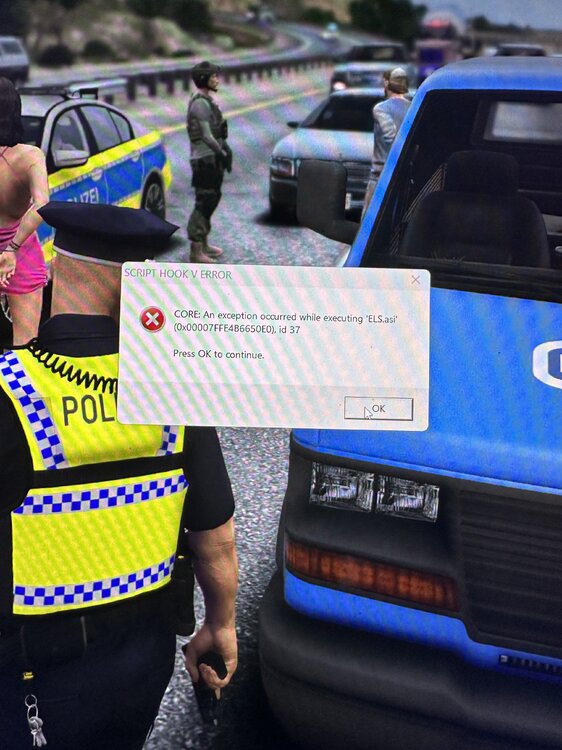
  2. i just fixed it, i deleted scripthookdotnet and now it works. I try to add some plugins now and then i will see if it still works if not i will send the Rage log to see 🙂
  3. Hello, just wanted to play lspdfr after a long time again, I got a new pc installed it all correctly and it worked, but as i installed more plugins for LSPDFR its crashing in the Startup screen, and idk why it does, i tried deleting plugin over plugin to see which one causes the Crashes but now its even crashing while i dont have any plugin installed. I dont know what to do 😞 Dear Regards


Account

Navigation

Search

Search

Configure browser push notifications

Chrome (Android)
  1. Tap the lock icon next to the address bar.
  2. Tap Permissions → Notifications.
  3. Adjust your preference.
Chrome (Desktop)
  1. Click the padlock icon in the address bar.
  2. Select Site settings.
  3. Find Notifications and adjust your preference.