
Crapulence1337
Members
-
Joined
-
Last visited
Everything posted by Crapulence1337
-
SoCal Thero has an awesome CHP pack with a Foxbody that you can reskin to fit whatever department you desire!
-
Your post is pretty vague but from what I can gather your problem can be anything from straight up improper installation to not having a good game configuration file. Without knowing what you're installing and how you're installing it and what game configuration file you're using; I can't be of much more help.
-
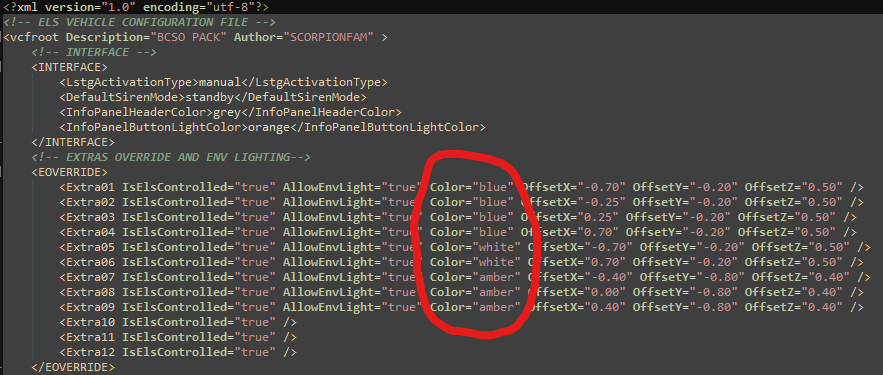
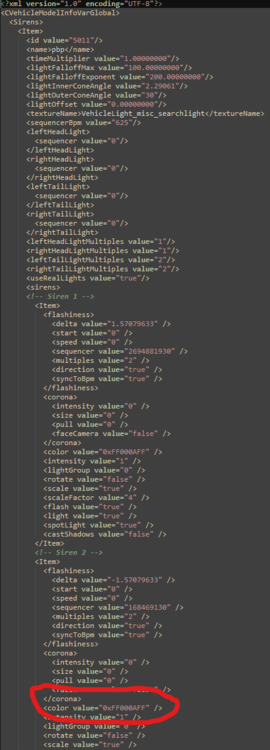
It depends on the type of lighting your vehicle relies on, but here is the method for both ELS and non-ELS: • For an ELS vehicle it's as simple as opening the corresponding XML file and changing the "Color" value (as demonstrated in the first picture). • For a non-ELS vehicle access the vehicle's carcols.meta file and adjust the "color value" value (as demonstrated in the second picture). I make no guarantee that this is right, but I believe these are the hex values used in a carcols.meta file: Red = <color value="0xFFFF0000"/> Blue = <color value="0xFF0000FF"/> Orange = <color value="0xFFFF5000"/> Yellow = <color value="0xFFFFFF00"/> Green = <color value="0xFF00FF00"/> White = <color value="0xFFFFFFFF"/>
-
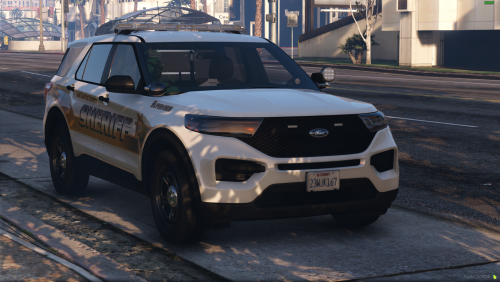 I have to ask; what department is this based on? It looks identical to my local sheriff department, but our county has a population less than 40K, so it would be quite bizarre to see liveries based off on them (however I am aware that designs are used, sometimes with slight modifications, across multiple agencies across the country). Anyway, I was just curious. Very nice pack, thanks for the release!