M M DeveGroup
Members
-
Joined
-
Last visited
Everything posted by M M DeveGroup
-
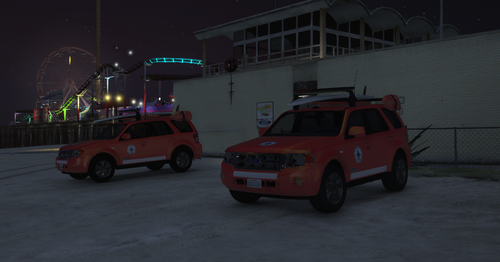 PL Oryginalny model: https://pl.gta5-mods.com/vehicles/ford-escape-2012-add-on-replace-tuning-wipers Replace do pojazdu 'lguard' w wariancie Wodnego Pogotowia Ratunkowego. Model: FoxtrotDelta & Elope Malowanie: Michciu Zdjecia: Michciu Kontakt: *****@*****.tld, https://discord.gg/CBduFmvy7G Instalacja: 1. Pobierz model auta. 2. Otworz pobrany folder oraz znajdz folder z nazwa "replace" 3. Podmien ytd na nasze. 3. Otworz openIV i znajdz D:-Grand Theft Auto V-mods-x64e-levels-gta5-vehicles.rpf 4. Skopiuj lguard.yft, lguard.ytf, lguard.ytd do folderu, a nastepnie zastap pliki. 5. Ciesz sie nowym malowaniem. ENG Original model: https://pl.gta5-mods.com/vehicles/ford-escape-2012-add-on-replace-tuning-wipers Replace for the 'lguard' vehicle in the Water Rescue variant. Model: FoxtrotDelta & Elope Painting: Michciu Photos: Michciu Contact: *****@*****.tld, https://discord.gg/CBduFmvy7G Installation: 1. Download the car model. 2. Open the downloaded folder and find the folder with the name "replace". 3. replace ytd with ours. 4. Open openIV and find D:-Grand Theft Auto V-mods-x64e-levels-gta5-vehicles.rpf 5. copy lguard.yft, lguard.ytf, lguard.ytd into a folder and then replace the files. 6. enjoy the new paint job.