SpecOps Gaming
Members
-
Joined
-
Last visited
Everything posted by SpecOps Gaming
-
i seem to have gotten everything fixed after working on it the past few hours, my nativeUI file was gone that seemed to fix the problem , but i promise LML did not work for me till i used openIV unless i was supposed to take another step but clicking downlaod with LML for the Gameconfig did not work
-
yes i did that, but LML does not install GameConfig properly like it says it does so i had to use openIV and that seemed to work but now the game loads fine and everything but once i hit go on duty it crashes and im getting lspdfr.dll is crashing message
-
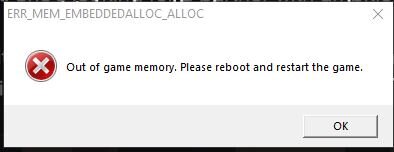
is this is the right place for this post? and if its not the right place maybe PLEASE tell me the right place before deleting it and basically denying me a chance at help because just saying post in the right place but not telling me where isn't helpful!!!!! Game Crashes And says no memory please restart with this image pop up error