Skip to content
View in the app

A better way to browse. Learn more.

LCPDFR.com

A full-screen app on your home screen with push notifications, badges and more.

To install this app on iOS and iPadOS
  1. Tap the Share icon in Safari
  2. Scroll the menu and tap Add to Home Screen.
  3. Tap Add in the top-right corner.
To install this app on Android
  1. Tap the 3-dot menu (⋮) in the top-right corner of the browser.
  2. Tap Add to Home screen or Install app.
  3. Confirm by tapping Install.

mp925gg

Members
  • Joined

  • Last visited

Everything posted by mp925gg

  1. I'm running the most up to date version of EUP. I was using a custom but reverted back to the original EUP uniforms since I was having trouble.
  2. I'm looking to change all the AI and Ultimate Backup uniforms so they all can match me. I tried watching some tutorials but they haven't been giving me the answers I'm looking for.
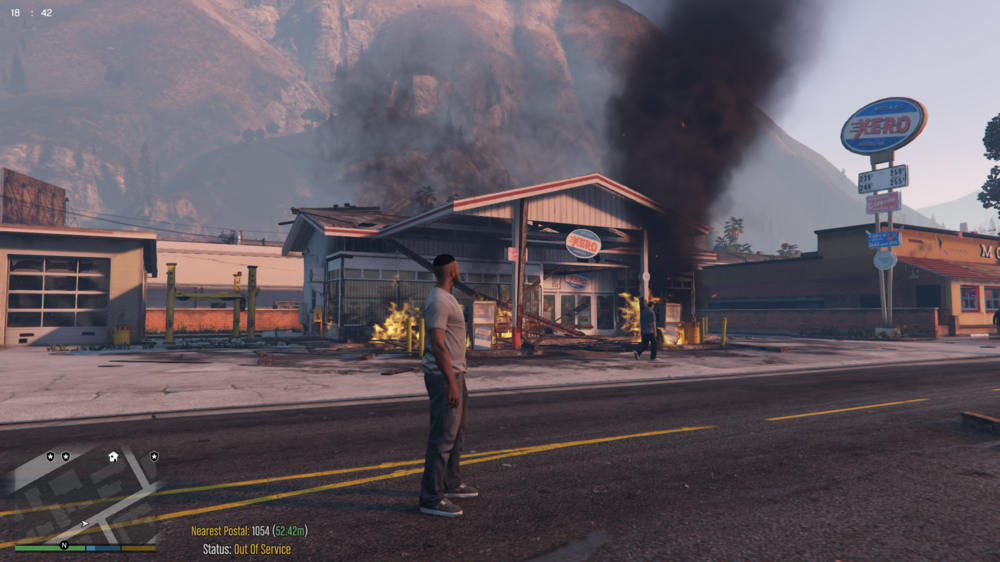
  3. Does anyone know why the gas station is consistently on fire? If so, is it fixable, what do I need to do?
  4. My game has been crashing for the past few days. I am able to load into LSPDFR and force duty. Once I get on a traffic stop or on my first call it ends up crashing. The error code typically reads LSPD First Response.dll has crashed. I have attached the Rage log, any assistance would help. RagePluginHook.log

Account

Navigation

Search

Search

Configure browser push notifications

Chrome (Android)
  1. Tap the lock icon next to the address bar.
  2. Tap Permissions → Notifications.
  3. Adjust your preference.
Chrome (Desktop)
  1. Click the padlock icon in the address bar.
  2. Select Site settings.
  3. Find Notifications and adjust your preference.