Thygo.Veld
Members
-
Joined
-
Last visited
Files posted by Thygo.Veld
-
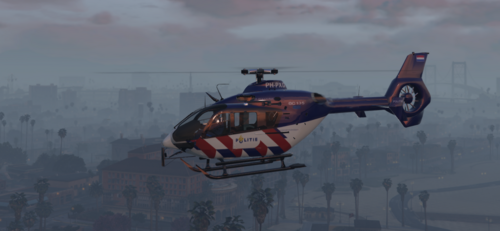
Hierbij mijn allereerste mod. Dit is een fictionele zulu livery, ik ben hierbij voor de "oov" striping gegaan wat, al zeg ik het zelf, wat mij betreft best goed heeft uitgepakt. :Xd
Mocht je tips of ideetjes hebben laat het dan vooral weten.
Veel plezier ermee! 🙂
Installatie NL:
Stap 1: Download originele model, via GTA5-Mods
Stap 2: Hernoem de 2 .yft bestanden van SCRAT | MattZepol naar: polmav.yft en naar polmav_hi.yft
Stap 3: Plaats de 2 yft bestanden van stap 2 via OpenIV in: mods/update/x64/dlcpacks/[laatste patchday]/dlc.rpf/x64/levels/gta5/vehicles.rpf
Stap 4: Plaats vervolgens de 2 .ytd bestanden uit het skin mapje via OpenIV in: mods/update/x64/dlcpacks/[laatste patchday]/dlc.rpf/x64/levels/gta5/vehicles.rpf
Installation EN:
Step 1: Download the orginal model, via GTA5-Mods
Step 2: Rename the 2 .yft files from SCRAT | MattZepol to: polmav.yft en naar polmav_hi.yft
Step 3: Place the 2 .yft files from step 2 with OpenIV in: mods/update/x64/dlcpacks/[latest patchday]/dlc.rpf/x64/levels/gta5/vehicles.rpf
Step 4: Then place the 2 .ytd files from the skin folder via OpenIV in: mods/update/x64/dlcpacks/[last patchday]/dlc.rpf/x64/levels/gta5/vehicles.rpf
----------------------------------------------------------------------------------------------------------------------------------------
Credits:
Original Model from GTA SA: Rasper
Modified Model: Game68240
Template: Game68240
Politie logo's: Dutch Skinpack 4K
DO NOT RE-UPLOAD TO ANY OTHER SITE WITHOUT PERMISSION!
- 395 Downloads
Updated