


Thygo.Veld
Members
-
Joined
-
Last visited
Everything posted by Thygo.Veld
-
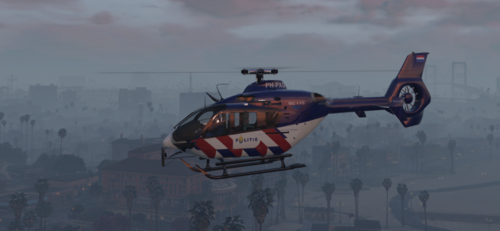 Hierbij mijn allereerste mod. Dit is een fictionele zulu livery, ik ben hierbij voor de "oov" striping gegaan wat, al zeg ik het zelf, wat mij betreft best goed heeft uitgepakt. :Xd Mocht je tips of ideetjes hebben laat het dan vooral weten. Veel plezier ermee! 🙂 Installatie NL: Stap 1: Download originele model, via GTA5-Mods Stap 2: Hernoem de 2 .yft bestanden van SCRAT | MattZepol naar: polmav.yft en naar polmav_hi.yft Stap 3: Plaats de 2 yft bestanden van stap 2 via OpenIV in: mods/update/x64/dlcpacks/[laatste patchday]/dlc.rpf/x64/levels/gta5/vehicles.rpf Stap 4: Plaats vervolgens de 2 .ytd bestanden uit het skin mapje via OpenIV in: mods/update/x64/dlcpacks/[laatste patchday]/dlc.rpf/x64/levels/gta5/vehicles.rpf Installation EN: Step 1: Download the orginal model, via GTA5-Mods Step 2: Rename the 2 .yft files from SCRAT | MattZepol to: polmav.yft en naar polmav_hi.yft Step 3: Place the 2 .yft files from step 2 with OpenIV in: mods/update/x64/dlcpacks/[latest patchday]/dlc.rpf/x64/levels/gta5/vehicles.rpf Step 4: Then place the 2 .ytd files from the skin folder via OpenIV in: mods/update/x64/dlcpacks/[last patchday]/dlc.rpf/x64/levels/gta5/vehicles.rpf ---------------------------------------------------------------------------------------------------------------------------------------- Credits: Original Model from GTA SA: Rasper Modified Model: Game68240 Template: Game68240 Politie logo's: Dutch Skinpack 4K DO NOT RE-UPLOAD TO ANY OTHER SITE WITHOUT PERMISSION!

