Pikel
Members
-
Joined
-
Last visited
Everything posted by Pikel
-
I'm pretty sure the reason why it keeps crashing is because of the fact i deleted something in handling.meta, no im pretty sure i dont have any backup files of handling.meta so if anyone can send me a link to one or the file download that would be great.
-
ohh alright, i think i get what you mean but before for some reason i had nothing in my mods folder so i moved what i had in my updates folder into my mods folder because thats what i saw on a different forum, so i dont have an extra one unless someone has like a download link to the file of one.
-
base folder as in just the main GTAV folder? because if so I don't see it there.
-
I had to change my handling.meta file for a mod but turns out I did something wrong so does anyone have a clean version of the file? Thanks.
-
Thank you!
-
Hello, I need to insert something into pack_default thats supposed to be in the ELS folder but the pack_default folder is missing, does anyone know why or can anyone send me the file
-
oh alright ill remove it, and before this, they were in the lspdfr but i moved them out because it didnt work so wether its inside the folder or not it still doesnt work oh alright ill remove it, and before this, they were in the lspdfr but i moved them out because it didnt work so wether its inside the folder or not it still doesnt work
-
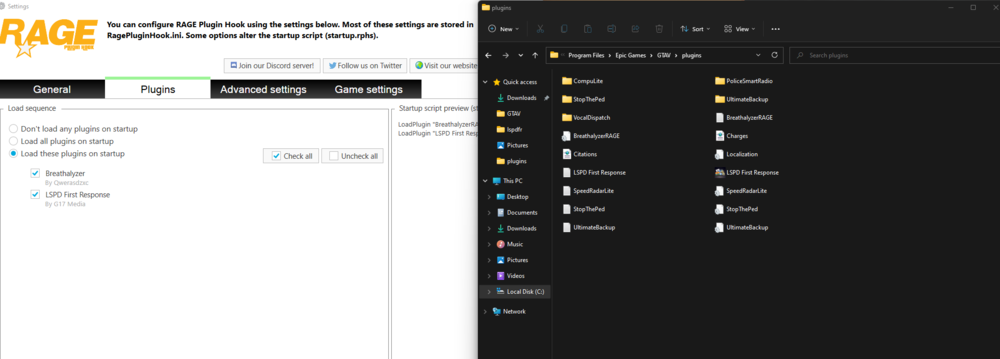
Hello, I installed some mods for LSPDFR and for so me reason the only ones that pop up in rage plugin hook are breathalyzer and LSPD First Response even though I have more mods than just those two