
BZ Modding
Members
-
Joined
-
Last visited
Everything posted by BZ Modding
-
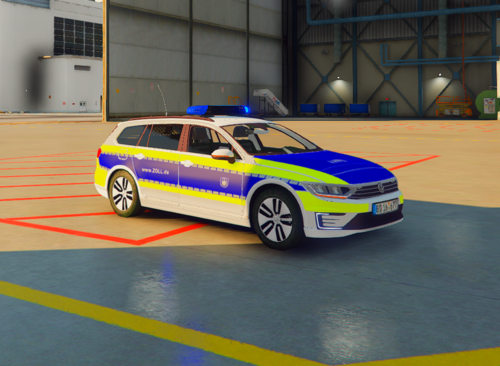 ----------------------------------------------------------------------------------------------------- [DE] Es ist verboten, dieses Fahrzeug ohne eine gültige Lizenz (die Lizenz ist kostenlos) im Multiplayer zu nutzen! Hey, dies ist mein Skin für den VW Passat B8 GTE von X-Modding! Anweisungen, wie du den Wagen installieren kannst, findest du bei X-Modding im Download beigelegt, ebenfalls stehen bei meinem Download auch noch ein paar Informationen in der README Datei! 1. Du darfst den Skin verändern, so wie du willst. 2. Du darfst den Skin NICHT als deinen ausgeben! 3. Du brauchst eine Lizenz von meinem Discord sofern du den Wagen im MP nutzen willst! ----------------------------------------------------------------------------------------------------- [EN] It is forbidden to use this vehicle on multiplayer without a valid license (the license is free)! Hey, this is my skin for the VW Passat B8 GTE by X-Modding! Instructions on how to install the car can be found in the X-Modding download, and there is also some information in the README file with my download! 1. You are allowed to change the skin as you like. 2. You may NOT pass off the skin as yours! 3. You need a license from my Discord in you warnt to use Thai car on MP. -----------------------------------------------------------------------------------------------------