



Kibowden59
Members
-
Joined
-
Last visited
Everything posted by Kibowden59
-
Yeah i think that is why as i removed LSPDFR the other day to play GTA Online and that worked fine ill let you know Also is there a updated gameconfig as mine is still 1699? ok so, still infinte when i load through RPH
-
Yeah i cant find out why myself so i thought ild ask for help! RagePluginHook.log That might be why actually because i did try to revert back to 1699 when LSPDFR and scripthookv was outdated for the time being
-
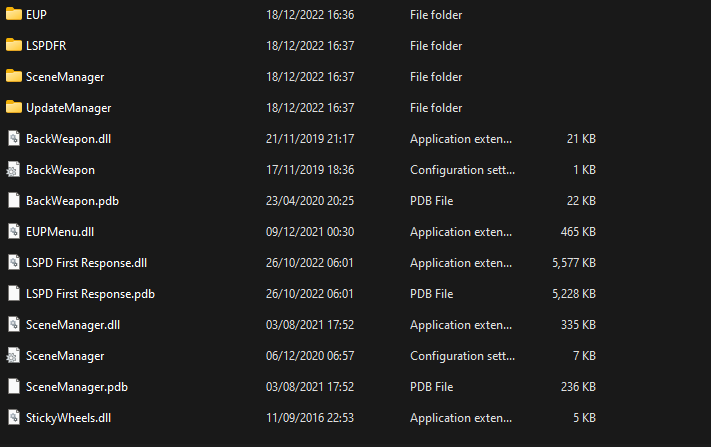
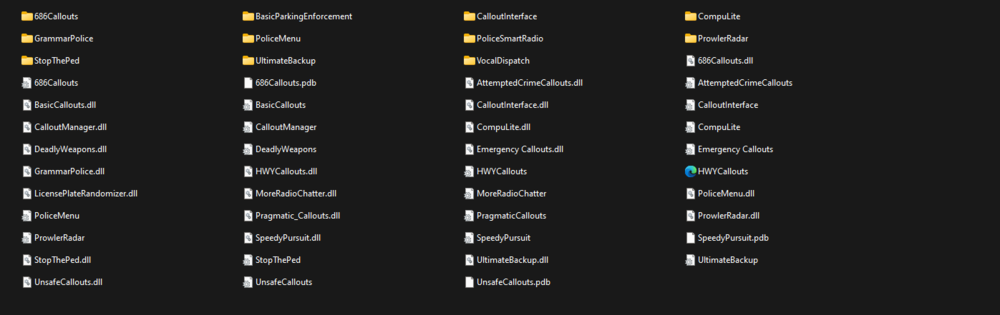
Ok so ill get you started for a quicker reply, So what you will need is OpenIV which you can get here >https://openiv.com/?cat=23 then you need scriphookv > http://www.dev-c.com/gtav/scripthookv/ then you need scripthookv.net 3 > https://scripthookvdotnet.wordpress.com/ once you have all those installed if you go onto downloads page and plugins you will find callouts and things like that i will show you mine. Ok so the LSPDFR folder inside the included plugins folder is where callouts go and others. some have to go in the plugins folder but not in LSPDFR e.g Grand Theft Auto V/ Plugins. I suggest you download these they are a good start: ELS Lighting > This is the feature some cars use but some dont use it when downloading a car it will state if it does or not Scene Manager > used for some callouts and a good add-on for more realistic gameplay Grammar Police > used to talk to dispatch through a mic Realistic gun sounds > makes the guns sound better EUP > A outfit add-on for better outfits compulite > A better police database pack that you can use to give people fines and arrest reports also shows outcomes of there court case Prowler radar > use to see NPCS car speeds Licence plate randomiser > Gives each NPC diffrent plates so there not all the same which i find annoying so its a good plugin ultimate backup > gives better backup then normal LSPDFR and has there own menu to choose from Stop the ped > used to stop peds and gives many options to do the ped And the callouts i like are: 686 Callouts, HWY callouts, Unsafe callouts, Speedy Pursuit, Emergency Callouts, Basic Callouts, Lore Callouts. Also there is mods you can get that make the game better e.g 4k blood, radiance, LA roads. This will make you need a modded game conifg you can get it here > https://www.gta5-mods.com/misc/gta-5-gameconfig-300-cars you can choose between more mods or less mods and less traffic or more traffic but if you have a less powerfull pc i suggest keeping gta default. You can use all these but if you have a less powerful pc it could crash your game on overload so in RPH set plugin timeout to 60,000. You can watch videos on how to install/ use these on youtube which for your first time i suggest you do that for every single plugin or anything you like to do and always make a backup just incase you mess something upso you dont have to reinstall so i suggest you watch these: I personally watched these myself when i first started these are good videos to watch for starters! Any questions just ask ill be around
-
Ok, so another update another infinite loading screen. So it was working fine before the update but after i updated my game i seem to have infinite loading again. I updated lspdfr and scripthookv. Any fixes for this? Thanks
-
Damn ok thanks anyway
-
so just got to wait for a update?
-
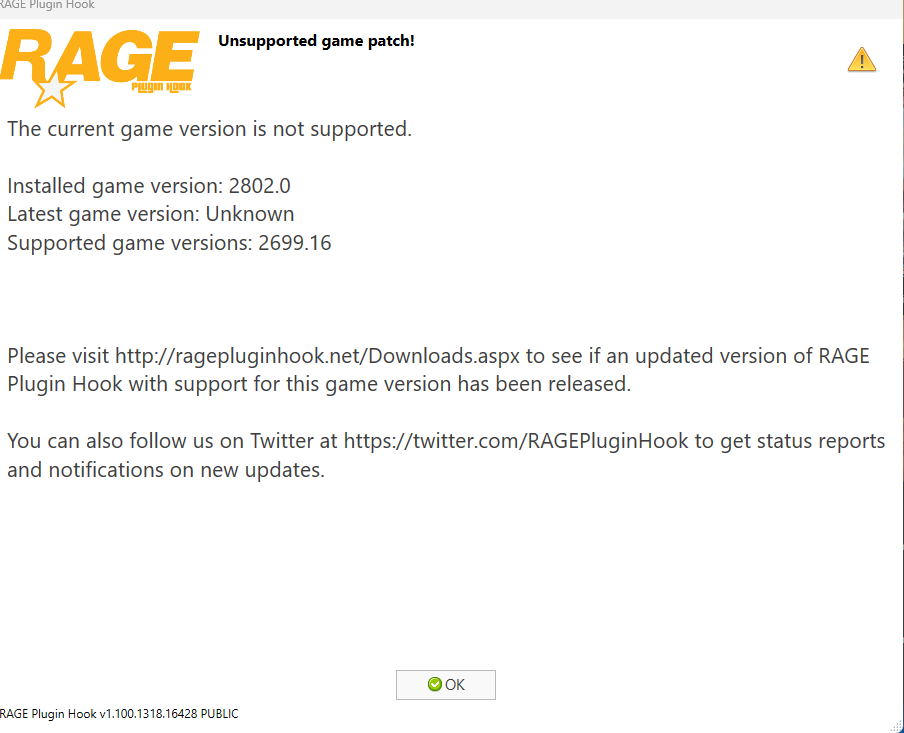
how do i fix this? do i just have to wait for a update or is there a way round it.
-
when you do it in files do you save it and restart your game?
-
yes thats the point you put _mods to disbale it and if it works perfect you have too rebuild your mods folder as i said. if you dont want to do it then your game will stay broken
-
run your game
-
yeah
-
do you have scripthook v dinout8 and scripthookv.net 3 in your gta main directory
-
hi Bamxaniel2, rename mods to _mods try again and if it is that just delete your mods folder and just rebuild it!
-
hi so what i would do in this situation is download these and put them in your gta v directory https://www.gta5-mods.com/tools/heapadjuster https://www.gta5-mods.com/tools/heap-limit-adjuster-600-mb-of-heap After installing these if it still says slow system or permissions do this: if your using basic windows security you search windows security -> virus & threat protection -> under virus & threat protection settings click manage settings -> Exclusions -> Add a exclusion -> Folder -> select your gta v folder -> restart pc -> run RPH as normal. if it still doesnt work after this restart your pc and try again.
-
Hi, so if you have done this correctly have you put the els files in pack_default and no further? Do they have the same name e.g Car file is fbi1 so the els vcf file is called fbi1
-
Also, have you completed the introduction before modding? if so download these and chuck them into your gta v directiory and rerun. https://www.gta5-mods.com/tools/heapadjuster https://www.gta5-mods.com/tools/heap-limit-adjuster-600-mb-of-heap
-
how did you instal eup?
-
What are your laptops specs? Also i recommend the mods: https://www.gta5-mods.com/tools/heapadjuster https://www.gta5-mods.com/tools/heap-limit-adjuster-600-mb-of-heap by using this you can adjust how much ram gta v uses so by using this it uses more on gta v causing less problems and quicker loading times. Also i do not suggest if you only have 8gb of ram this can make your pc unstable when playing.
-
Have you tried to install any cars, or anything to do with OpenIV?
-
Hi, i can see you have system.acccessViolationException so maybe try set gtav/lpsdfr as a exception in your antivirus and this may fix your problem. if your using basic windows security you search windows security -> virus & threat protection -> under virus & threat protection settings click manage settings -> Exclusions -> Add a exclusion -> Folder -> select your gta v folder -> restart pc -> run RPH as normal. Let me know how you get on!
-
Hi, my game crashes as soon as i run RPH i have no mods nothing and i cant see why it crashes when there is nothing else installed. nevermind, restarted pc and now loads fine 🙂
-
you just replied on a forum wherei posted my problem and you say same problem if it doesnt help there is no need to post on it
-
Hi, can somebody please help me my game crashes when loading with rph. i have attached my log file RagePluginHook.log
-
i cant i dont have lspdfr and rph installed as i said before its a fresh install
-
It has 0 mods and i havent touched the files its fresh



