


Ron Dzon
Members
-
Joined
-
Last visited
Everything posted by Ron Dzon
-
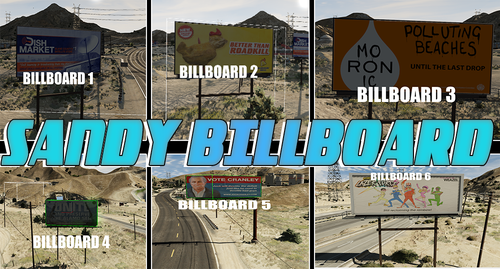 Hello i just have one thing unclear about custom made bill boards that they're disappearing after some distance and i can't find out why and where is like this ? i converted customized .ydr file to XML changed some parameters there than re-upload to game and still the same maybe you are able to help me out with this issue ? i can't find any info about it. would be highly appreciated for solution!
 -
still need
-
.thumb.png.26dcf684c7ed304ca989f7d9186acbcd.png) you're right about light bar, and last thing the T bar at the back is going true the cars, also going under the ground if you lover all the way down is it possible to fix ? if no also fine I'll turn horizontal T bar off and will leave vertical T bar. thanks for quick reply.
you're right about light bar, and last thing the T bar at the back is going true the cars, also going under the ground if you lover all the way down is it possible to fix ? if no also fine I'll turn horizontal T bar off and will leave vertical T bar. thanks for quick reply. -
Hello i found some bugs in the truck and i have some question about it: 1) support legs are they moving ? i mean do they go inside or just an extra like this ? because in our server we not gonna use mod menu to enable extras for service mechanics because we will provide towing service for truckers they will have 95 destinations in total across the map. Bugs: the lights bar on top steer wheels on both sides sticking some rims out of rubber on top will see in the photo if you could fix those things our project would be highly appreciated. thank you.
.thumb.png.26dcf684c7ed304ca989f7d9186acbcd.png)
