
Avalanche Productions
Members
-
Joined
-
Last visited
Everything posted by Avalanche Productions
-
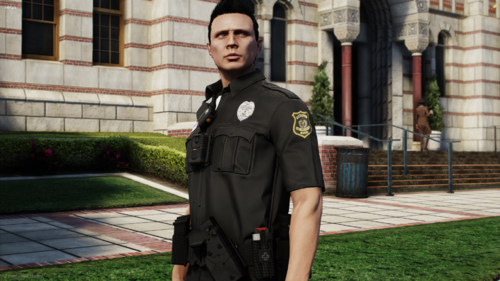 Hello everyone, Avalanche Productions has released a new free product. This is a SK Security FiveM Ready EUP package. This is our second free EUP release of 2024. Below is what the pack consists of: - Class A, B, C - T-Shirt - Polo - Rain Jacket - Fleece Jacket - Bomber Jacket - Forward Facing Baseball Cap - Beanie - Patrol Pants - Cargo Pants - Chest Badge - Vest #1 - Vest #2 - Vest #3
 -
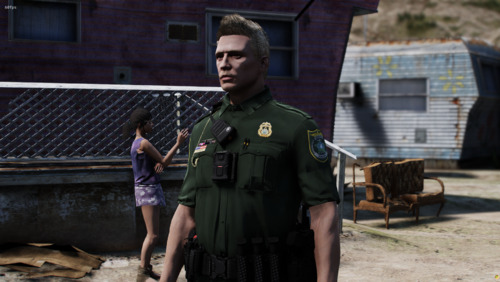 Hello everyone, Avalanche Productions has released a new free product. This is a Blaine County Sheriff's Office FiveM Ready EUP package. This is our first free EUP release of 2024 and of Avalanche Productions history. Below is what the pack consists of: - Class A, B, C Shirts (White Variants For Command) - T-Shirt (Regular, Canine, Speed Enforcement, Traffic Unit, C.I.D, Air Unit, Game Warden, S.R.U) - Polo (Regular, Canine, Speed Enforcement, Traffic Unit, C.I.D, Air Unit, Game Warden, S.R.U) - Rain Jacket - Bomber Jacket - Air Unit Shirt - Patrol Pants - Cargo Pants - Air Unit Pants - Motorcycle Pants - Chest Badge - Neck Badge - Slim Body Vest - Slim Body Vest With Bodycam - Forward Facing Baseball Cap - Backwards Facing Baseball Cap (FEMALE VARIANTS COMING SOON) Avalanche Productions: https://discord.gg/5s7UQuyK6t
 -
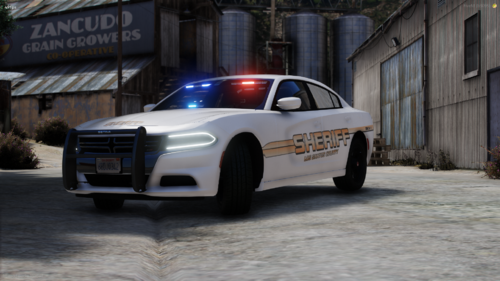 Hello everyone, Avalanche Productions has released a new free product. This is a 2018 & 2014 Dodge Charger Slicktop Pack. This is our first free vehicle release of 2024. The livery included in the vehicle is custom made by Avalanche Productions. Avalanche Productions: https://discord.gg/5s7UQuyK6t
 -
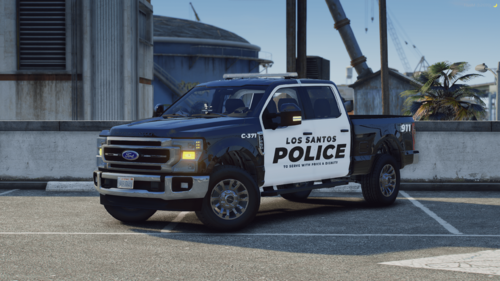 Hello everyone, Avalanche Productions has released a new free product. This is a 2017 Ford F-250 Whelen vehicle. This is our first free vehicle release of 2023 and of Avalanche Productions history. The livery included in the vehicle is custom made by Avalanche Productions. Avalanche Productions: https://discord.gg/MUjhTXfxE4
 -
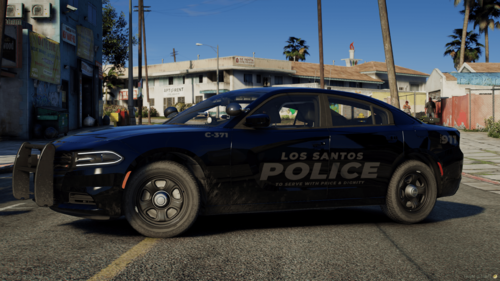 Hello everyone, Avalanche Productions has released a new free product. This is a 4K Palatine Police inspired livery for Fusions' 2018 Code 3 Charger. This is a single vehicle livery package. Avalanche Productions: https://discord.gg/5s7UQuyK6t Important Information Please note all liveries made by Avalanche Productions are produced at 4K quality to ensure the best experience and gameplay. However some vehicle models do lower the quality automatically based on the "Properties" in OpenIV. If you add the livery to your vehicle and in the server it turns out to be blurry please follow the instructions below. 1.) Open OpenIV and make sure "Edit Mode" is on, having a blue box around it. 2.) Open the YTD file in OpenIV. 3.) Once you have the YTD open please find the "sign" section by clicking the search bar. 4.) Once you have found the sign texture with the livery on it right click and select "Properties". 5.) Under the "Properties" tab you will find the "MipMap levels", make sure that value is set to 1, and the "Pixel format" is set to "DXT5" 6.) Click "Ok" in the bottom right, then click save in the bottom right. 7.) Once you complete all steps above you can replace the file in your server and it should be working! Vehicle Download Link:
 -
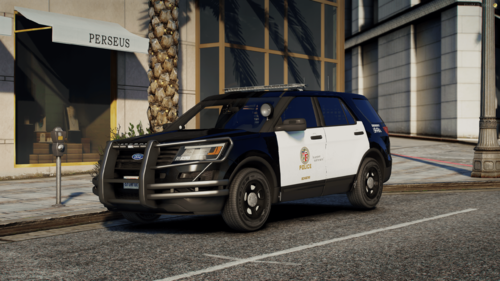 Hello everyone, Avalanche Productions has released a new free product. This is a 4K LAPD inspired livery for Dynamic Modifications 2016 PPV Explorer. This is a single vehicles livery package. Avalanche Productions: https://discord.gg/MUjhTXfxE4 Important Information Please note all liveries made by Avalanche Productions are produced at 4K quality to ensure the best experience and gameplay. However some vehicle models do lower the quality automatically based on the "Properties" in OpenIV. If you add the livery to your vehicle and in the server it turns out to be blurry please follow the instructions below. 1.) Open OpenIV and make sure "Edit Mode" is on, having a blue box around it. 2.) Open the YTD file in OpenIV. 3.) Once you have the YTD open please find the "sign" section by clicking the search bar. 4.) Once you have found the sign texture with the livery on it right click and select "Properties". 5.) Under the "Properties" tab you will find the "MipMap levels", make sure that value is set to 1, and the "Pixel format" is set to "DXT5" 6.) Click "Ok" in the bottom right, then click save in the bottom right. 7.) Once you complete all steps above you can replace the file in your server and it should be working! Vehicle Download Link:
 -
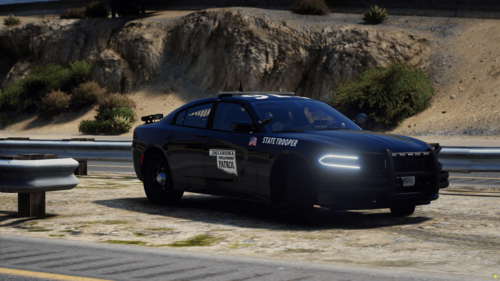 Hello everyone, Avalanche Productions has released a new free product. This is a 4K Oklahoma Highway Patrol inspired livery for Prestoniskey BCSO Mega Pack. This livery package only currently includes patrol liveries, we plan to add more such as K-9, Bomb Squad, ETC. Please join the discord for updates. Avalanche Productions: https://discord.gg/5s7UQuyK6t Important Information Please note all liveries made by Avalanche Productions are produced at 4K quality to ensure the best experience and gameplay. However some vehicle models do lower the quality automatically based on the "Properties" in OpenIV. If you add the livery to your vehicle and in the server it turns out to be blurry please follow the instructions below. 1.) Open OpenIV and make sure "Edit Mode" is on, having a blue box around it. 2.) Open the YTD file in OpenIV. 3.) Once you have the YTD open please find the "sign" section by clicking the search bar. 4.) Once you have found the sign texture with the livery on it right click and select "Properties". 5.) Under the "Properties" tab you will find the "MipMap levels", make sure that value is set to 1, and the "Pixel format" is set to "DXT5" 6.) Click "Ok" in the bottom right, then click save in the bottom right. 7.) Once you complete all steps above you can replace the file in your server and it should be working! Vehicle Download Link:
 -
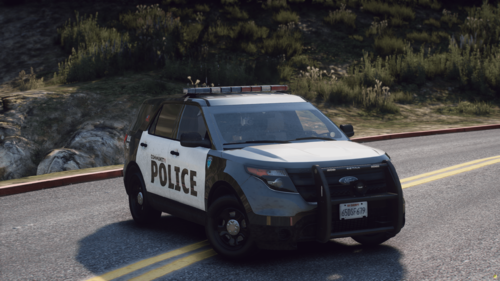 Hello everyone, Avalanche Productions has released a new free product. This is a 4K livery for all server's that use "Community Police" we designed this livery on Husky Modifications free 2013 Explorer. Avalanche Productions: https://discord.gg/MUjhTXfxE4 Important Information Please note all liveries made by Avalanche Productions are produced at 4K quality to ensure the best experience and gameplay. However some vehicle models do lower the quality automatically based on the "Properties" in OpenIV. If you add the livery to your vehicle and in the server it turns out to be blurry please follow the instructions below. 1.) Open OpenIV and make sure "Edit Mode" is on, having a blue box around it. 2.) Open the YTD file in OpenIV. 3.) Once you have the YTD open please find the "sign" section by clicking the search bar. 4.) Once you have found the sign texture with the livery on it right click and select "Properties". 5.) Under the "Properties" tab you will find the "MipMap levels", make sure that value is set to 1, and the "Pixel format" is set to "DXT5" 6.) Click "Ok" in the bottom right, then click save in the bottom right. 7.) Once you complete all steps above you can replace the file in your server and it should be working! Vehicle Download Link: https://huskymods.com/shop/23/2013-ford-explorer-fivem-ready
 -
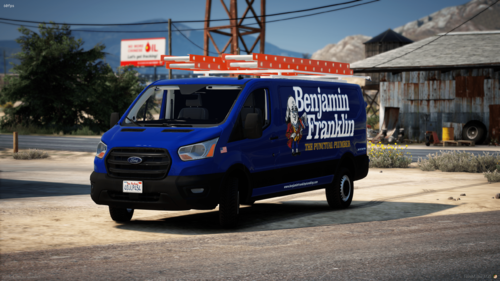 Hello everyone, Avalanche Productions has released a new free product. This is a 4K livery based off of Benjamin Franklin's Plumbing Co. This is a single vehicles livery package. Avalanche Productions: https://discord.gg/MUjhTXfxE4 Important Information Please note all liveries made by Avalanche Productions are produced at 4K quality to ensure the best experience and gameplay. However some vehicle models do lower the quality automatically based on the "Properties" in OpenIV. If you add the livery to your vehicle and in the server it turns out to be blurry please follow the instructions below. 1.) Open OpenIV and make sure "Edit Mode" is on, having a blue box around it. 2.) Open the YTD file in OpenIV. 3.) Once you have the YTD open please find the "sign" section by clicking the search bar. 4.) Once you have found the sign texture with the livery on it right click and select "Properties". 5.) Under the "Properties" tab you will find the "MipMap levels", make sure that value is set to 1, and the "Pixel format" is set to "DXT5" 6.) Click "Ok" in the bottom right, then click save in the bottom right. 7.) Once you complete all steps above you can replace the file in your server and it should be working! Vehicle Download Link: