

TheHunter6499
Members
-
Joined
-
Last visited
Everything posted by TheHunter6499
-
I did this and it still crashed. Here are the logs. RagePluginHook.log RagePluginHookLauncher.log
-
Where do I do that? Is that a file in the manual install? Just tried installing everything like I have before. It was working fine until I installed the vehicles. I placed them in the mods folder. Even when I deleted the mods folder, the game was still crashing. Here is the latest log RagePluginHook_09082025_225704.log RagePluginHook.log
-
I reinstalled it, and it crashed again. The vehicles have been removed completely. RagePluginHook_26072025_034155.log
-
Hello, I just got back into LSPDFR after being away for a while. I downloaded everything a week ago and got the game running. Now that I added vehicles, the game keeps crashing before it can load into the session. I am not getting any error messages or pop-ups. I am not sure what's going on this time... help? RagePluginHook_20072025_015025.log
-
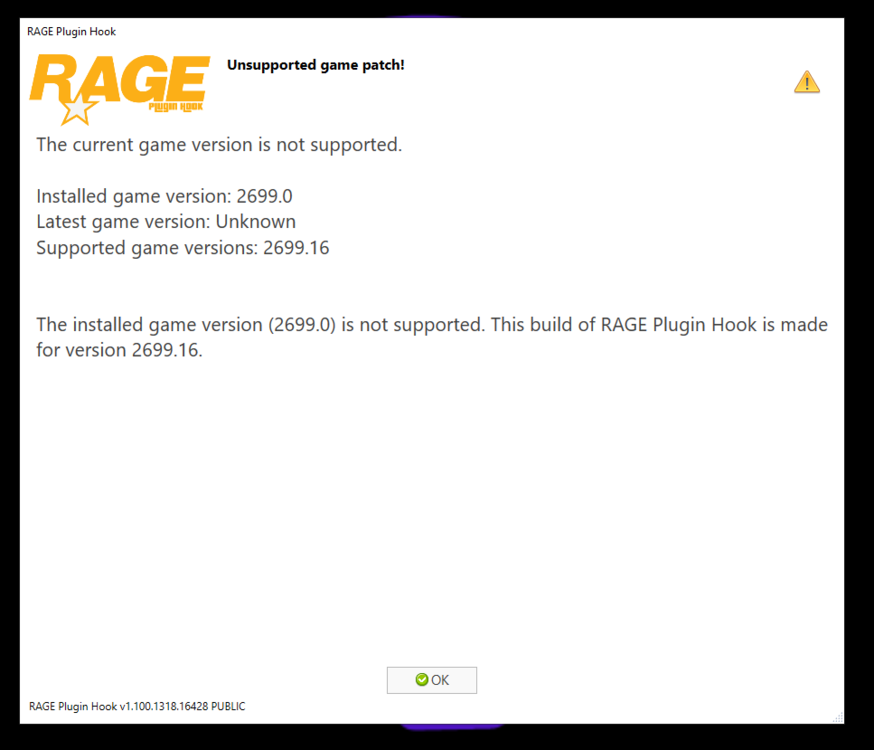
Hello, I've tried re-installing everything several times. I get this warning every time I try to launch RPH. When I try to just load GTA V it just crashes on loading screen. I also tried manual install of LSPDFR and replaced all files. Not helping. There is no update for GTA V in Steam..... Help?
-
I got it now. Thanks for the help!
-
Update: I renamed the mods folder, and it worked with me loading LSPDFR once in-game. How do I go about re-doing the mods folder or finding what is causing the issue?
-
I tried it with that on and off. Same result both times. I tried removing my mods folder and it worked, but trying to mess with it to see what caused the issue. I still have to launch it and then load LSPDFR once in-game
-
Hello, I have been having trouble launching LSPDFR. I saw another topic like mine where GTA V story loads fine, but LSPDFR does not. They said to set the threshold to 60000. I tried that, and it still did not work for me. Every time I launch the game it crashes on the loading screen before it can even load LSPDFR. I uploaded the crash report below... help? crash report.txt