



BoasyToo
Members
-
Joined
-
Last visited
Everything posted by BoasyToo
-
Have you tried to run the game after removing it from plugins folder and only keeping it in the main directory?
-
I would remove it from the plugins folder, only need it in the main directory. Also make sure it's up to date: https://github.com/alexguirre/RAGENativeUI/releases
-
Could you send in a screenshot of your plugins folder? Your log sadly doesn't load enough info for me to see what you have installed.
-
Hi, Do you have a mods folder? If you do, please rename it to _mods and try to launch the game to see if that fixes your problem. If it does, that means you have a mod installed causing the problem.
-
Hey mate, This might fix the problem.

-
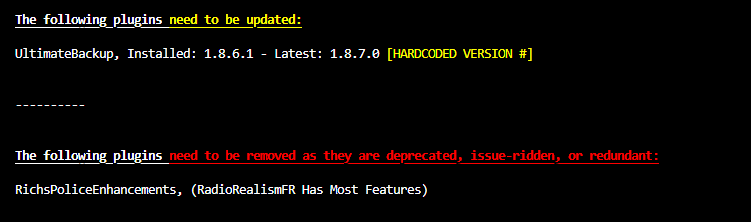
Hi mate, See if this fixes the problem.
-
Please post the actual log file instead of the copy and paste. It's a text file in your directory.
-
No Problem, always good to keep an eye out on readme files to see if there are any requirements.
-
Do you have a mods folder? If you do, rename it to ''_mods'' and try to see if you still have the issue.
-
Thank you, plugins seem to be okay and up to date. Do you have this installed and up to date: https://github.com/alexguirre/RAGENativeUI/releases
-
Hey, Could you pull the log file directly from the directory and attach that, this log doesn't allow me to do checks.
-
This is something that you'll need to put some time into mate. But here's a video to help with installing LSPDFR:
-
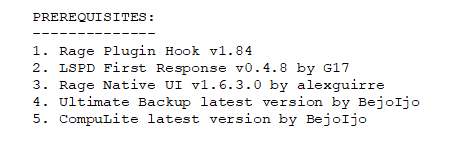
StopThePed has some requirements that you can find in the ReadMe file that comes with the plugin. Based on running your log it doesn't seem like you have the required prerequisites. Rage Plugin Hook comes with LSPDFR. Rage Native UI: https://github.com/alexguirre/RAGENativeUI/releases Ultimate Backup: https://www.bejoijo.com/post/ultimate-backup Compulite: https://www.bejoijo.com/post/compulite
-
That could be the case, but it's the only option that I know of, someone else on the forum might have more ideas.
-
Hey bud, good news is that your plugins seem to be up to date and no issues. Firstly, only thing I can't see in your log is if you have RageNativeUI.dll and up to date, you can download it here: https://github.com/alexguirre/RAGENativeUI/releases To install, you just drag and drop it into your GTA Directory. Do you have a mods folder? If Yes, try to rename it to ''_mods'' so that they do not run and see if that fixes the problem.
-
I don't know/think that you can fully turn off lights and sirens on AI cars. But you can try going to the ELS config file and edit this part: ElsActiveOnAi = true Change this to false. I think this may change it over to the vanilla game files for AI.
-
Do you have a mods folder? Also, can you provide a RagePlugin log?
-
Could you provide a most recent log after a crash happened and your game closed?
-
Hi, Try to do this:

-
I recommend removing these: Also make sure you have this up to date: https://github.com/alexguirre/RAGENativeUI/releases

-
Can you attach the RagePlugin log instead so that we can run it?
-
I mean, if you delete the mods folder it will delete them. I don't have much experience with mods, only car replacements and some clothes mods. Generally they're very trial and error, sometimes I install a car and it causes an issue and I have to fix it. Youtube might be able to help more.
-
Unfortunately there's no way to tell which mod is causing the problem, or not as far as I know anyway sadly. Sorry.
-
Your plugins seem to be okay, up to date and nothing that is currently discontinued. Do you have RageNativeUI.dll up to date? You can find it here: https://github.com/alexguirre/RAGENativeUI/releases You said you disabled your mods and still had the same issue? If not, rename your mods folder to ''_mods'' and try to launch it as well.
-
Did LSPDFR ever work for you? For example, did you try launching it before installing any plugins/mods? Are you able to load regular GTA Story mode?


