
BoasyToo
Members
-
Joined
-
Last visited
Everything posted by BoasyToo
-
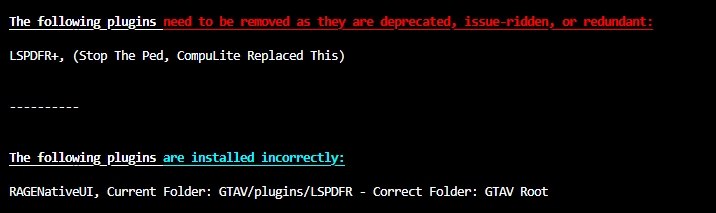
Try to remove this: Also, make sure your RageNativeUI.dll is up to date: https://github.com/alexguirre/RAGENativeUI/releases

-
Please attach your RagePlugin log from your GTA Directory. Thank you
-
It's his own tool: https://github.com/DarkVypr/LSPDFR-Update-CheckerAre you hitting Left Shift to blip them and indicate for them to pull over? Also, you can initiate a pursuit yourself by holding down 'B' I believe.Can you please provide your RagePlugin log? The one in your GTA Directory please.Hi mate, StopthePed requires some stuff installed that based off your log you don't have, it's always important that you have all requirements installed as it can cause crashes or plugins to not work effectively. Here is StopthePeds prerequisites found in its 'ReadMe' file:
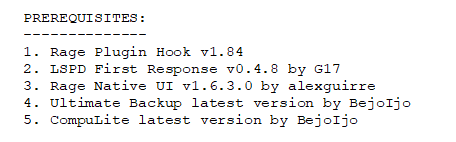 Hey, If you could send in the correct crash log after you encounter the issue you are having (make sure to close your game) as sometimes the log isn't fully complete otherwise. We'll take a look then.Sadly the log didn't show me much. Do you have a mods folder? If Yes, please rename it to: _mods this will disable them and then try to launch the game. -- If it works fine, a mod you have installed is likely causing the issue, at this time there is no way to tell which one exactly. If no (or disabling mods doesn't work), what plugins do you have installed? Ideally please send a screenshot of your plugins that you have installed.Sadly the log didn't show me much. Do you have a mods folder? If Yes, please rename it to: _mods this will disable them and then try to launch the game. -- If it works fine, a mod you have installed is likely causing the issue, at this time there is no way to tell which one exactly. If no (or disabling mods doesn't work), what plugins do you have installed? Ideally please send a screenshot of your plugins that you have installed.Hey mate, Do you have a mods folder? If Yes, please rename it to: _mods this will disable them and then try to launch the game. -- If it works fine, a mod you have installed is likely causing the issue, at this time there is no way to tell which one exactly. If no (or disabling mods doesn't work), what plugins do you have installed? Ideally please send a screenshot of your plugins that you have installed.Do you have a mods folder? If you do, please rename it to _mods and see if that resolves the issue.Do you have a mods folder? If you do, please rename it to _mods and see if that resolves the issue.We need you to send us your RagePlugin log, it's found in your directory. Please send in the actual file.Hi, Quite a few issues:
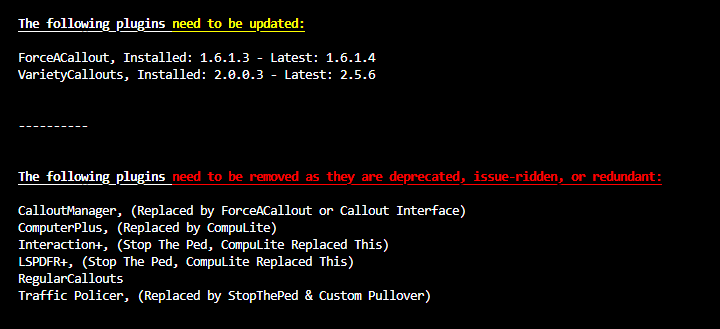 Can you send a screenshot of the LSPDFR plugins you have installed in your game?Change the name of the mods folder to: ''_mods'' this will disable them and try to launch the game, see if the issue is still there.I also recommend fixing these:
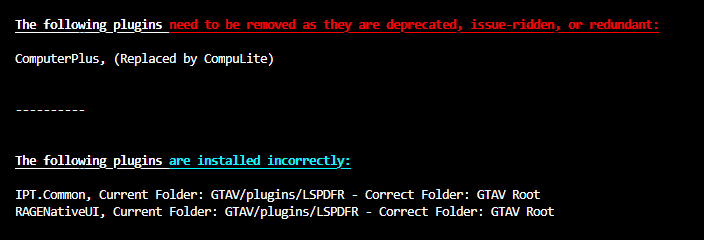 Do you get any error? Does the game just force close? Does it freeze before crashing? What do you have installed from the plugins? Do you have a ''mods'' folder?Please attach the actual log file. It should be a text document that you got that from.Please attach the actual RagePlugin log so that we can run it.Personally I use Grammar Police and do not have radiorealismfr installed.Hey mate, This is likely the problem: Get rid of these and you should be alright.
 That's right.Still seems like you have RAGENativeUI in your plugins/LSPDFR folder. Also, one plugin needs to be removed. As for the Python question, you'll need to do some research yourself, I figured it out after a while but I'm in no position to teach anyone, barely know what I'm doing myself.