SergeantBlake
Insiders
-
Joined
-
Last visited
Files posted by SergeantBlake
-
MADE FOR - POLICINGREDEFINED.
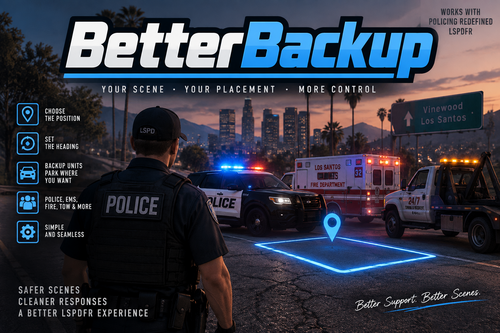
Sick of the destruction derby when calling for an Ambulance, Fire trucks, tow trucks or even just code 1 backup? BetterBackup solves this by allowing players the option to mark where they would like their backup to spawn at.
Features:
Works for all types of back up options, except for (on purpose):
Pursuit backup
Traffic stop backup
Options to specifically have a backup vehicle respond to a marked area (stand in the area and face the direction you want the backup to go to, nose out), OR have the backup vehicle park behind your crusier
Smooth natural drive up handled by PolicingRedefined, getting as close as possible before a quick warp to the location
Option to force the spawn/warp of the backup unit if it looks like they are stuck (unit must already be within a certain distance to you before it will allow you to force warp it)
Customisable ini keys
How it works:
Players provided an option to designate the enroute back up unit a parking spot. A marker will follow the player, and the marker initially generates outwards to where the player is facing (i.e. where the player is facing is where the nose will go)
The waypoint can be moved by walking the player to where you want it to go, and by using NumPad4 and 6 (changeable) to rotate (where the nose points)
Players are also provided an option as above to have the enroute unit park behind your last entered emergency vehicle (note, only one can park behind at a time)
BetterBackup then kills the routing tasks provided by PolicingRedefined when within a certain range and redirects the enroute units to where you want it to go
Within a certain distance, the vehicle will then warp to it's parking spot with the nose pointing where you set it to. The warp is designed to be as close as possible so that it doesn't look choppy.
Units are then handed back over to PolicingRedefined to exit the vehicle and complete tasks, until you dismiss them via PolicingRedefined like normal.
When the unit is responding, you can press "E" (customisable) to cancel BetterBackup and just let the unit respond as per normal through PolicingRedefined.
Works with all requestable units including prisoner transports. Is disabled for pursuit and traffic stop backup.
Note - this does not manage the units once they are dismissed. Expect a destruction derby once dismissed. Next update might manage the departure?
Showcase 1 - ambulance and police respond in a car park
Showcase 2 - coroner and prisoner transports
Showcase 3 - ambulance and police told to park opposite traffic on a tight street
For support, bugs etc - please message me through this website. I tend not to use Discord. Please ensure you link to your RPH log for your session.
GitHub open source (note, the reference DLLs have been removed) - CstBlake/BetterBackup: Source files for BetterBackup
If you have improvements etc, would love to hear.
Install instructions:
Place the INI and the DLL into the GTA V\LSPDFR\Plugins folder.
- 1,574 Downloads
- 28 Comments
Updated -
This siren is primarily used by the Ambulance Service in Queensland, Australia. It contains a yelp and a wail.
Please, dear god, read the readme before installing this modification.
I will not provide support should your game break.
I'm aware that it sounds a little weird in parts, especially the apex of the wail, but there is not much that I can do to mitigate that. That issue was created when I amplified the siren so it could be heard in game.
Siren Showcase (ignore the skin on the vehicle)
Further updates may be made to the siren, but it is unlikely.
- 512 Downloads
- 3 Comments
Submitted