

EmulationGuru
Members
-
Joined
-
Last visited
Everything posted by EmulationGuru
-
indeed
-
I have been away but glad to be back!
-
ill say it slower, its not working at all it closes instantly when i run it. I am not watching another wasted video on lies about fixing it, if I cant get help here I am done with this mod after i try what someone said on yet another misleading video
-
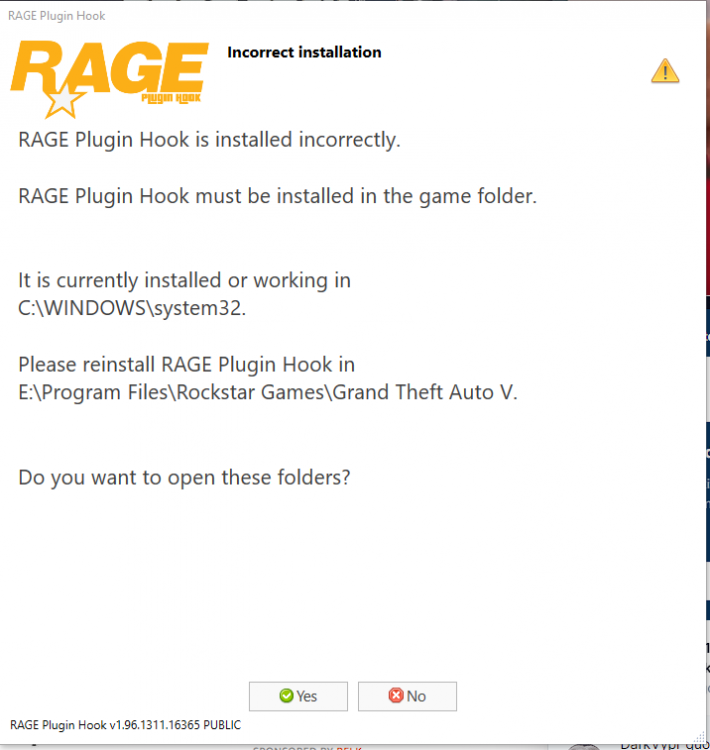
This extremely annoy one useless youtube video after another of simpletons lying about fixes when none of their wasted methods work. I had this thing working just fine weeks ago now it does not load at startup at all. I am also being told it is installed incorrectly? FFS!
-
poor guy don't over think it. Problem solved thanks
-
because that's the version I have man.... nvm I assume this can be run on retail GTA5 without worries of ban
-
I recently discovered this awesome community while modding my gta 5 game. I installed everything correctly but, now have error that it no longer supports version 2545 which I currently have. Is there and old version that does? Also none of the tuts on youtube explain whether to run this on retail GTA5 or modded copy like I installed it to. Is all these files safe to run in retail without ban? I have never ever risked it because I have been modding GTA5 so long with pirate copy to leave my retail account safe.