Skip to content
View in the app

A better way to browse. Learn more.

LCPDFR.com

A full-screen app on your home screen with push notifications, badges and more.

To install this app on iOS and iPadOS
  1. Tap the Share icon in Safari
  2. Scroll the menu and tap Add to Home Screen.
  3. Tap Add in the top-right corner.
To install this app on Android
  1. Tap the 3-dot menu (⋮) in the top-right corner of the browser.
  2. Tap Add to Home screen or Install app.
  3. Confirm by tapping Install.

RichieDupz

Members
  • Joined

  • Last visited

Everything posted by RichieDupz

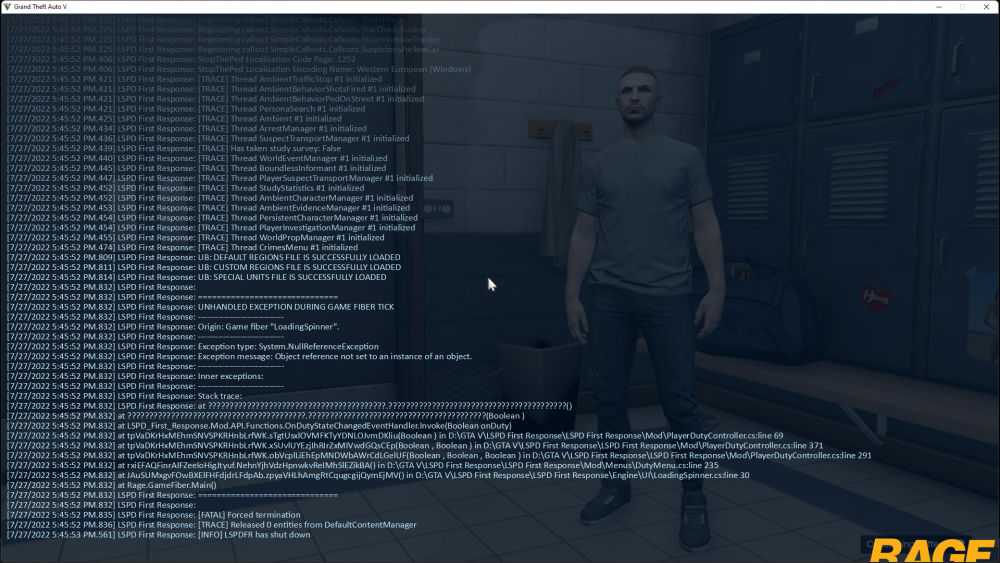
  1. Thank you! I am having a different issue where I'm constantly crashing now when trying to go on duty.. Any clue what this could be caused by?
  2. Hi all, I've updated my LSPDFR and added the new scripthook V. My game isn't launching in clean-mode or in LSPDFR w/RHP. I get the error, "PackfileLimitAdjuster - Unable to find pattern #15" Any help? I have been unable to play LSPDFR since the last update over a month ago and was hoping this new update would fix all. (Steam + R* Games Launcher) A little annoyed. Many thanks in advance for any help given. Take care, Richie

Account

Navigation

Search

Search

Configure browser push notifications

Chrome (Android)
  1. Tap the lock icon next to the address bar.
  2. Tap Permissions → Notifications.
  3. Adjust your preference.
Chrome (Desktop)
  1. Click the padlock icon in the address bar.
  2. Select Site settings.
  3. Find Notifications and adjust your preference.