Skip to content
View in the app

A better way to browse. Learn more.

LCPDFR.com

A full-screen app on your home screen with push notifications, badges and more.

To install this app on iOS and iPadOS
  1. Tap the Share icon in Safari
  2. Scroll the menu and tap Add to Home Screen.
  3. Tap Add in the top-right corner.
To install this app on Android
  1. Tap the 3-dot menu (⋮) in the top-right corner of the browser.
  2. Tap Add to Home screen or Install app.
  3. Confirm by tapping Install.

cainetopping

Members
  • Joined

  • Last visited

Files posted by cainetopping

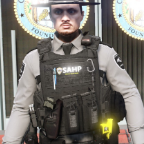
  1. Switched up the textures for vest 7 setups 1 & 2 for Hanako's "EUP VEST&EARPIECE 1.1".
     
     
    • 4,389 Downloads
    • 9 Comments
    Updated
  2. As default the texture of the vest says "POLICE" but I decided that I think it's bland and I wanted to change it so I did and I decided to share it. And hopefully get some feedback. The texture on the pack has a stitched American flag along with a San Andreas city logo/patch.
     
    Sorry that it's pretty bland, it's my first time doing this.
    • 193 Downloads
    Updated

Account

Navigation

Search

Search

Configure browser push notifications

Chrome (Android)
  1. Tap the lock icon next to the address bar.
  2. Tap Permissions → Notifications.
  3. Adjust your preference.
Chrome (Desktop)
  1. Click the padlock icon in the address bar.
  2. Select Site settings.
  3. Find Notifications and adjust your preference.