
Skip to content
View in the app

A better way to browse. Learn more.

LCPDFR.com

A full-screen app on your home screen with push notifications, badges and more.

To install this app on iOS and iPadOS
  1. Tap the Share icon in Safari
  2. Scroll the menu and tap Add to Home Screen.
  3. Tap Add in the top-right corner.
To install this app on Android
  1. Tap the 3-dot menu (⋮) in the top-right corner of the browser.
  2. Tap Add to Home screen or Install app.
  3. Confirm by tapping Install.

Daumen

Members
  • Joined

  • Last visited

Everything posted by Daumen

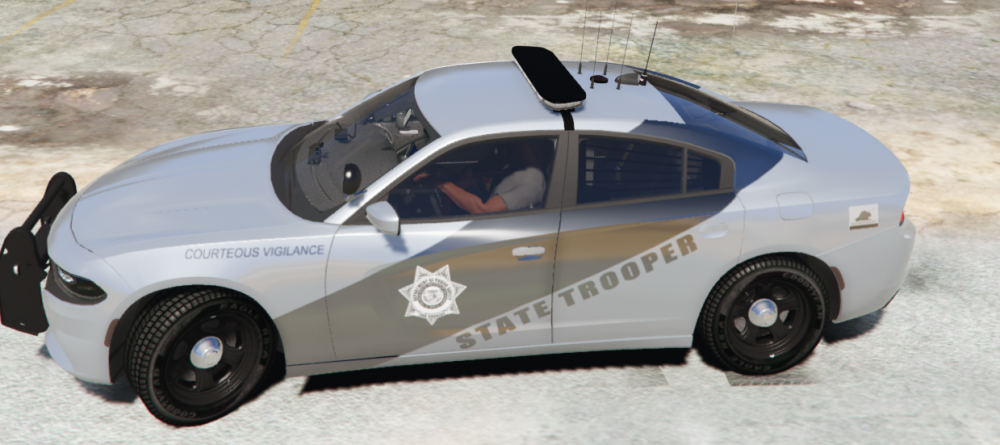
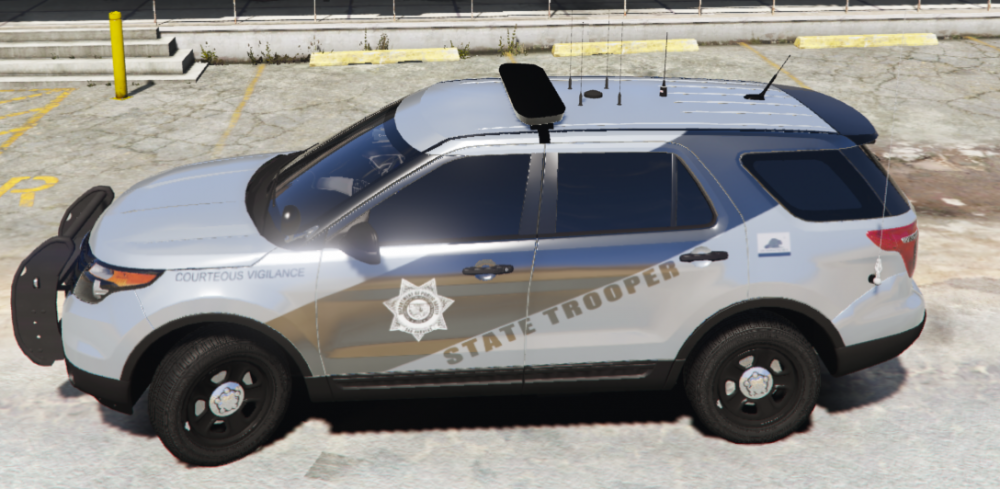
  1. Hello, I'm actually already very experienced when it comes to modding GTA V. However, there is one thing that has been pushing me to my limit for weeks. Every time I spawn Sheriff/Sheriff2 or meet them on the street, they have a disgusting chrome color on them (ONLY SHERIFF/SHERIFF2). I checked and found that they always spawn with the color "117". I checked everything in carvariations.meta/.ymt and added new lines, it doesn't help. Even replacing new models didn't help. I hope one of you can help me I'm at the end of my strength ;D This ist how they look and it shouldn't be that way:
Account

Navigation

Search

Search

Configure browser push notifications

Chrome (Android)
  1. Tap the lock icon next to the address bar.
  2. Tap Permissions → Notifications.
  3. Adjust your preference.
Chrome (Desktop)
  1. Click the padlock icon in the address bar.
  2. Select Site settings.
  3. Find Notifications and adjust your preference.