


.png.dee02057e08503a7facb7c08cbe9db35.png)
TekZy77
Members
-
Joined
-
Last visited
Everything posted by TekZy77
-
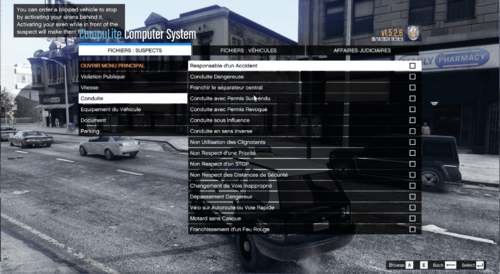 Bonjour, oui je suis Français ! Il y a quelques années, j'ai installer une traduction que je trouvais vide. Parfois après l'arrestation, je ne trouvais pas le motif adéquat. Donc j'ai repris le fichier Original en Anglais que j'ai traduis en entier Pour le moment je n'ai rien ajouté, mais il y aura des MAJ si les gens qui installe la traduction veulent des nouvelles accusation.
- 3 comments
- 1 review
-
La traduction du célèbre plugin Compulite pour LSPDFR en Français Tuto pour l'installation Une fois le fichier installé, faites "extraire tout" Ouvrez le fichier et Aller à la racine de GTAV puis plugins > LSPDFR > CompuLite et remplacer - Charge.xml - Citation.xml - Localization.ini PREREQUIS AVANT INSTALLATION Télécharger et installer Compulite: https://www.bejoijo.com/post/compulite Si vous avez un fichier CourtCase.db vous pouvez le supprimer, (il reviendras au prochain lancement de votre jeu) afin que les anciens jugements soit supprimé Le fichier sera souvent mis à jour, si vous voulez que je rajoute quelque chose dites le en commentaires et je l'ajoute ! ---------------------------------------- The translation of the famous Compulite plugin for LSPDFR into French Installation tutorial Once the file is installed, do "extract all" Open the file and Go to GTAV>plugins>LSPDFR>CompuLite and replace - Charge.xml - Citation.xml - Localization.ini If you have a CourtCase.db file you can delete it (it will come back the next time you launch your game) so that the old judgments are deleted The file will be updated often, if you want me to add something, say it in the comments and I'll add it! REQUIREMENTS : Download Compulite: https://www.bejoijo.com/post/compulite
- 3 comments
- 1 review
.thumb.png.dd325a8df1ea63441fe1002cdd7be16b.png)
