Jeanfranco
Members
-
Joined
-
Last visited
Everything posted by Jeanfranco
-
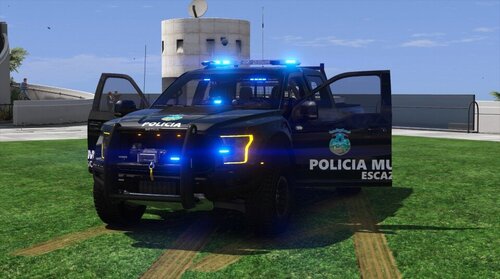 --------------------------------------------Español-------------------------------------------- -----------IMPORTANTE!!!----------- Esto es solo una representacion de de la unidad de la Policia Municipal de Escazu Costa Rica, no es una copia exacta de estas unidades -----------REQUISITOS----------- Necesitaras un programa como "OpenIV" Necesitas la unidad "2018 Ford Raptor Police", de Trooper Corentin, link del mod: https://libertycity.net/files/gta-5/212036-2018-ford-raptor-police.html -----------COMO INSTALAR----------- -Metodo 1 reemplazando el YTD Copia el archivo "18gttruckbb.ytd" de la carpeta "YTD File" y pegalo en la ruta de instalacion del vehiculo ubicada en "Grand Theft Auto V Legacy\mods\update\x64\dlcpacks\18gtruckbb\dlc.rpf\x64\levels\gta5\vehicles\vehicles.rpf\" -Metodo 2 reemplazando unicamente el Template Abre la ruta de instalacion del vehiculo ubicado en "Grand Theft Auto V Legacy\mods\update\x64\dlcpacks\18gtruckbb\dlc.rpf\x64\levels\gta5\vehicles\vehicles.rpf\", Abre el archivo "18gttruckbb.ytd" en modo edicion, busca la textura "18raptor_sign_1.png" y "windows_template.png" y reemplazala por el archivo "18raptor_sign_1.png" y "windows_template.png" ubicado en la carpeta "Template only" -----------Creditos----------- Modelo original: Trooper Corentin Template: JeanFranco --------------------------------------------English-------------------------------------------- -----------IMPORTANT!!!----------- This is only a representation of the Escazu Costa Rica Municipal Police unit; it is not an exact copy of these units. -----------REQUIREMENTS----------- You will need a program like "OpenIV" You need the "2018 Ford Raptor Police" unit by Trooper Corentin. Mod link: https://libertycity.net/files/gta-5/212036-2018-ford-raptor-police.html -----------HOW TO INSTALL----------- -Method 1: Replacing the YTD File Copy the "18gttruckbb.ytd" file from the "YTD File" folder and paste it into the vehicle installation directory located in "Grand Theft Auto V" Legacy\mods\update\x64\dlcpacks\18gtruckbb\dlc.rpf\x64\levels\gta5\vehicles\vehicles.rpf\" -Method 2: Replacing Only the Template Open the vehicle installation path located in "Grand Theft Auto V Legacy\mods\update\x64\dlcpacks\18gtruckbb\dlc.rpf\x64\levels\gta5\vehicles\vehicles.rpf\", Open the "18gttruckbb.ytd" file in edit mode, find the textures "18raptor_sign_1.png" and "windows_template.png" and replace them with the "18raptor_sign_1.png" and "windows_template.png" files located in the "Template" folder. only"
 -
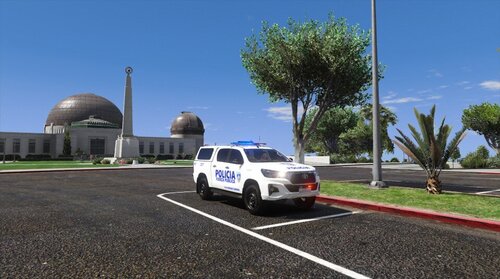 -----------IMPORTANTE!!!----------- Esto es solo una representacion de de la unidad de la Fuerza Publica de Costa Rica, no es una copia exacta de estas unidades -----------REQUISITOS----------- Necesitaras un programa como "OpenIV" Necesitas la unidad "NSWPF Dog Unit Toyota Hilux SR", de East Coast Mods, link del mod: https://www.lcpdfr.com/downloads/gta5mods/vehiclemodels/23823-nswpf-dog-unit-toyota-hilux-sr -----------COMO INSTALAR----------- En el archivo "Readme IMPORTANT" -----------IMPORTANT!!!----------- This is only a representation of a Costa Rican Public Force unit; it is not an exact copy of these units. -----------REQUIREMENTS----------- You will need a program like "OpenIV" You need the "NSWPF Dog Unit Toyota Hilux SR" mod from East Coast Mods. Mod link: https://www.lcpdfr.com/downloads/gta5mods/vehiclemodels/23823-nswpf-dog-unit-toyota-hilux-sr -----------HOW TO INSTALL----------- In the "Readme IMPORTANT" file
 -
I need help: what happens to me is that when I put ForceDuty in the command console, Gta v crashes, if someone knows w hat is happening, please help me RagePluginHook.log