



ethanplayzGTAV
Members
-
Joined
-
Last visited
Everything posted by ethanplayzGTAV
-
 Good Idea thank you for letting me know I will look into it when i get freetime!
 -
Thank you so much I am definitely in the works of adding a LOT of more callouts it will be some time bare with me
-
*******************UPDATE FOR 8/14/2023*********************** I am currently in the works of adding at least 20+ callouts to the pack, some open sourcing will be released soon for devs!!
-
Alright I took a peak at this I don’t see anything regarding the callout I’ll look on my end and see what it could be but I see you have traffic policer and CalloutManager, which are HIGHLY outdated and could cause crashes in LSPDFR. Callout manager got replaced by CalloutInterface because if you press the f8 key you can pick what callout you want.
-
go into your GTAV main directory and look for the ragepluginhook application, then under it is the log. here's a reference image below
-
send me your ragepluginhooklog I’ll look thru the logs and see what’s causing it. Do you have open all interiors as stated in the description tag me when you send your ragepluginhook.log
-
no problem man!
-
yea ofc thanks man! im currently in the works of a bomb threat call+ way more stay tuned!
-
the update is released it is good to go yes you may use karencallouts!
-
Yea they all should be good just make sure you don’t download ones that haven’t been updated in awhile. I have at least 100+ callouts in my game without issues
-
When I pushed the 1.0.2 update I forgot to edit the assembly information file before the upload which is the cause of your issue with it showing 1.0.0, rest assured I’ll have it fixed within a couple of days if not the earliest tomorrow.
-
Thank you for bringing this to my attention I will have a look as soon as I can! I most likely uploaded the 1.0.0 by mistake when I pushed the update for 1.0.1. Regarding your crashes what else have you installed aside from Karen callouts before the crashes began occurring @louizythank you for bringing this issue to my attention I’ll update my assembly info as soon as I can and push this update out as soon as I can regarding your crash join this discord and there’s a log reader that should help you but I’ll ask a few basic question to better help understand your cause of crash: 1. What all have you installed before the crash occured 2. does the crash occur at startup before lspdfr fully loads in or does it occur midway thru game(ex during a callout)? 3. Have you verified your RageNativeUI is uptodate? 4. Do you have a scripts or mods folder? Have you tried renaming the folders to _scripts and _mods? I hope these questions help. If not join this discord I’ll link below and someone will assist you https://discord.gg/lspdfrts Have a great rest of your day! -Comical Gamer author of KarenCallouts
-
Alright……. What else could be causing this problem?
-
Sadly not yet I’ve tried reinstalling my audio drivers too full on uninstalling them and reinstalling them to no avail. Have you tried reinstalling C++ redists yet?
-
yes hes tole me similar its def my side? if reinstalling c++ redists dont help check if you have audio engines like for example steelseries GG as they have streaming audio outputs and inputs
-
i guess just uninstall and reinstall them all thru control panel im doing that rn
-
i might try and reinstall all my C++ redist rq and i found formatting my pc helped it apparently it happened again now and im not resetting again lmao reply if you find a solution
-
thank you so much for the feedback i reall appreciate it i will most def look into the school shooter callout
-
gotta download it to find out tehe........ im jus kidding its a buglury karen called in a house robbery lol
-
thank you !
-
thanks ill need it lol
-
************Current Callouts************ - House Robbery - Armed Robbery ************Planned Callouts************ -Campus Shooter -false 911 call -Bomb Threat -Supervisor Request ************In Development************ -Active Shooter -Bomb Threat ************REQUIREMENTS************ RageNativeUI 1.9.2 - https://github.com/alexguirre/RAGENativeUI/releases OpenAll Interiors v5.1 - https://www.gta5-mods.com/scripts/open-all-interiors ************KNOWN ISSUES************ None at this time ************Update notes as of 7/13/2023************ Version 1.1.0 -Cleaned up small bits of code -Added Callout: "Armed Robbery" version 1.0.3 -fixed some code in the assembly info to match the version on LSPDFR.com and in game version 1.0.2 -possibly fixed version info (see known issues above) version 1.0.1 - fixed some text issues with in game dialogue ************************************************************************************* Join my discord for FAQ about the callout and for support and more!! https://discord.gg/5Zg6QtWB Callouts Apartment Burglary Armed Robbery
-
 Hello opus, me and a few buddies of mine have had an issue with the previous version with sound effects not being played when u receive a call out via the MDT.
- 451 comments
- 50 reviews
-
so im having an issue, i have grammar police, callout interface and ELS and they work fine but the beeps when i click between light stages and the tone that plays when i click the button to talk to dispatch doesn't work. Also when i receive calls via callout interface the beeps don't play for that either. Ideas why?
-
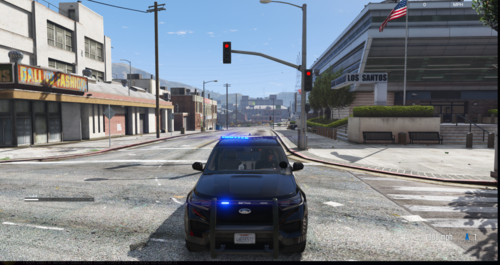 Hello! Please don't hate this is my first livery. It is still a WIP and is not finished so more changes will be made in the future. This livery is based off my hometown, Chesapeake VA.



