


akinmyband
Members
-
Joined
-
Last visited
Everything posted by akinmyband
-
Hi everyone, I hope you're having a good day. So I had added three new plugins to my LSPDFR yesterday called BodyCam, Door Control & Immersive Effects. After installing said plugins, I ended up dying after responding to a biker assault on officers and when I came out of the hospital, the "Wasted" screen was stuck and wouldn't go away... Could it be from Immersive Effects? And if so, how do I fix it? There is no error line in the RPH log after exiting the game.
-
GTA and LSPDFR worked fine when it was LSPDFR alone. It was when the same callouts and plugins that I have, was added to my friends game (They're all up to date and working 100% no reason for them to be faulty) is when singleplayer GTA and RPH basically gave up. Everything was fine before the plugins and callouts were added. Again, he is using the exact same plugins and callouts as I'm using and his GTA directory is set up just like mine is, and it stopped working altogether after the additions were added. Even when he removes the plugins and callouts and uninstalls LSPDFR and RPH, GTA still doesn't want to load.
-
No GTA just doesn't work anymore. Even after reinstalling it, removing LSPDFR, verifying the files etc. GTA just won't load anymore it gets stuck on Loading Story Mode for singleplayer and gets stuck at Loading Population And Game World for RPH. We've looked everywhere on the internet and nothing is a solution.
-
Anyone able to help?
-
Hmm... It might have something to do with a mod (Sounds, weapons, vehicle(s), ENB etc) that you may have installed... Have you checked OpenIV to see if your update.rpf needed updating? If it doesn't, try removing all of your mods and boot up LSPDFR. If it doesn't load still then there's gotta be a corrupted file some where... Where that might be, I've no idea. But it's worth a shot to uninstall any mods you might have, if all else fails Then remove your mods folder and see if that makes a difference. If it doesn't, use OpenIV and go to Tools and click on ASI Manager then uninstal the 3 files there (keep your mods folder deleted.) and allow it to create a fresh mods folder for you. LSPDFR itself isn't the issue, it loads it just gets stuck by a possible corrupted file.
-
Cool. Let me know if it worked. 🙂
-
One of my friends sent me this RPH log, with a screenshot of where RPH LSPDFR is stuck at. It's stuck at "Completing interoperability" and we've both looked everywhere on the internet for a possible solution and absolutely nothing works. He has done (and has) the following: Renamed mods to _mods Deleted mods folder, recreated via OpenIV Has no message to update the file update.rpf in OpenIV after accessing edit mode Removed all plugins and replaced them with fresh files Turned his antivirus off and launched RPH to no prevail Uninstalled and reinstalled LSPDFR + RPH as well as deleting leftovers of LSPDFR for a fresh reinstall Has zero mods on his GTA5 (No vehicles, weapons, sounds, ENB, ELS nothing) Deleted mods folder and ran RPH to no prevail RAGENativeUI is up to date RPH is at its latest version Using LSPDFR 0.4.9 latest update Verifying GTA5 via Steam Reinstalled GTA5 Used OpenIV to uninstall ASI Loader, openCamera & the other file (Can't remember the name) and reinstalled them. Still no prompt to update the update.rpf file. I've sent him my mods folder (Has zero actual mods. But LSPDFR works for me) which has the exact same plugins and other files as I have. Launched RPH as an administrator We have No Idea what is wrong with his game. We've done everything and looked everywhere, this is our last resort. RagePluginHook (1).log
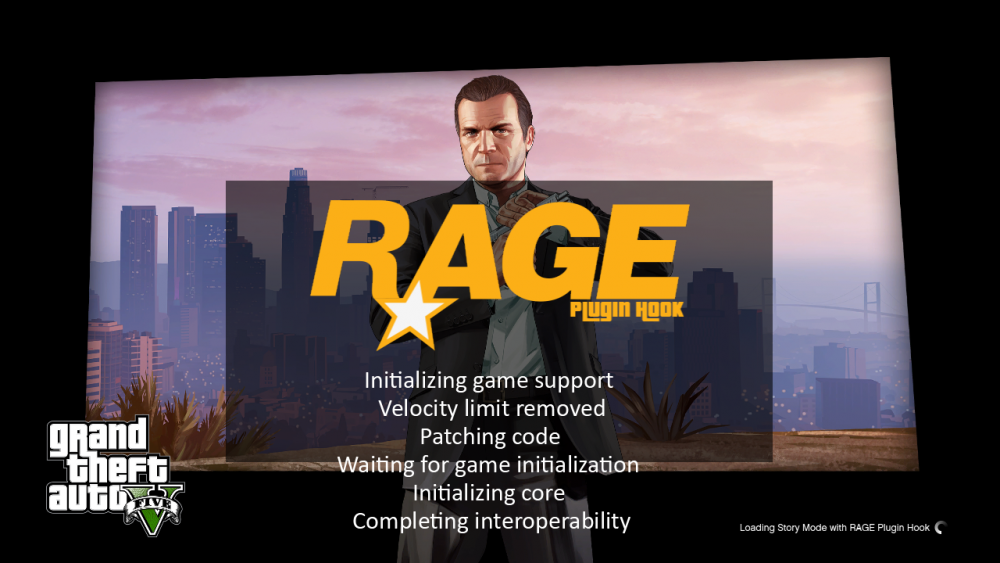
-
Have you tried any of the following? Backing up your mods folder to your desktop, then deleting mods folder from your GTA5 Directory. Renaming mods to _mods Checking OpenIV for an outdated update.rpf Running RPH as administrator Removing plugins and re-adding them one by one to see if there's a plugin issue Disabling your firewall + antivirus/Windows Defender then running RPH Removing any installed mods located in your mods or _mods folder EDIT: Also when uninstalling LSPDFR make sure you also backup and delete the lspdfr folder in your GTA5 Directory for a completely fresh LSPDFR.
-
I found out the problem, I had to completely uninstall LSPDFR (deleting the left behind folders as well after uninstallation) and had to reinstall it. There were files that were previously corrupted... I'm kinda dumb for that. It's fixed now though. 🙂
-
So basically I run RPH, I have no other plugins for LSPDFR it's just LSPDFR on its own. I've reinstalled the mod multiple times, reinstalled GTA 5, but it STILL crashes at the loading plugin. My game won't even load me into Franklin, Michael or Trevor it just stops and closes after the beep. RagePluginHook.log

