Skip to content
View in the app

A better way to browse. Learn more.

LCPDFR.com

A full-screen app on your home screen with push notifications, badges and more.

To install this app on iOS and iPadOS
  1. Tap the Share icon in Safari
  2. Scroll the menu and tap Add to Home Screen.
  3. Tap Add in the top-right corner.
To install this app on Android
  1. Tap the 3-dot menu (⋮) in the top-right corner of the browser.
  2. Tap Add to Home screen or Install app.
  3. Confirm by tapping Install.

HobeSpielt

Members
  • Joined

  • Last visited

Everything posted by HobeSpielt

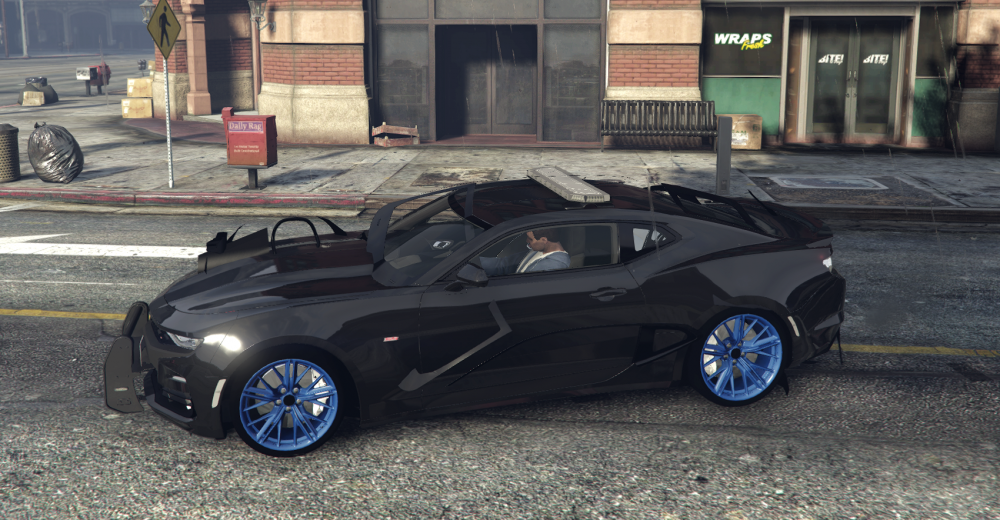
  1. Hi guys, I just started creating my first custom police car from unlocked sources. After fitting a lightbar and a rambar i started noticeing that one part of the car (mesh of chasis dummy) tend over left and right (picture). This happens only when i start driving the car. I cant remember seeing this issue before adding the rambar an its sirens. After repairing the car the part is in place again. Somebody know this issue? If you need more information or the z3d File just let me know. Thanks

Account

Navigation

Search

Search

Configure browser push notifications

Chrome (Android)
  1. Tap the lock icon next to the address bar.
  2. Tap Permissions → Notifications.
  3. Adjust your preference.
Chrome (Desktop)
  1. Click the padlock icon in the address bar.
  2. Select Site settings.
  3. Find Notifications and adjust your preference.