


DrHershi
Members
-
Joined
-
Last visited
Everything posted by DrHershi
-
i think i might have solved it and i think it was the plugin 'keep calm' because when i removed that plugin m6y fps got alot better
-
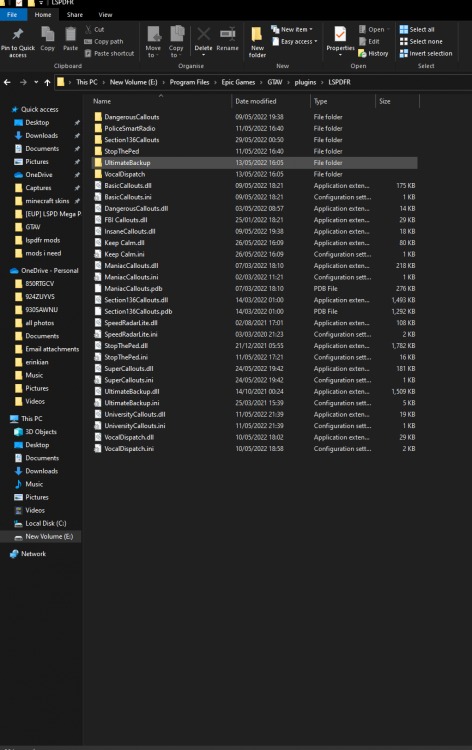
so when i log into gta v i get 144fps basically all the time but as soon as i go on duty and my plugins load and stuff my fps goes to about 50 in the city and 70 in sandy shores. i have alot of mods installed so is there any in particular that decrease fps. ill post a pic of my plugins. also my pc specs are: rtx 2060, intel core i5 9600k, 16 gigs of ram and a gigabyte z390 ud motherboard. any help would be appreciated thx.
-
im just using the rage plugin hook application located in my gta folder where lcpdfr is so i assume thats the most recent version if its not please let me know.
-
now its saying even on the loading screen that lcpdfr.dll has crashed. and when i did what u said it also said that lcpdfr.dll has crashed. do u know what i should do?
-
what do u mean by fully loads? when the game has loaded in story mode? thanks.
-
basically lcpdfr wasnt launching so i deleted and then reinstalled gta v and reinstalled lspdfr but now when i open gta v and rage plugin hook it all works until the splash screen should come up but it just doesn't come up. it says in the corner loading gta v with rage plugin hook but nothing happens. any idea how to fix this?
