Skip to content
View in the app

A better way to browse. Learn more.

LCPDFR.com

A full-screen app on your home screen with push notifications, badges and more.

To install this app on iOS and iPadOS
  1. Tap the Share icon in Safari
  2. Scroll the menu and tap Add to Home Screen.
  3. Tap Add in the top-right corner.
To install this app on Android
  1. Tap the 3-dot menu (⋮) in the top-right corner of the browser.
  2. Tap Add to Home screen or Install app.
  3. Confirm by tapping Install.

Five Mods

Members
  • Joined

  • Last visited

Everything posted by Five Mods

  1. This is something we have considered however it would be a paid listing rather then a free release.
    • 967 downloads
    • Version 1.0.0
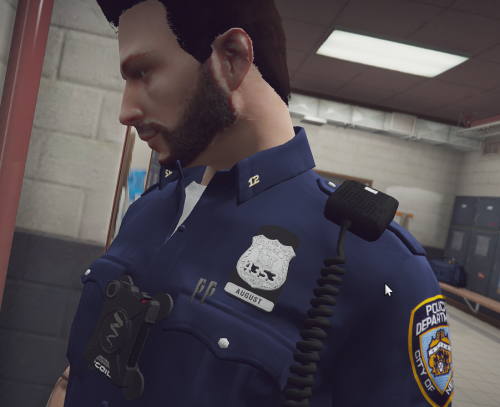
    !! EUP IS REQUIRED !! This is our first release as a development company and so would like to take the opportunity to deliver a unique product showcasing our developers abilities. This badge is a part of a paid listing our developers are working on that will include all the NYPD badges for each rank. Join our Discord today for the opportunity to get one of these models customized to your liking for a cheap and fair price!
Account

Navigation

Search

Search

Configure browser push notifications

Chrome (Android)
  1. Tap the lock icon next to the address bar.
  2. Tap Permissions → Notifications.
  3. Adjust your preference.
Chrome (Desktop)
  1. Click the padlock icon in the address bar.
  2. Select Site settings.
  3. Find Notifications and adjust your preference.

