Skip to content
View in the app

A better way to browse. Learn more.

LCPDFR.com

A full-screen app on your home screen with push notifications, badges and more.

To install this app on iOS and iPadOS
  1. Tap the Share icon in Safari
  2. Scroll the menu and tap Add to Home Screen.
  3. Tap Add in the top-right corner.
To install this app on Android
  1. Tap the 3-dot menu (⋮) in the top-right corner of the browser.
  2. Tap Add to Home screen or Install app.
  3. Confirm by tapping Install.

TanK071011

Members
  • Joined

  • Last visited

Everything posted by TanK071011

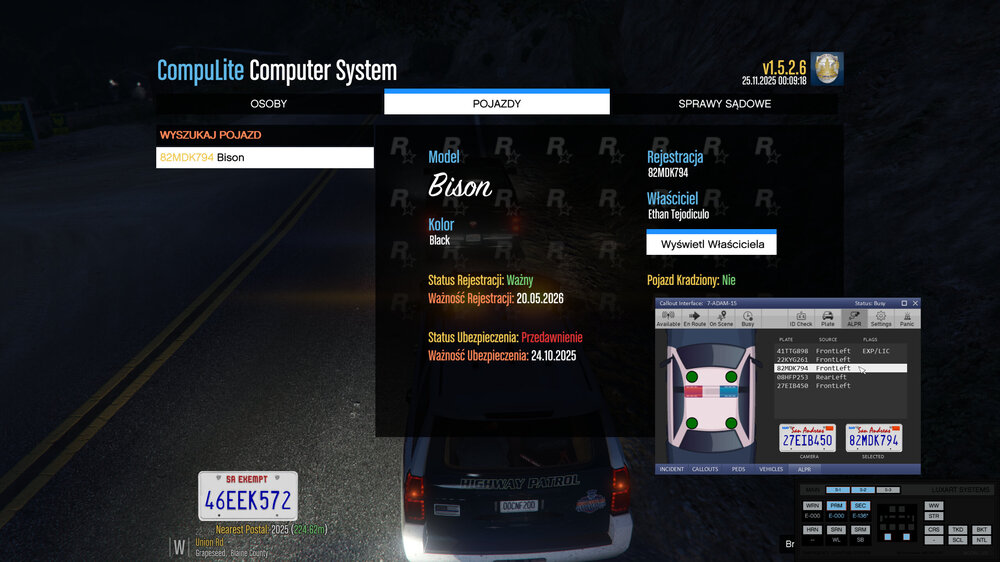
  1. Hi, I have the Stop The Ped, CompuLite, and Callout interface mods. The problem is that when I enable ALPR in the Callout interface, it reads the license plate and everything works fine. However, when I initiate a traffic stop, enter CompuLite, it suddenly shows that the vehicle is uninsured, the driver has warrants, etc., while ALPR and Callout interface don't show anything. Is there any way to synchronize these three mods so they work together and display the same information, instead of one mod saying the car is 100% legal and the other saying something completely different?
  2. TanK071011 posted a topic in Legacy
    Hi everyone, I installed ELS as it is in the guides and in readme, there is no ELS in the plugins, also lctrl + P does not work in the game, if someone could help, I would be grateful, thank you

Account

Navigation

Search

Search

Configure browser push notifications

Chrome (Android)
  1. Tap the lock icon next to the address bar.
  2. Tap Permissions → Notifications.
  3. Adjust your preference.
Chrome (Desktop)
  1. Click the padlock icon in the address bar.
  2. Select Site settings.
  3. Find Notifications and adjust your preference.