Bamxaniel2
Members
-
Joined
-
Last visited
Everything posted by Bamxaniel2
-
-
Pretty sure it's 5 sirens you can have in total, but I have no idea. I have seen fivem videos and been in servers where there are way more sirens in game for specific vehicles, even like 1 vehicle out of an entire pack has a different siren than all the others, (i'm guessing to emulate realism based off of whatever department). How can I get more than just the regular amount of sirens in my game, is there a way? Or is there not? I have heard of luxart vehicle control being able to do these kinds of things but its only for fivem (which stinks). Any help?
-
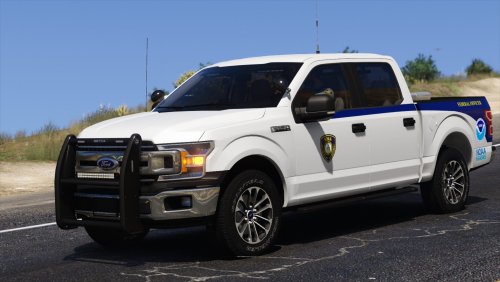 Could you make this same livery, but for the lore friendly caracara? https://www.gta5-mods.com/vehicles/unmarked-caracara-sas994
 -
 Hey, so I have specific sirens for certain vehicles, for example, the older, retro sounding sirens for the old LSPD Stanier and Alamo, while there are more modern sirens for the LSPD vehicles with newer, LED style light bars. The AI who utilize the older LSPD vehicles use the siren that I put on my lore Ambulance, and all of the add on lore friendly vehicles I use have the police yelp, instead of the yelp I want the vehicles to use. I was wondering if this is has to do with with the Audio/Config/REL file, or if this is something that I need to change in DLS itself. I really would like to hear the AI in my game use the Ambulance yelp I intended it to have, as well as have my older LSPD vehicles use the siren I created for them. Thank you!
- 281 comments
- 22 reviews
-
-

- 1
-
-
Hey, so I am having a bit of an issue. The AI that respond in the game use the police yelp. It is so annoying, and as someone who wants to have their vehicles immersive, and represent real life emergency vehicles, it kindof is a bummer. I use the lore friendly packs made by 11john11 and others. I also use DLS. I want to know how I can change the sirens of the ambulance, certain police cars, (such as SAHP) the fire truck, etc. Even if it is simple enough to change around some stuff in vehicles.meta. Thank you!
-
-
Hey man! Late to the party here. Just wanted to say that the green tint on that weapon is actually supposed to be there, because it’s a taser. Also, I had the same exact problem as you. I had dudes spawning, using ultimate backup, with all these weird clothing configurations! Weird, right? Well, unless you have a lot of time, and you really know what you are doing down to a T, you can’t really edit them yourself! Now, there are different files that have been released throughout LSPDFR and GTAPoliceMods that let you actually have the peds spawn with all the correct uniforms! You need to make sure to always download the most up to date files. A lot of these files that are still on here have not been updated for the longest time. Hell, I saw one just the other day that was optimized for EUP Beta! That hasn’t been out for a while! I will link some of the files tomorrow, so you can use with your game, if that is still an issue for you!!
-
-
Hey guys, once again I am experiencing issues regarding GTA 5, and basically the add-on maps that I installed do not have collisions loading. Yes, I know that Rockstar basically patched them, and now there is no way to actually play on said maps. However, I really want to be able to play LSPDFR on these maps, because I am getting bored of just playing around in LS County and Blaine County. That being said, does anyone actually know a way to maybe bypass or fix this issue? Does someone have a spare copy of GTA 5 Version 2545? I would love some solid answers. Also, I have the San Fierro and Las Venturas add ons installed. Thanks in Advance! Also, yes, I have a gameconfig, heapadjuster, and blah blah blah already installed.
-
I named my mods folder to _mods and it worked fine, other than that, the new update seems to be making my game remain stuck on a forever loading plugins screen. I think its my custom gameconfig, because I have the one from 2699 and it still hasn't updated to 2802 or whatever. I want to keep all my mods and stuff, though, because I hate re downloading LSPDFR and trying to make it work all over again. I've done that a million times.
-
That doesn't do anything, besides it makes all my shit disappear
-
I’ve installed these packs before and driven the vehicles in these packs though, which lead me to believe it’s a storage compatibility issue
-
I already have all of these installed
-
Hey good morning y’all. I just downloaded the Ultimate Backup 9.5 configs for LSPDFR, that include the lore friendly vehicles. My gaming laptop is stock, and it only has about 400 GB worth of storage. When I try to install all of them that are required , not just the basic ones, my game gets an ERR_FIL_PACK_1. I know that if I delete certain packs my game will not crash. However, I want all of them. Does anyone know what I need to do? Should I get a better computer so it can run more add on mods? Should I get more storage space? Or is there no cure, and it’s just GTA 5? Thank you in advance! Oh, also I have Forests of San Andreas, City Lights, GTA 5 Remastered, and LA ROADS installed, and I want those to stay in the game.
-
 How do you work this? Do you just double click the file you drag on your desktop and wait till it’s done with it’s 60 seconds, then click on RPH after and run LSPDFR?
- 13 comments
- 2 reviews
-