


suttertome
Members
-
Joined
-
Last visited
Everything posted by suttertome
-
 Great mod, been playing with it for a bit before the upd, but the newest version has an issue: In the old version, the mod's files were named "EmergencyLightingResponseStatus" and in the new version while this was fixed and everything has the correct name now as on LSPDFR, "RealisticLightbarResponseStatus", the actual mod still relies on the old folder for it's config, as when you load in the plugin, it creates a folder (if you didn't have it beforehand) under that old name, thus ignoring the new folder, and using everything in the old one. ^^^ This is confirmed by putting in the beep.wav in the old folder, which makes the plugin work as intended for first time install users, and editing the .ini file in the same old folder, which the mod also reacts to.
- 56 comments
- 2 reviews
-
-

- 1
-
-
Gotcha! Thank you a lot for trying to help me, regardless <3
-
Unless I am running GTA5+RGL+RPH as mentioned as admin, the RageNativeUI related mod crashes would still occur, so I think the only solution here seems to be just doing so. Which is weird, because it truly shouldn't make a difference I'm attaching a log where I don't run the above mentioned as admin and RageNativeUI based mods crash upon trying to use their settings menus. (AGS crashing is normal, I am currently in process of modding the game again) The issue starts at line 939 in the log, "[5/9/2026 8:35:15 PM.842] ROLEPLAY+:", and line 965 "[5/9/2026 8:35:24 PM.666] BackWeapon:" where I try to load those mods and they crash due to "Exception type: System.ComponentModel.Win32Exception", and that happens /w every mod that uses RageNativeUI. RagePluginHook.log
-
I've tried settin perms for game folder, then RageNativeUI.dll and .xml to "Full control" but with "failed to enumerate objects in container, access is denied" errors for game folder, it seemed to ignore the perms setting for some files which include .dlls, as to why this solution might have not worked. Then I've also tried to "convert inherited permissions into explicit permissions on this object" in the advanced security menu on the main game folder, and MS support steps with changing the owner to everyone and adding everyone as a subject with full control in the same advanced security menu, yet none of those seem to solve it, even though they should as everyone has access now, including perms set to .DLLs which didn't work earlier. I wonder if this is windows being its beautiful self again or a mistake on my end? If you have any more ideas, I'd love to hear them as I'm interested in trying to solve this more correctly, but thank you for the initial help. :) I am also not sure if I should then create a topic myself for this, as this one has technically been answered
explorer.png.f25e501a7d8c33e0a0c7ad2b49ade825.png)
explorer.png.0051d0a62bfa788fb0abbbd03b02f129.png)
explorer.png.bd86466d9357b2cd4ea1c81fa1575992.png)
-
Excuse me for bumping this old topic, but I've had the same issues with any RageNativeUI mods as you and OP describe, and turns out all I've had to do was set GTA5.exe to be ran as administrator, and as I have an EGS version of the game I've also had to run RGL as admin for the game to launch and launch it from RGL first. As a double-safe I've also ran RPH as admin afterwards and with all 3 ran as admin, the crashing stopped and the RageNativeUI based mod menus started working as intended. Posting this for anyone who came here to search for a proper solution, as I've did!
-
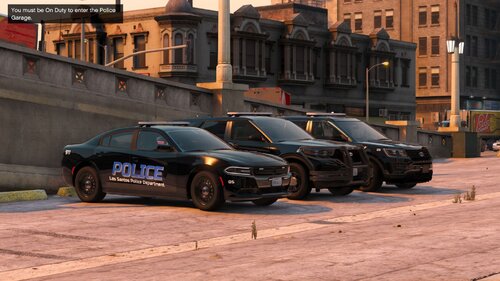 Absolutely gorgeous models, as always! Love 'em ^^
 -
.thumb.jpg.427c14b290482c019f67ced0ff28bb07.jpg) Absolutely LOVE this model, but especially it's ELS with those parking light stages, never seen that realistic feature implemented on a model, so I am a big fan of that ^^
Absolutely LOVE this model, but especially it's ELS with those parking light stages, never seen that realistic feature implemented on a model, so I am a big fan of that ^^


explorer.png.f25e501a7d8c33e0a0c7ad2b49ade825.png)
explorer.png.0051d0a62bfa788fb0abbbd03b02f129.png)
explorer.png.bd86466d9357b2cd4ea1c81fa1575992.png)
.thumb.jpg.427c14b290482c019f67ced0ff28bb07.jpg)