


Snakey1212121
Members
-
Joined
-
Last visited
Everything posted by Snakey1212121
-
Didn't work, I could reinstall the mod itself. My process was Download mod, and it put the mod straight into Gta 5 and I really don't know what I have to do for it to work
-
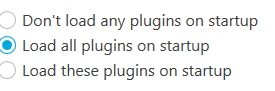
For some reason it just goes to don't load any plugins on startup once I save and launch, Should I put lspdfr in a plugins folder for Gta 5 because it is in one right now and then I load up the game and it doesnt't load lspdfr
-
So I just started lspdfr today and I need some tech support, I don't know where to put this so. I have watched alot of videos on the install, I installed Rage and lspdfr but when I load it and its giving me the "Loading and populating game" or "velocity limit removed" It doesn't give me "Loading lspdfr" and when I load in, its just normal story mode (I just came out of "Welcome to los santos") So please help.

