
Spleeens
Members
-
Joined
-
Last visited
Everything posted by Spleeens
-
think i misread it the first time lol. the issues are because realistic driving only works on vanilla vehicles and hasnt been updated in quite some time. seems like others have been having an issue with it and custom vehicles will have bad handling. personally, ive used smooth driving and just adjusted the file until i felt the driving was where i wanted it to be
-
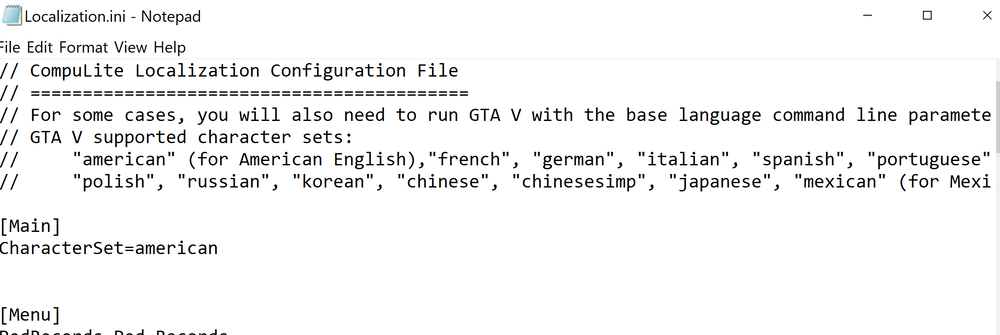
did you change the language in the Compulite Localization.ini? If you havent, delete "american" and replace with "russian" (without quotations). this will allow Compulite to use russian characters
-
If GTA V launches with the Rockstar Launcher you will be unable to revert to any backup since the launcher verifies the game version and will throw a 7002 error if the game is outdated. It sucks but theres not much you can do. I know there are some ASI files out there that skip the launcher but ive seen others have issues with those causing their game to crash on launch
-
typically takes around a week. I'd recommend just checking once or twice a day for the RPH update to release.
-
 delete the replacement textures from the patchday you put them in, or replace them with a different car pack
- 261 comments
- 37 reviews
-
your ragenativeui might be out of date. most recent one is here https://github.com/alexguirre/RAGENativeUI/releases if it still doesnt fix it, delete and reinstall lspdfr
-
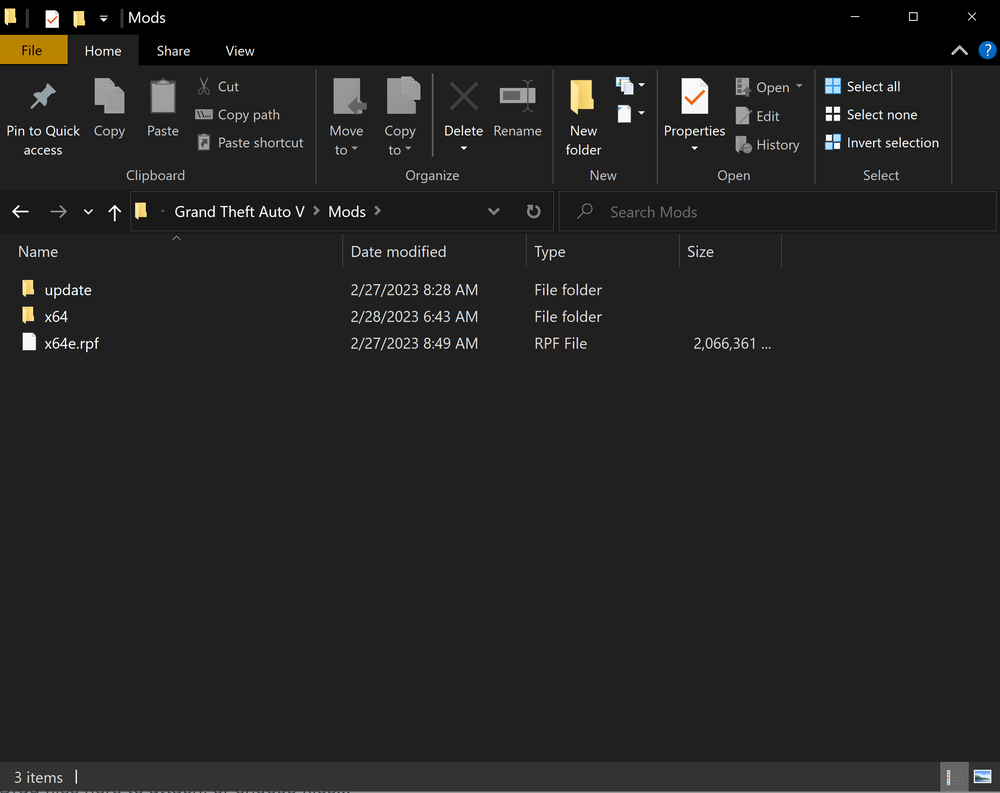
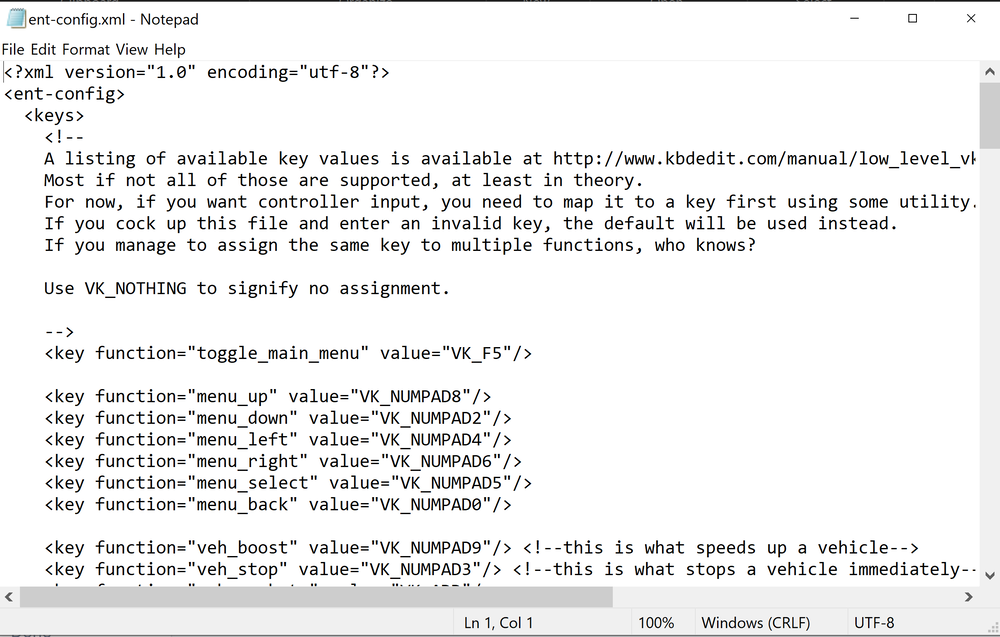
theres...alot... to say the least lol. biggest thing is to make sure you are editing inside your mod folder only, we all mess up installations every now and then and sometimes the mod folder just breaks and you have to delete it and remake it. being in the mod folder ensures that the base game files wont be affected. im going to attach some screenshots of what my mod folder looks like so you can see what files should be put in there for everything from cars to sounds. x64e is only there because of the graphics mod I use. chances are you probably dont have x64 in the mod folder so go into the main game directory and copy the x64 file and paste it into the mods folder. this file is where the sirens i use go. When it comes to vehicles, there are two ways to go. add-on or replace. add-on vehicles will require a trainer to spawn (i use enhanced native trainer) *be aware that most trainers will share a keybind with the RPH console so once downloaded, go into the trainers .ini file or config.xml depending on which trainer you choose and switch the keybind from F4 to something else if it conflicts* i changed the main menu toggle from F4 to F5 add on vehicles will also require 3 additional items to not crash your game. these are -game config for limitless vehicles -packfile limit adjuster -heap adjuster all 3 can be found on gta5-mods.com vehicle replacers will replace the default police vehicles with what you install. it really comes down to personal preference but be careful because sometimes when you replace the vehicle.meta, something gets corrupt or wasnt edited correctly and when a vehicle spawns it crashes your game. i had an instance where a replacer had something wrong in the meta file for POLICEB and anytime a police motorcycle spawned it crashed my game so i ended up deleting my mod folder and starting over. its relatively rare for something like that to happen so dont worry too much about it. most mod makers will typically give you a readme with the pathways needed for proper installation so it makes it rather easy. Sirens, Vehicles, EUP, Graphics, weapons, etc. will go into your mod folder with open IV. plugins and scripts are typically drag and drop. typically you will just drop the included plugin folder into the main directory or into plugins/lspdfr, but ALWAYS read the read me just to be sure. it can be very confusing at first but it gets really easy once you get the hang of it. if you need more assistance or recommendations message or respond to this and i can offer more help
-
what mod is it? Smooth driving V?
-
Have you tried reinstalling the launcher? if not, head over to your rockstar games launcher folder (C:\Program Files\Rockstar Games\Launcher) and double click the uninstaller. after that, Delete all these files. C:\Users\[username]\Documents\Rockstar Games\Social Club C:\Users\[username]\Documents\Rockstar Games\Launcher C:\Program Files\Rockstar Games\Social Club C:\Program Files (x86)\Rockstar Games\Social Club C:\Program Files\Rockstar Games \Launcher (wherever it was installed previously) restart your computer, then reinstall the launcher. Hope this helps!
-
can take around 5-6 days but it can vary
-
Rockstar launcher, currently, will not work on outdated versions of the game (will throw a 7002 error) so unfortunately reloading a backup will make matters worse. idk if theres a work around for that but if there isnt, then we just have to wait
-
Idk if you still need advice but heres some input When loading RPH click the settings icon->plugins and see if you have load plugins at start selected or not. if you dont, thats ok, you can either select to load LSPDFR from launch, or, you can load plugins from inside the game by doing this Press F4 (F4 is default keybind for the RPH console, if tit doesnt appear, check the ini to see which keybind its set for) Type in "ReloadAllPlugins" (without quotations) and hit "Enter" this should start loading all downloaded plugins assuming they are installed correctly. if needed i can send a screenshot of my plugins folder so you can see what its supposed to look like. *IMPORTANT* RPH is currently outdated and will not work with the new GTA V update. We will have to wait for RPH to release an update before you can use the launcher. For now LSPDFR will not work as it requires RPH to function
-
as far as im aware, backing up no longer works with the rockstar games launcher as it checks to make sure you are on the most recent update. i had the 7002 error when i did it, but after verifying through steam to get the most recent update again, GTAV SP loaded without error. just going to have to wait for the RPH update unfortunately. wish there was better news, i was just as bummed out since i downloaded a bunch of new stuff to try