


ThoroughbredGaming
Members
-
Joined
-
Last visited
Everything posted by ThoroughbredGaming
-
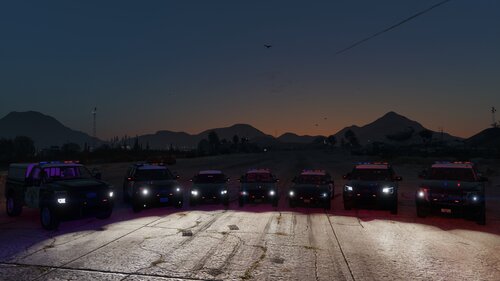 Added to the file! Not all vehicles are shown, as there are models that share the same lighting setup. You're welcome! Yes, I do have the add-on. Unfortunately, the link in TheHurks original download is not working, but there are people in the comments of his post that have a link to a download that does work for the add-on package. No problem!:)
 -
 To anyone having ELS issues, I made an ELS pack that should fix the majority of the lighting issues, and can be found here: https://www.lcpdfr.com/downloads/gta5mods/datafile/55135-thehurk-2017-chp-pack-els-fix/
- 964 comments
- 158 reviews
-
This is an ELS pack that I have spent way too long working on. I'm a huge fan of @Thehurk 2017 California Highway Patrol Mega Pack, but the vehicle lighting had several issues that I couldn't find a solution for anywhere. So, I decided to attempt fixing it myself. Original Mod: TheHurks – 2017 California Highway Patrol Mega Pack (ELS): https://www.lcpdfr.com/downloads/gta5mods/vehiclemodels/14852-2017-california-highway-patrol-mega-pack-els/ All vehicle models and original assets belong to their respective creators. This release contains modified ELS configuration files intended to improve the lighting behavior of the original pack. Video ShowcaseFeaturesLights now work as intended. Fixed the issue where the steady burn would only appear on the left side. Stage 3 lighting now alternates properly. Lights switch to a steady burn when you exit the vehicle. Recoloured the lights to display environmental lighting correctly. Cleaned up the XML files wherever possible. Known IssuesThere are still a few issues that I haven't been able to resolve: Distant lightbar lights: From approximately 50 feet away, you may see one or two lights appearing above the vehicle's lightbar. I'm not sure what is causing this or how to fix it, so suggestions are welcome. Hwaycar7: This is the CHP motorcycle. I've tried countless ways to fix its lighting, but haven't been able to figure it out. If anyone knows how to fix it, please let me know. I would be happy to update the pack and give credit to anyone who provides a solution. Takedown lights: At least one vehicle has takedown lights that point toward the ground when activated. I believe this is a model-specific issue rather than an ELS issue. Stage 2 rear lighting: Stage 2 does not have both the rear red and blue lights on as a steady burn. Only the left-side blue light remains steady. This can be corrected by changing the lighting type from CHP to ELS in the XML, but doing so causes the environmental lighting to display incorrectly. Installation / CompatibilityAt the moment, this is configured for the add-on version of the pack only. The download for the add-on pack can be found in the comments of TheHurks' original file. It should be fairly easy to use this with a replace version instead. You would simply need to rename the ELS files to match the corresponding replace vehicle and copy them over to your ELS folder. I've included the vehicle names at the top of each XML file to make it easier to identify which configuration belongs to which vehicle. If there is enough interest, I may put together separate versions for both the add-on and replace packs. If anyone runs into issues with the pack, I'll do my best to help. Just keep in mind that this is the first time I've ever modified ELS files, so I may not have all the answers. It might end up being a learning experience for both of us! Any feedback, suggestions, or solutions to the remaining issues are more than welcome.
-
-
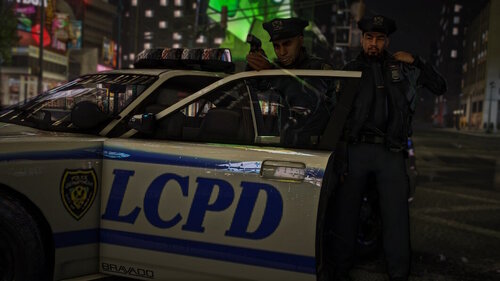 Through mods. The peds are included with the LCPP, or you can use this mod: https://www.gta5-mods.com/misc/gta-iv-law-enforcement-pack You would manually spawn the ped through a trainer and use the model selector. Just input the model name.
- 7 comments
- 2 reviews
-
-

- 1
-
-
Firstly, a huge thank you to aiexx_ on Discord for taking the lovely photo above! This is a voice overhaul mod for GTA V, utilizing the police voice lines from GTA IV which pairs nicely with the Liberty City Preservation Project. All audio has been increased and changed from 24,000Hz to 48,000Hz. This mod replaces 99% of all voice lines for police peds, currently excluding sheriff and SWAT peds. A few voice lines were left vanilla, as I could not find a good alternative in the GTA IV voice lines (mainly in the "MINI" files). The "MINI" voice lines are noticeably larger than the vanilla files, but I have had zero issues with them regarding performance or game crashes, even while using other audio mods such as weapon and siren SFX. As always, though, make sure to create backups in case anything goes wrong. If you have any issues or suggestions, please let me know and I can look into them. Install directions The Path for S_FULL_SER files goes to: mods > x64 > audio > sfx > S_FULL_SER The Path for S_MINI_SER files goes to: mods > x64 > audio > sfx > S_MINI_SER If the folder does not exist in your mods folder, you will find it in your GTA V main folder. Transfer it to your mods folder. Future Plans I hope to replace the current dispatch audio with the one from GTA IV. Video link showcasing the mod:
- 7 comments
- 2 reviews
-
-

- 2
-
-
 For anyone who is wanting the default callout notifications to no longer show up (the ones that appear above the minimap when you receive a callout from LSPDFR). Launch the game, then, hit the pause button, navigate to "Settings", then go down to "Notifications", from the "Notifications" tab, you will see at the top "Phone Alerts", toggle that to off. From there, you can play the game as normal and you will no longer get notifications appearing above the minimap, it will only appear through this amazing plugin. Hope this helps some people :)
- 451 comments
- 50 reviews
-
-
-
-

- 31
-
