Skip to content
View in the app

A better way to browse. Learn more.

LCPDFR.com

A full-screen app on your home screen with push notifications, badges and more.

To install this app on iOS and iPadOS
  1. Tap the Share icon in Safari
  2. Scroll the menu and tap Add to Home Screen.
  3. Tap Add in the top-right corner.
To install this app on Android
  1. Tap the 3-dot menu (⋮) in the top-right corner of the browser.
  2. Tap Add to Home screen or Install app.
  3. Confirm by tapping Install.

NZTPAYNE

Members
  • Joined

  • Last visited

  1.    O2FUNNY reacted to a post in a topic: Make all enhanced file have their own page
    • 115 downloads
    • Version 1..0.0
    # AR Fire Mode Toggle (Auto / Single) — FiveM A lightweight FiveM client-side script that lets players toggle assault rifles between FULL AUTO and SINGLE FIRE. “Single fire” is simulated by allowing one shot, then briefly blocking the fire control for a short cooldown to prevent automatic spray (no weapon meta edits required). --- ## Features - Toggle ARs between AUTO and SINGLE fire - Supports addon weapons (WEAPON_DD11_B included by default) - Additional addon weapons can be added via the config (client.lua) - Configurable cooldown for realistic semi-auto feel - Optional vehicle support - Lightweight and easy to customize --- ## Installation 1. Download and extract the resource folder: - nzt_firemode 2. Place it into your server’s resources directory: - resources/nzt_firemode 3. Add to your server.cfg: ensure nzt_firemode 4. Restart the server (or start the resource). --- ## Usage - Default toggle key: J - command /togglefiremode When holding an AR, pressing the key/command will switch between: - AUTO - SINGLE If the current weapon is not in the configured AR list, it will notify: “not an AR”. --- ## Configuration Edit client.lua: To Increase the speed of the "Single Fire" edit ----> in Client.lua (SingleShotCooldownMs = 140) (Higher = Slower Lower = Faster) ##
  2. most callouts and plugins work flawlessly on enhanced as RPH uses a HYBRID launch now
  3.    Officer Here reacted to a comment on a file: 2019 unmarked bugatti divo gta v ready
    • 548 downloads
    • Version PRE-ALPHA
    2018 LAPD CHARGER ------------------------ WHAT NEEDS FIXING! ------------------------ LIVERY NEEDS TOUCHING UP PINK DOOR OUTLINE WHEN DOOR IS OPEN HANDLING ^ WILL BE FIXED SOON FIXED ___________ Handling Has been fixed
    • 597 downloads
    • Version PRE-ALPHA
    Ford Transit Los Angeles Coroner (WORK IN PROGRESS) Needs fixing ========= livery remake window Shattering ============== works perfectly fine
  4. any chance for a updated verison with a more in depth interior and maybe a higher detailed livery
  5. YES CHARVA     Responded to a Crashed Car in Vinewood, Elgin Ave
  6. YES CHARVA     Finished responding to a Stolen Cellphone in Gd. Senora Desert, Joshua Rd
  7. YES CHARVA     Finished responding to a Stolen Cellphone in Mount Chiliad, North Calafia Way
  8. YES CHARVA     Finished responding to a Broken Vehicle in Chiliad Wilderness, Cassidy Trail
  9. YES CHARVA     Responded to a Broken Vehicle in Chiliad Wilderness, Cassidy Trail
  10. YES CHARVA     Responded to a Domestic Disturbance in Sandy Shores, Zancudo Ave
  11. YES CHARVA     Finished responding to a Traffic Break in Gd. Senora Desert, Cat-Claw Ave
  12. YES CHARVA     Finished responding to a BadDriver in Gd. Senora Desert, Panorama Dr
  13. YES CHARVA     Responded to a BadDriver in Sandy Shores, Alhambra Dr
  14. YES CHARVA     Arrested Kirsty Ryders in Sandy Shores, East Joshua Road
  15. YES CHARVA     Reported a PC148 in San Chianski Mountains, Senora Fwy
  16. YES CHARVA     Performed a traffic stop on a Black Gauntlet with registration 26UHU741 in Gd. Senora Desert, Senora Fwy
  17. YES CHARVA     Finished responding to a BankRobbery in Gd. Senora Desert, Senora Fwy
  18. YES CHARVA     Responded to a BankRobbery in Gd. Senora Desert, Senora Fwy
  19. YES CHARVA     Arrested Julian Romano in Paleto Bay, Procopio Dr
  20. YES CHARVA     Performed a traffic stop on a Worn Dark blue Scrap Truck with registration 44DWW825 in Mount Chiliad, Great Ocean Hwy
  21. YES CHARVA     Performed a traffic stop on a Worn Dark blue Scrap Truck with registration 44DWW825 in Mount Chiliad, Great Ocean Hwy
  22. YES CHARVA     Performed a traffic stop on a Worn Dark blue Scrap Truck with registration 44DWW825 in Mount Chiliad, Great Ocean Hwy
  23. YES CHARVA     Finished responding to a Barricaded Suspect in Mount Chiliad, Great Ocean Hwy
  24. YES CHARVA     Responded to a Barricaded Suspect in Mount Chiliad, Great Ocean Hwy
  25. Flawl3ssAlex started following NZTPAYNE
  26.    GTA 5 Jedi Master reacted to a comment on a file: 2024 Ford Mustang GT [REPLACE]
    • 2,323 downloads
    • Version 1.0
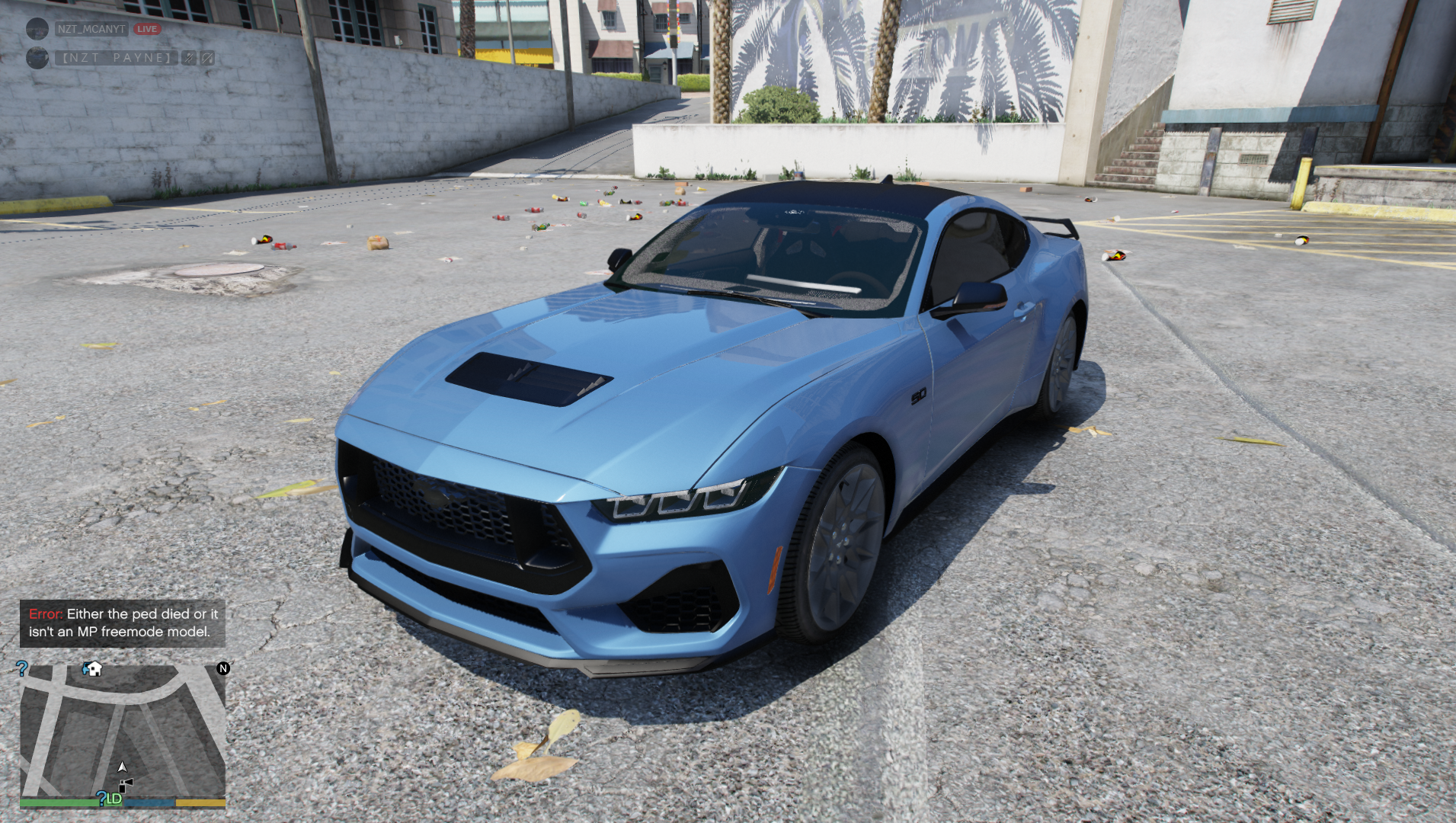
    2024 FORD MUSTANG GT [REPLACE] INSTALL TO MODS/UPDATE/X64/DLCPACKS/PATCHDAY28NG/DLC.RPF/X64/LEVELS/GTA5/VEHICLES TO USE IN GAME USE MENYOO AND SPAWN THE VAPID DOMINATOR hope you enjoy
  27. NZTPAYNE changed their profile photo
  28. Heres is proof or permission for uploading https://imgur.com/a/Rii2w0X
    • 6,402 downloads
    • Version 1.0.0
    ELS Unmarked 2019 Bugatti Divo [works with LSPDFR] INSTALL UPDATE/X64/DLCPACKS DRAG AND DROP THE tn_divo FOLDER IN UPDATE/UPDATE.RPF/COMMON/DATA Edit DLCLIST and enter <Item>dlcpacks:\tn_divo\</Item> SAVE els file goes in game directory your direcotry/grand theft auto v/ELS/PACK DEFAULT Can send proof of permission to upload

Account

Navigation

Search

Search

Configure browser push notifications

Chrome (Android)
  1. Tap the lock icon next to the address bar.
  2. Tap Permissions → Notifications.
  3. Adjust your preference.
Chrome (Desktop)
  1. Click the padlock icon in the address bar.
  2. Select Site settings.
  3. Find Notifications and adjust your preference.