


loreofficial
Members
-
Joined
-
Last visited
Everything posted by loreofficial
-
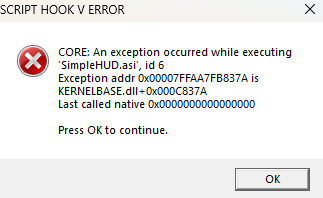
When i start GTA V this message came out. Somebody can explain?
-
I start GTA V with RagePluginHook without load any plugin and the game start normally, but when in the in-game console (F4 console) i load LSPDFR plugin the game instantly crash. I have already installed other plugins such as stop the ped, traffic police, etc. but the game crash only loading LSPDFR plugin. I attach this file which may be useful. I attach also this file.RagePluginHook.log
-
*sorry for the english, i'm italian😅* I did the update of GTA V and LSPDFR, but when i start the game the loading screnn of story mode with RAGEPluginHook is infinite and i don't know how fix it. Can sameone help me?
-
LSPDFR crashes after 8-10 minutes from going on duty or during a call, usually the first one, showing this error code: does anyone know what to do?(sorry for my english: i'm italian😅) I installed LSPDFR on my own and also inserted the following plugins: RagePluginHook, StopThePed, Police SmartRadio, Computer +, ALPR +, Keep Calm, Emergency Callouts, ELS, Arrest Manager, OP Immersive Dispatch, HighPriority, Traffic Policer, ClearTheWay, EUP S&R and Realistic Sound Weapon (the latter two using the OpenIV installation). I have also included a car package called 'LSPD Pack 4.0' with the ELSs. Having said that, now I'll explain the problem: the game loads correctly only that when I go on duty, in loading all the plugins, at some point LSPDFR crashes. Below I put the error code: Can anyone help me please?

