


TheClassicsFan2011
Members
-
Joined
-
Last visited
Everything posted by TheClassicsFan2011
-
OHHHH You Know i got it WORKING! Its because already built-in to my system was .Net 4.8 it just was not activated and then i activated it but for some reason i did not see lspdfr BECAUSE IT WAS NOT LOADING! thanks for the help OfficerChris1
-
RagePluginHook.log
-
it does work but if i load the log it does not show anything related lspdfr and its actually installed.
-
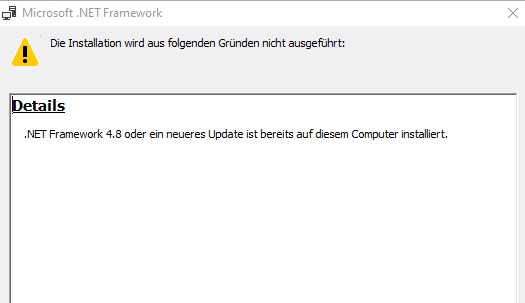
it did not come with my system it was installed through an installer i installed But, BUT i can't install 4.8 because of this
-
so where is the file location of 5.0. because then i can deinstall it and then finally install 4.8?
-
I did not know that thanks oh wait i have microsoft framework 5.0 and the problem is i can't do a automatic deinstall of 5.0 which i need to do inorder to get 4.8 on to my computer
-
well yeah im having problems with the Net framework 4.6 Installation because It says I have a newer version and i can't install 4.6. help?

