


gta5Bosnianpolicedesigns
Members
-
Joined
-
Last visited
Everything posted by gta5Bosnianpolicedesigns
-
Well i didnt quite figure it out,i just downloaded packs until i found a pack that works for me,its pretty much easy to say that eup is freaking complicated i did want gsp but nope,eup decided that i shouldn get it,i guess i dont think i messed up,the thing i dont get is why did fhp eup pack replace lspd uniforms instead of sahp
-
-
Update so Fhp worked,but it didnt replace sahp it replaced lspd,so i downloaded san andreas state mega pack and it worked,so its probably due to packs i downloaded before
-
Switched to Arkansas i will try FHP if it doesnt work then i dont know what to do
-
A little update on some website i found some eup pack,downloaded it and still uniforms remained same
-
So this siren is used on illionis state police explorer I like it,but cant really find what siren is it
-
Yes,thats only for swat and bike helmet,other should work but they dont,also used some eup pack that i wanted to re design,and it didnt show up,the uniforms remained same
-
Here,but have in mind that i tryed other packs but uniforms still remained same,also i am not only pearson having this issue:
-
So i downloaded one gsp pack,and it didnt show up in game,i installed another gsp pack following instructions 3 times,it doesnt show up in game,what to do? yes i have eup menu,eup law and order,fire and rescue
-
gta5Bosnianpolicedesigns replied to gta5Bosnianpolicedesigns's topic in Vehicle Modification Showroomnope second letter is i
-
Here is another video,in this video there are 3 videos,first 2 are at night,it shows code 3 resoonding of fiat,and the video at day shiws citroen not fiat i want so please ignore it
-
.thumb.png.3955860e170105e3cd40399707f13b4c.png) Does anyone know what siren they use?
Does anyone know what siren they use? -
What about some optimization?I mean i got freezes on clean lspdfr version,and my pc aint even that bad
-
Well it should be 2020 model with template,lighbart on roof,mini lightbar on back of roof and lights in grill like this one: My plan is to make livery just like in video
-
here RagePluginHook.log
-
So in last couple of days it takes game like half an hour to load and when it loads finally,its super laggy and buggy
-
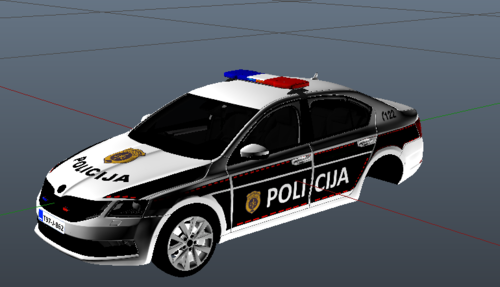 So here is it a little better version,still not the best as i dont have template but its ok IMPORTANT:For black lights issue,make sure car is washed MODEL:
 -
If its only addon i see this as win,cause my country only got like 5-7 different cars and thats it,i think i will keep it off its not causing issues,but i will remove pursuit pack
-
Well do you mean like addon vehicles or vehicles i replaced?
-
Yes its already installed,in fact i watched tutorial on youtube to fix texture loss and it said to keep that option off,and it helps i get no texture loss Idk how i messed up and put it in lspdfr folders instead of gta v,cause i already know it needs to be in gta v folder
-
As for the ambiet i have to keep it off because when its on i get a little bit of texutre loss
-
But my games works fine,lspdfr loads no crash for like 2-3 hours
-
So everytime i boot up the game it says that a new version of plugin is aviable but i dont know for which plugin it says that here is log RagePluginHook.log
-
Yo,i managed to figure that out like half an hour after i pisted this post,but thanks for mentioning,and i didnt expect it to crash because of charachter
-
Started randomlly RagePluginHook.log


.thumb.png.3955860e170105e3cd40399707f13b4c.png)
