
Rebqi
Members
-
Joined
-
Last visited
Everything posted by Rebqi
-
Hello, Please put your Replace Vehicles into Patchdayg9ecng. If that still doesnt Work Please Try and Reinstalling ASILoader and OpenIV.asi by going into OpenIV > ASI Manager > Uninstall ASI Loader and OpenIV.asi > restart your PC > Reinstall Both ASI Loader and OpenIV.asi > Load into game and Check if it Works.
-
Please Attatch your Log, its a Textdocument called RagePluginHook
-
Thanks. First Start GTAV, once Fully loaded into Story Mode tab out of the Game and Start RPH
-
Hello, If you have Stop The Ped make sure to disable Realistic Weapons Sytem, if that doesnt work try and see if it works withot RPH / LSPDFR
-
Hi, As far as im aware the Epic Games Launcher is not Really able to Detect Previously installed Games meaning you would need to Install GTAV Again However there is a trick that you could try in order to not completly reinstall GTAV as stated on this site
-
Hello, could you confirm to me that Regular GTAV is working?
-
Please Try and install a Modified Gameconfig, Heap Limit Adjuster and Packfile Adjusters https://www.gta5-mods.com/misc/gta-5-gameconfig-300-cars Gta Config v30 for v 1.0.2802 > More Mods > Any Traffic Put the Gameconfig.xml into this path: GTAV\mods\update\update.rpf\common\data https://www.gta5-mods.com/tools/heap-limit-adjuster-600-mb-of-heap https://www.gta5-mods.com/tools/packfile-limit-adjuster Place the .asi file and .ini into your main GTA V folder.
-
Either Install ScriptHookVDotNet or Remove PursuitPack, I Personally reccoment to remove PursuitPack due to ScriptHookVDotNet being know to cause issues
-
Thanks, Please rename your Mods Folder to _mods
-
First Start GTAV, Once Fully loaded into Story Mode with a Character such as Micheal Tab out of the Game and Start RPH
-
Please Upload your Latest Log, Your Log can be found in your Main GTAV Directory called RagePluginHook its a Textdocument
-
Yes it has, Update LSPDFR & RPH from the manual Download from here and ScriptHookV from here
-
Update ScriptHookV from here
-
No Problem 👍
-
I dont see anything Wrong or Suspicous. Are you sure that you are Installing EUP into your Mods folder and not into your Regular GTAV Folder? Reinstalling ASILoader Would be my final guess. For that Go to OpenIV > ASI Manager > Uninstall ASI Loader and OpenIV.asi > restart your PC > reinstall ASI Loader and OpenIV.asi > Load into game and test.
-
Update RageNativUI, and i cannot see your Pictures https://github.com/alexguirre/RAGENativeUI/releases
-
Yes, i dont quite see anything since you prob didnt open EUP. Try reinstalling EUP and EUP Menu. And Please send a screenshot of your Whole GTAV Folder,
-
Yes please
-
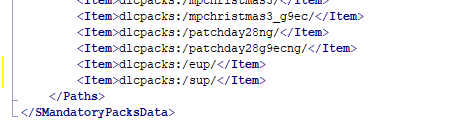
Sure, Open OpenIV and Go to Grand Theft Auto V\mods\update\update.rpf\common\data Make Sure Edit Mode is on and Rightclick on dlclist.xml and Click Edit Then add <Item>dlcpacks:/eup/</Item> If you have SUP too add <Item>dlcpacks:/sup/</Item> To the Bottom of the Line, It should look like this afterwards: see image
-
You need to install either Lawn & Order or Server & Rescue to use EUP, If you have one of both either reinstall EUP or add the dlclist.xml lines back
-
Please Try and install a Modified Gameconfig, Heap Limit Adjuster and Packfile Adjusters https://www.gta5-mods.com/misc/gta-5-gameconfig-300-cars Gta Config v30 for v 1.0.2802 > More Mods > Any Traffic Put the Gameconfig.xml into this path: GTAV\mods\update\update.rpf\common\data https://www.gta5-mods.com/tools/heap-limit-adjuster-600-mb-of-heap https://www.gta5-mods.com/tools/packfile-limit-adjuster Place the .asi file and .ini into your main GTA V folder.
-
Right Click on your GTAV Folder and Choose Properties, Then go to the Security Tab and make sure Everyone and Everything has Full Control. Make sure to add your own User from your PC too