PolluxFlyer
Members
-
Joined
-
Last visited
Everything posted by PolluxFlyer
-
Good idea, yes, something else is wrong then. I would recommend a fresh install, then downgrade. Maybe that works. But keep in mind, that for LSPDFR you can now use the new version, because LSPDFR and RPH have a proper update as well. Of course, if you need to use ScriptHook V this will not work, because there is no update for that, yet.
-
Could it be a savegame you created with the new version?
-
Does it work without LSPDFR (disable LSPDFR-plugin in RPH)? Does it work without RPH?
-
This did not work for me, and I read it is because the recent steam clients don't allow it any more. To be sure I started GTA V after the revert while being offline, but lots of my LSPDFR plugins (most notably StopThePed) do not work when they can not phone home (quite a bad habit actually). So I was brave and started again being online, and it worked. Just be sure to disable the updates in the steam-client. Note that for the current update of GTA V there is already an update of RPH and LSPDFR, so no need to downgrade.
-
A few days ago my GTA V accidentally updated itself through STEAM and therefore I could not start RPH/LSPDFR! After a bit of searching I could downgrade my installation to the previous version and I want to share how I did that, in case someone else also has this problem: Disable automatic updates for GTA V in STEAM (see chapter "Disabling automatic updates" in the steam FAQ) Download and extract DepotDownloader Note that you might also need the current .NET runtime to run DepotDownloader Run the following commands to download the files that were replaced by the update: DepotDownloader.exe -app 271590 -depot 271591 -manifest 2115862916207197280 -username USERNAME -password PASSWORD DepotDownloader.exe -app 271590 -depot 271592 -manifest 928847224211886655 -username USERNAME -password PASSWORD DepotDownloader.exe -app 271590 -depot 271593 -manifest 884947165531941009 -username USERNAME -password PASSWORD DepotDownloader.exe -app 271590 -depot 271594 -manifest 3839630705452921359 -username USERNAME -password PASSWORD (replace USERNAME and PASSWORD with your STEAM-account data) This will create folders like "depots\271591\7881101" and download data into it. It takes quite a while to download the 100 GB. Move the downloaded data (files and folders except the ".DepotDownloader" folder) from the above mentioned folders into your game folder, overwriting any existing files Run the game and RPH/LSPDFR is working again! Of course, make a backup of your game folder prior to overwriting anything, just in case. Some useful links: I roughly followed this guide from a few years ago. the GTA V update history on STEAM-DB
-
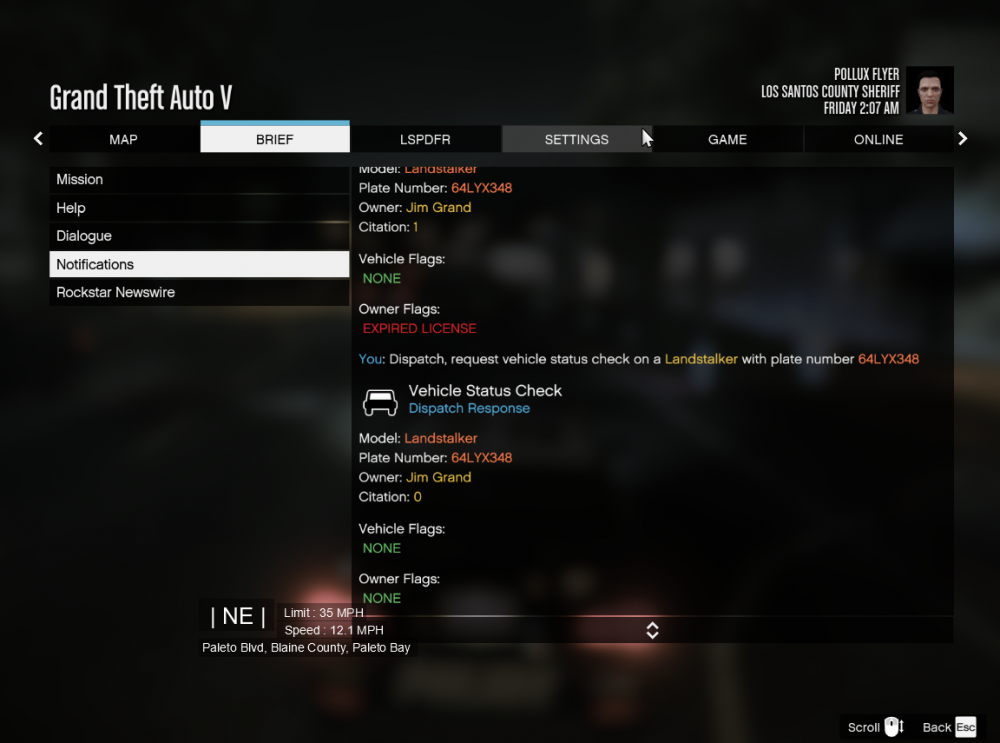
Hi all, I often have the following situation: * I do a vehicle check on a moving vehicle * I get a flag for the owner, i.e. an outstanding warrent or an expired driver license * I loose sight of the vehicle for a few seconds (i.e. because I have to do a U-turn) * I maneuver behind the vehicle * I repeat the vehicle check * I get a different outcome for the owner flags, i.e. no more outstanding warrent or expired license Is this a known bug? It looks a bit like the name of the owner is attached to the vehicle (never seen that change), but everything else about the owner it lost and when the vehicle is out of sight. PS: I use the context menu of Stop-The-Ped to do the vehicle checks.