


foxar0123
Members
-
Joined
-
Last visited
Everything posted by foxar0123
-
I'd love more arresting options and more freedom at it. Like When you arrest you can take to car, release, put on the ground, give warnings, move civ's away. Options, options options! So its less "ok you arrested now you can leave him orput in other cop car or yours" and more like "you arrested guy now do whatever you want" Also Handcuff models would be cool. :smile:
-
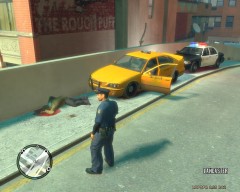
From the album: Aftermatches
Officer foxar noticed vechicle which was recklessly driving. After being pulled over, and asking for license, it turned out its drivers first pull over, as he had no citations, or any other troubles with LCPD previously. After officer came up at window to issue a small ticket, before even saying a word, driver bashed quickly out of car and pulled over Mini-Uzi weapon. Officer took cover behind his police car and called for backup. Upon backup arrival officer blind fired three times, witch resulted in one direct hit in arm of suspect. Suspect dropped weapon, and died before officers even tried to perform CPR on him.© Me, foxar.
-
Pictures presenting results of actions.
-
Is there any way to fix it? It is really annoying :/ Im talking about 0.91
-
Hello. I do have tiny problem. When i pull someone of vechicle (after chase) if there is any other policeman or partners present, they open fire on suspect even if hes on hes knees and i try to arrest them.
-
what if i want to install 0.91 over 0.95?
